Teaching my Urchin to type, then figuring out where the power went
My keyboard already worked with ZMK. I wasn’t trying to rescue a broken keyboard. I just wanted it to run RMK.
The keyboard is an Urchin, a small split keyboard with nice!nano controllers and nice!view displays. Moving it from ZMK to RMK meant bringing along the tap-hold behavior I liked, not just copying the keymap and calling it done.
That conversion led to a buffered tap-hold implementation, some display power management, and quite a few sessions with Nordic’s Power Profiler Kit II.
It also led to a rather convincing wrong explanation for where the power was going. At one point I was considering replacing the displays with e-paper. The displays were drawing about 3.7 µA. The board I was measuring was busy looking for another keyboard half that wasn’t there.
Oops.
First, make the typing work
Home-row modifiers are great until the firmware decides that an ordinary letter was actually a modifier. On my layout, for example, A doubles as Shift. Thumb keys also double as layer switches. The firmware has to decide whether I meant a tap or a hold while other keys are already arriving.
Fast typing, intentional capitals, and layer chords all need slightly different things. Just shortening the tapping term isn’t a complete answer. Neither is deciding that every key pressed during normal typing must be a tap: sometimes I really do want that Shift or layer.
The approach I implemented in my RMK fork is to buffer the following events while a tap-hold key is undecided. Once the owner resolves, it commits first, and the buffered events follow in order, using their original logical timestamps. That gives the modifier or layer decision a chance to take effect before the following key is interpreted.
For my Urchin, the configuration keeps a 200 ms hold timeout, enables permissive hold and same-hand tap filtering for the home-row modifiers, and uses a separate normal-mode policy for the thumb keys. Flow-tap is disabled, as is quick-tap repeat.
The feature is opt-in. I didn’t want to change how an existing RMK keyboard behaves just because someone updates the dependency.
There are limits, too. The implementation has a bounded event queue; it doesn’t pretend to have unlimited memory. It also isn’t a claim of full ZMK behavioral compatibility. The goal was to reproduce the typing policy I actually use, not every possible tap-dance or combo behavior.
On the hardware, this has been working well: fast typing, mixed-case letters, and layer switching all feel much better. The changes are in my RMK fork, and the keyboard configuration is in rmk-urchin. I want some ordinary daily use before turning the buffered tap-hold work into an upstream PR. A good test suite matters, but so does spending a few days typing things other than test cases.
Then, let the screens sleep
The keyboard already had a 30-second idle timeout. The application needed to do something useful with the sleep event.
Both screens now finish their current transaction, receive a final clear, and lose their switched supply. While asleep, they stop periodic display work entirely. Status events still update the software state in RAM. When the keyboard wakes, the application restores power, waits for the supply to settle, reinitializes the panel, and redraws the current state.
This isn’t MCU System OFF. The keyboard can still maintain its BLE links and detect keys.[1] It’s the display application responding to RMK’s sleep/wake events.
I also disabled USB CDC logging for the normal firmware. USB HID and Vial remain enabled; removing a logger didn’t require removing USB keyboard support.
The screen sleep and wake behavior worked on the real keyboard. The application’s host test suite reached 45 passing tests, including checks around sleep handling and in-flight display transfers. Those tests do not measure current, certify the physical power rail, or tell me what a radio is doing. That’s why the PPK2 came out.
A display can trigger work without consuming the power
The first whole-board measurements were not encouraging. Some awake runs were in the several-milliamp range. When the keyboard slept, the current dropped dramatically. It was tempting to call the difference “display power.”
That description mixed up two different things:
- Current going into the physical display.
- Everything else the firmware and MCU do while the display is awake.
The nice!view is a Sharp memory LCD, not an e-paper panel. It retains the pixel data, so unchanged content doesn’t need to be uploaded again. There is still LCD polarity maintenance to do. On this board, COM polarity is controlled through the serial interface rather than an external inversion signal. Our awake driver alternates it with short HOLD commands every 16 ms; full images are sent when the visible state changes.
I checked the LS011B7DH03 panel specification rather than treating generic Sharp Memory LCD advice as interchangeable. Its table 6-3-1 gives a 57–70 Hz frame frequency for serial COM control, and its polarity-driving notes describe 60 polarity changes per second. That is not a requirement to resend the framebuffer 60 times a second.
Even so, why would two bytes over SPI leave me looking at milliamps?
I eventually measured the display supply separately on my actual keyboard, using the PPK2 in ammeter mode. The result was 3.68 µA averaged over a minute with the display active.
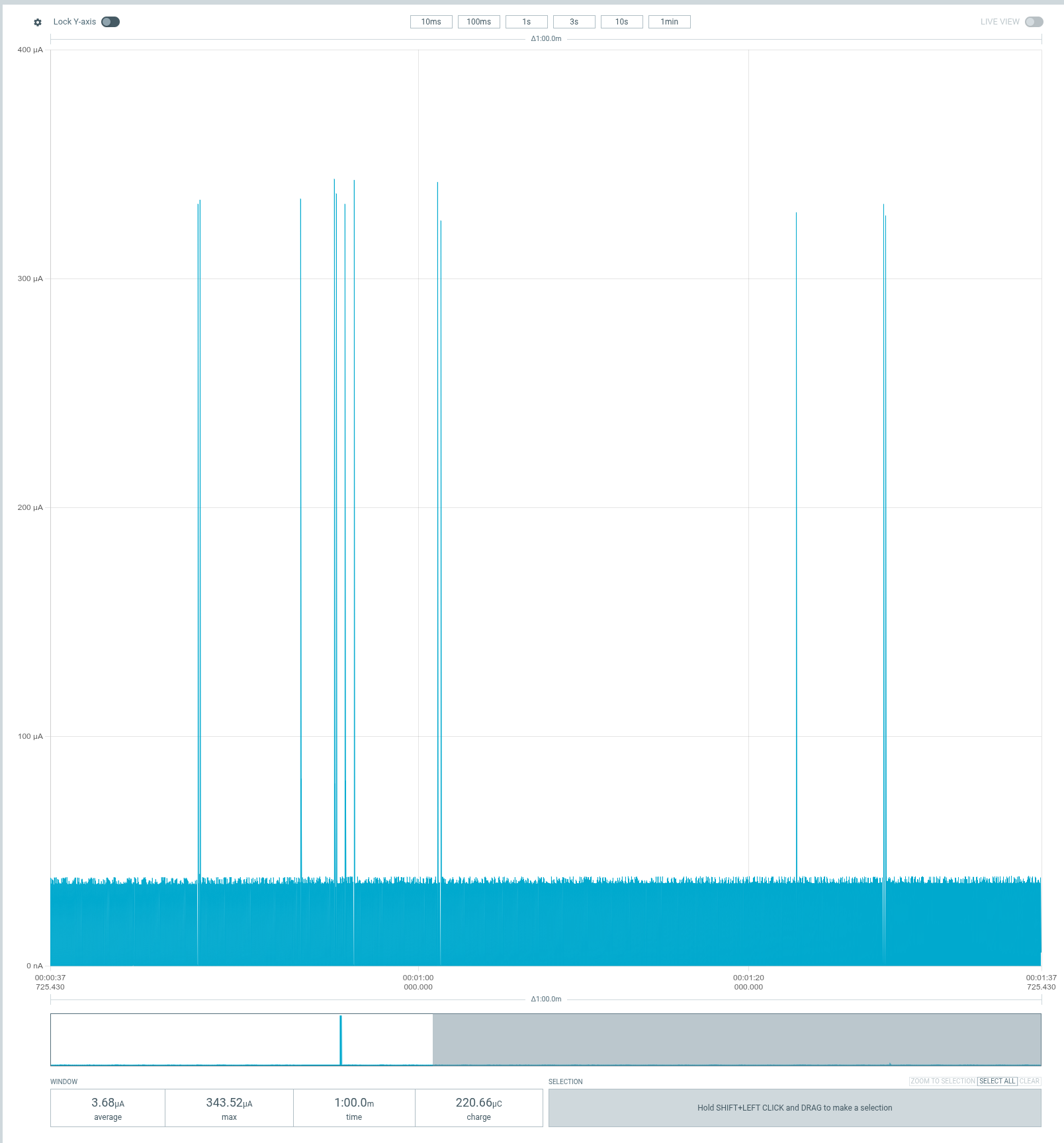
This is the display supply, not the whole keyboard. The average at the bottom is the useful number; the short peaks don’t make this a milliamp-scale load.
The physical panel wasn’t where the missing milliamps were going. Replacing it with e-paper might change how often the MCU needs to do display work, but it wasn’t a fix for a panel that was burning through the battery. The panel wasn’t doing that.
A cancellation guard wasn’t the answer either
We had an application-side cancellation wrapper around Embassy’s SPI driver. Its job is to stop an unfinished DMA transfer before a cancelled future can release the buffers. There is a synchronous wait in that abort path, which made it worth checking.
I built an isolated diagnostic image without the wrapper. Awake consumption stayed around 4.4–4.5 mA. That did not support the guard as the explanation for the sustained draw. The normal firmware keeps the protection.
I haven’t proved that every remaining microamp is necessary, or ruled out improvements in our driver or embassy-nrf. What I don’t have is evidence that a HAL defect explains these measurements. Removing a safety mechanism and seeing no useful improvement isn’t a reason to leave it removed.
The suspiciously regular 30 ms plateau
Zooming in made the awake current much more interesting. There were small recurring bursts and much longer high-current plateaus. The plateaus were about 30 ms long, repeating every 100 ms.
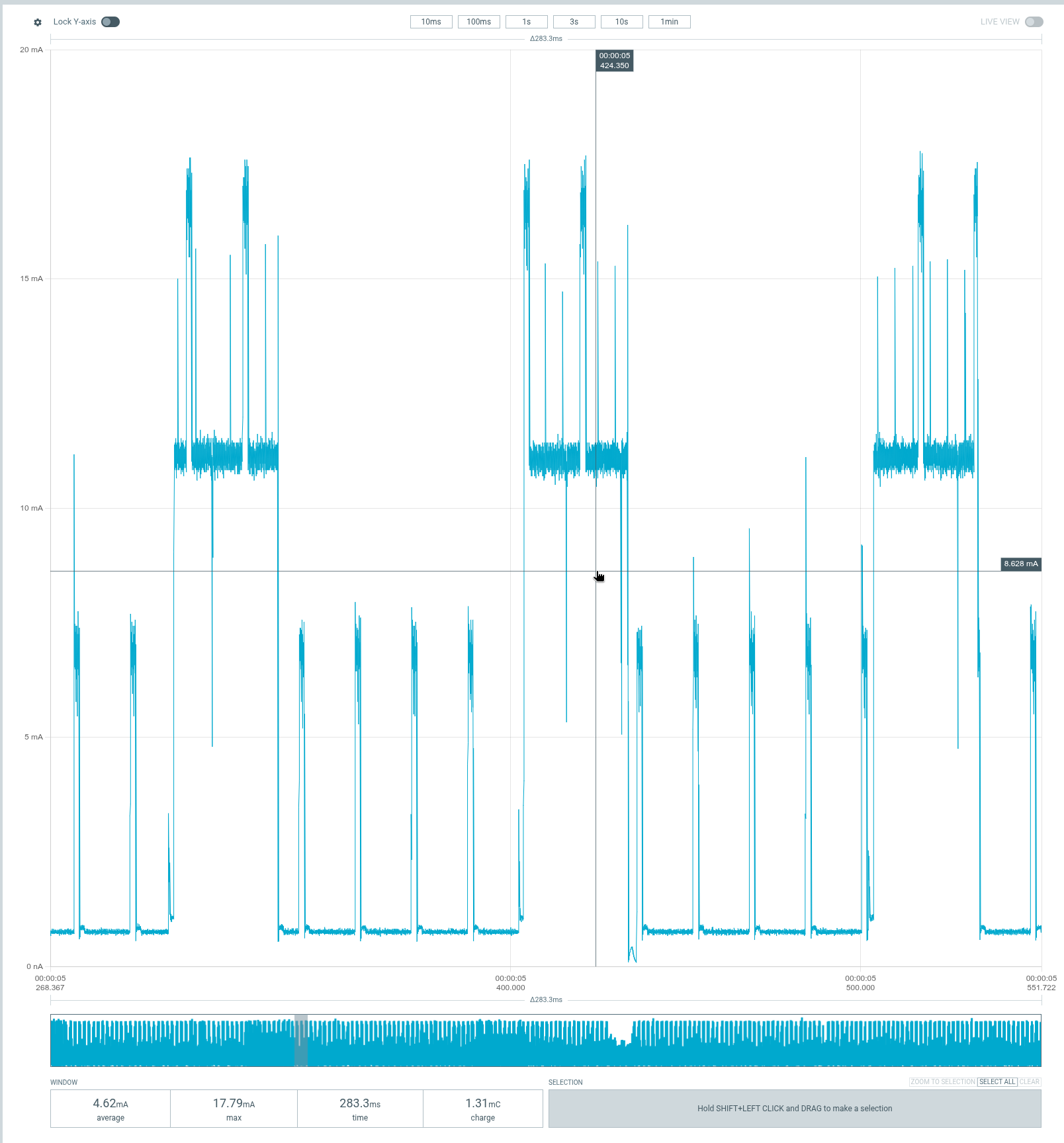
An early whole-board capture from the measurement setup. The window averages 4.62 mA. This isn’t an isolated measurement of SPI or the panel.
I connected CS and SCLK to the PPK2’s digital inputs and exported the current and digital channels together. The sample spacing was 10 µs, so it couldn’t decode a 1 MHz SPI clock reliably. CS was still enough to separate short commands from a full image transfer.
In that export, the CS-like strobes were only about 0.81–0.87 ms long, spaced roughly 16 ms apart. There were no long CS assertions corresponding to repeated full-frame writes. Meanwhile, the complete high-current plateaus measured 29.75 ms, with their starts exactly 100 ms apart.
Then we looked at RMK’s split discovery configuration:
// Split scan window
Duration::from_millis(30)

// Scan interval
Duration::from_millis(100)
Well, hello there.
The bare nice!nano[2] was running split-central firmware. The other half wasn’t connected. It was supposed to look for it, and it was doing exactly that. The pinned source spells out the 30 ms window and 100 ms interval.
An isolated build that didn’t run split discovery brought awake current down to around 1.8 mA in that test setup. A later connected sleep selection measured 68.78 µA. I had also changed the host pairing state during this part of the investigation, so these aren’t numbers to subtract blindly from earlier runs. They did give me a much better baseline than a board searching for an absent peer.
The important correction was bigger than the number: sleep stopped more than display work. It also changed what the split radio was doing. The big drop at the idle timeout had never isolated the display as the cause.
Finally, measure an actual split
I found another nice!nano, flashed the normal central and peripheral images, and connected the two. No need to redesign anything. Once all configured peripheral halves are connected, the central stops discovery.
The central’s sleeping consumption was higher than the host-only baseline: roughly 270–300 µA in the selected windows. Zooming in showed bursts almost exactly 20 ms apart.
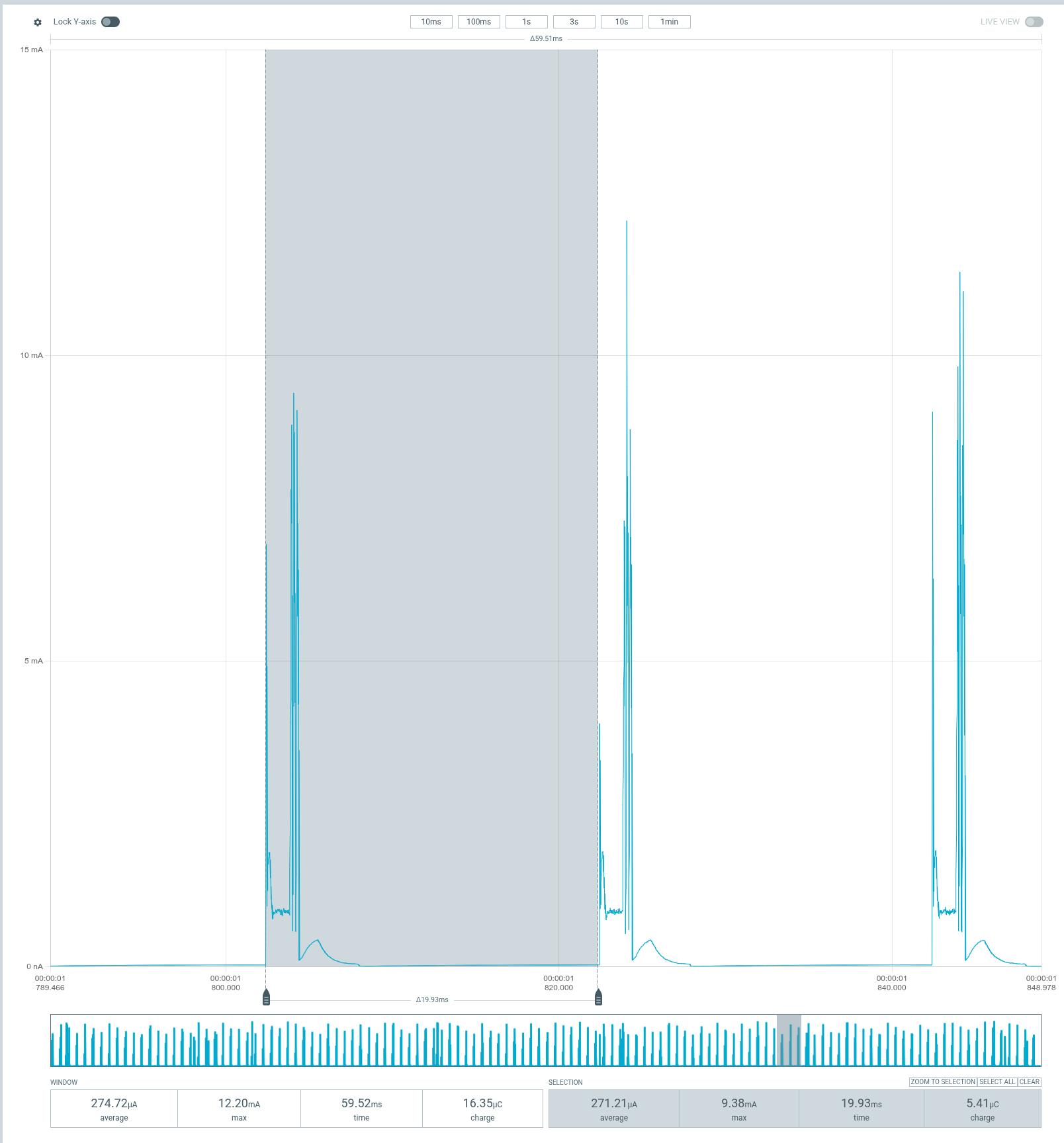
The central is connected to the host and its peripheral half. The selection spans almost one 20 ms interval, not just the pulse.
That matches RMK’s requested sleeping split interval when a host transport is active. The central schedules connection opportunities every 20 ms. The peripheral is allowed to skip many of them through peripheral latency; that doesn’t give the central the same event-skipping behavior.
This doesn’t imply a large stream of application messages between the halves. Empty link-layer exchanges and the work around connection events still cost energy. A current trace doesn’t tell me the contents of those packets, but the timing and configured interval fit.
The peripheral was the pleasant surprise:
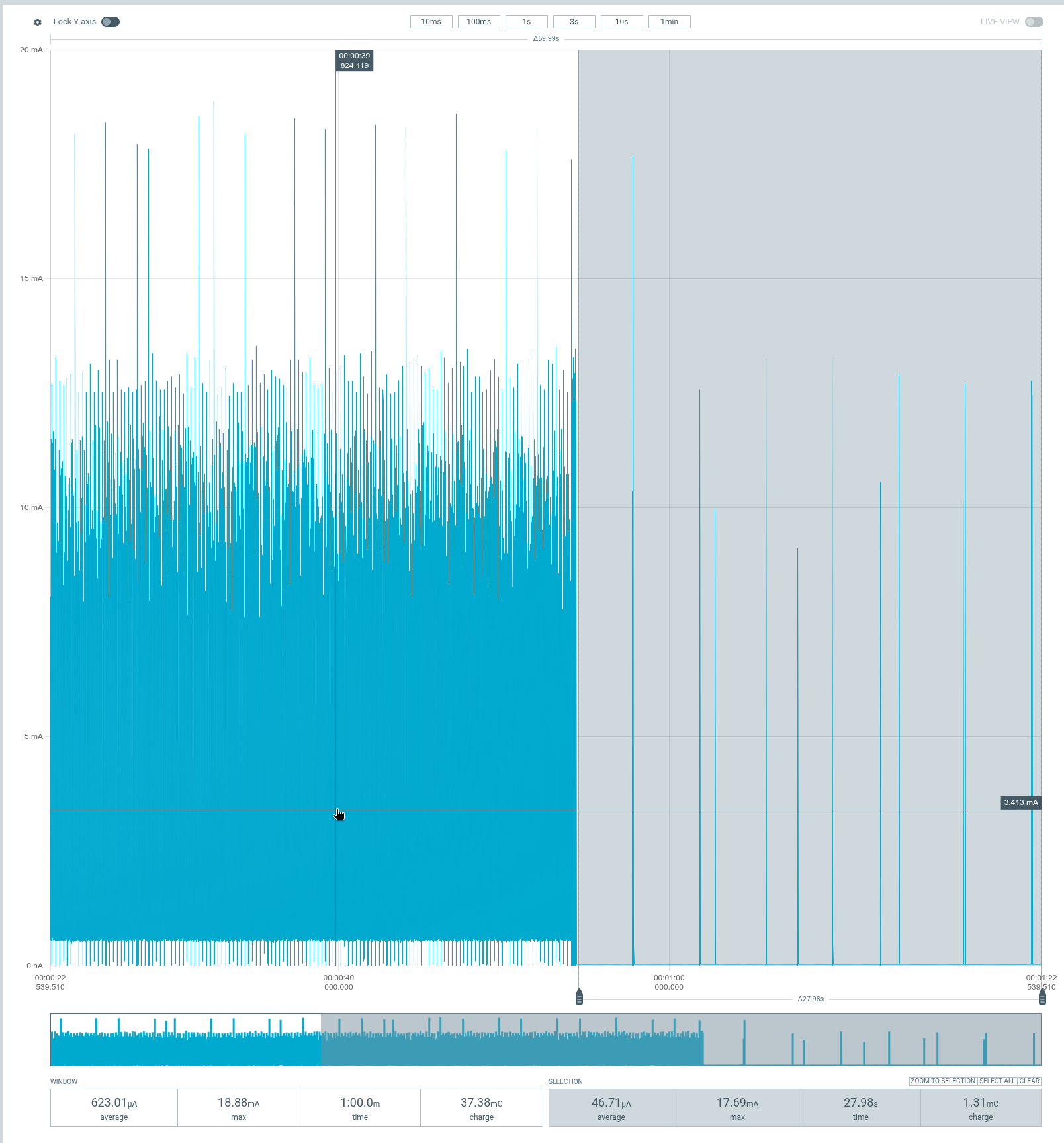
Read the selection at the bottom right: 46.71 µA over 27.98 seconds. The 623.01 µA whole-window average includes the earlier awake period.
In that run, its selected awake period averaged about 1.13 mA, then the sleeping selection came down to 46.71 µA. Those sparse bursts are consistent with the peripheral taking advantage of its allowed event skipping.
So the useful sleep figures, before enabling subrating, were:
| Setup | Measured sleep average |
|---|---|
| Test central, host connected, split discovery disabled | About 69 µA |
| Normal split central, host and other half connected | About 270–300 µA |
| Normal split peripheral, connected to central | About 47 µA |
These are different setups and selected measurement windows, not a controlled battery-runtime benchmark. They are much more useful than my original assumption that both halves would consume roughly the same amount while sleeping.
One more knob: connection subrating
RMK already has an optional subrating feature for the split link, with nRF52840 support. I hadn’t enabled it.
Unlike peripheral latency alone, connection subrating lets both sides skip connection events. In the pinned implementation, when a host is connected, the sleeping split link requests a factor of 30 on a 7.5 ms base interval. That gives roughly 225 ms between scheduled split events, rather than the ordinary 20 ms sleep interval.
The cost is wake latency. RMK documents about 116 ms on average and 232 ms worst-case for the first peripheral-side keypress after sleep. Those are upstream figures, not measurements of my keyboard. A local keypress on the central can initiate wake without waiting for that peripheral event. The split link returns to its fast settings after wake.
For me, a couple hundred milliseconds on the first key after an idle period is a reasonable thing to try. I enabled the existing feature on both halves of my real firmware, kept the 30-second idle timeout, and built a rollback pair before changing it.
I don’t have post-subrating power measurements or a week of typing results yet. The trial is the next step. In particular, I want to check quick peripheral taps that are released before the next event: delayed delivery is acceptable; a missing press or a stuck key isn’t. I also want to check held keys and reconnection from either half.
Changing RMK’s feature set can reset stored settings and bonds, so this is a flash-both-halves change with possible host and split re-pairing.
Where I stopped
The buffered tap-hold behavior is working well enough that I want to use it normally for a while. Screen sleep works. The physical display is a tiny load. The missing-half scan explains the big recurring plateaus, and the connected central’s 20 ms radio schedule explains why its sleep current is higher than the peripheral’s.
There is still awake-state overhead worth understanding. I haven’t turned a few short captures into a claim about how many days the batteries will last, and I haven’t demonstrated that subrating improves this particular keyboard yet.
But I no longer need to replace a perfectly reasonable display to fix a radio search. I’ll take that. In my ZMK setup, I kept losing the connections after idle periods. With this RMK setup, the halves keep their link and the central stays connected to the host while sleeping. Wakeups have been short, and getting back to typing feels much smoother. I prefer this behavior: the retained connections and quick wakeups make for a really nice typing experience. That’s my experience with these configurations, not a claim that every ZMK keyboard disconnects when idle. ↩ One early measurement had to go in the bin: I put a switch on the bare test board and forgot its matrix diode. That trace wasn’t valid evidence of key handling, so I repeated the experiment with the diode installed. ↩Footnotes