Exploring with gallo
Before we write a driver, we want confidence that we understand the
part. gallo is perfect for that: it lets us poke at a real device over
Pico de Gallo without writing any code yet.
For this walkthrough we are using SparkFun’s Digital Temperature Sensor - TMP102 (Qwiic) breakout board.
The Qwiic pinout documentation confirms the JST-SH wiring:
| Pin | Color | Signal |
|---|---|---|
| 1 | Black | Ground |
| 2 | Red | 3.3V |
| 3 | Blue | SDA |
| 4 | Yellow | SCL |
Wire the board to Pico de Gallo like this:
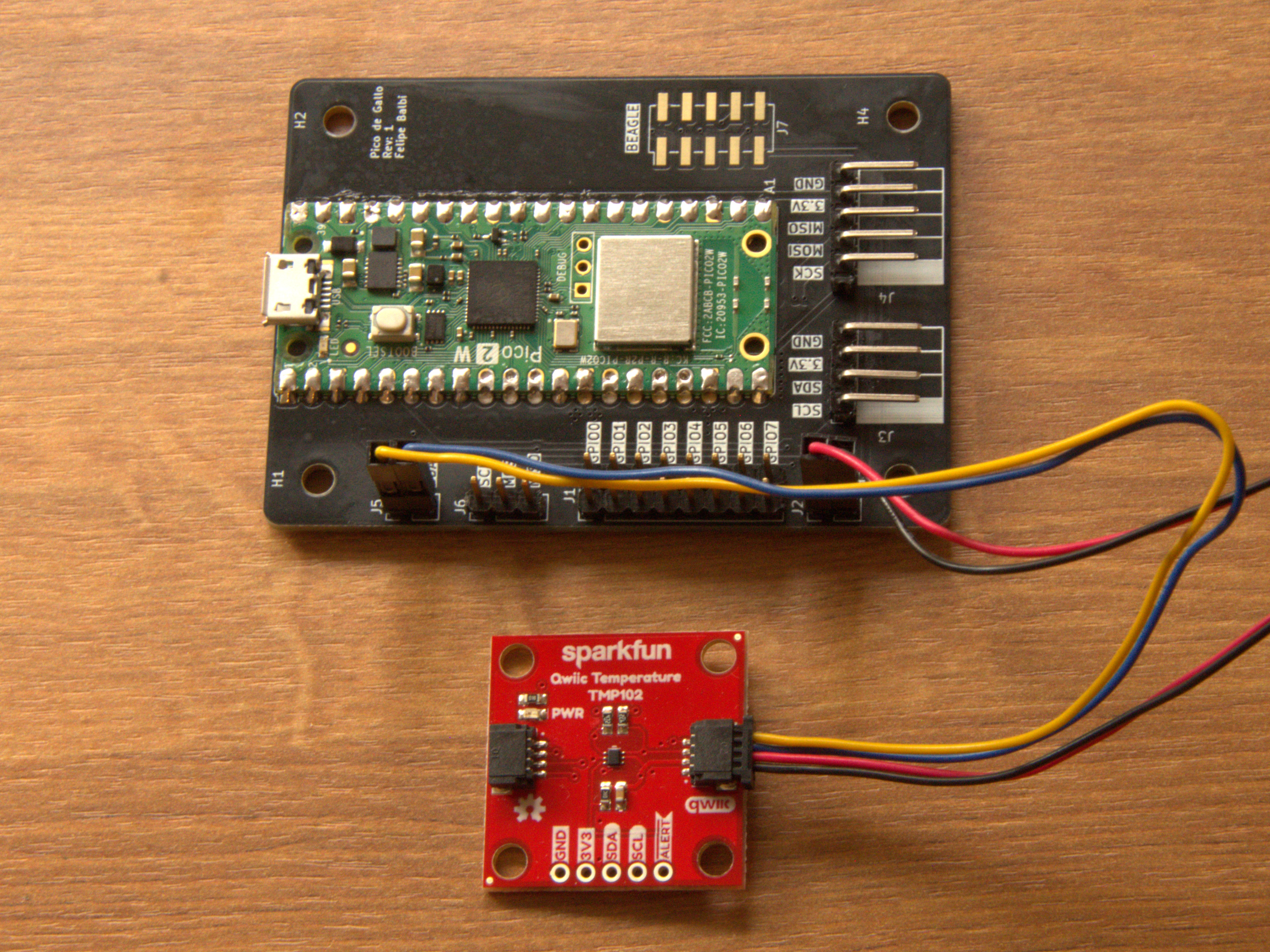
Now scan the I2C bus:
$ gallo i2c scan
╭────┬────┬────┬────┬────┬────┬────┬────┬────┬────┬────┬────┬────┬────┬────┬────┬────╮
│    │  0 │  1 │  2 │  3 │  4 │  5 │  6 │  7 │  8 │  9 │  a │  b │  c │  d │  e │  f │
├────┼────┼────┼────┼────┼────┼────┼────┼────┼────┼────┼────┼────┼────┼────┼────┼────┤
│ 0  │ RR │ RR │ RR │ RR │ RR │ RR │ RR │ RR │ -- │ -- │ -- │ -- │ -- │ -- │ -- │ -- │
│ 1  │ -- │ -- │ -- │ -- │ -- │ -- │ -- │ -- │ -- │ -- │ -- │ -- │ -- │ -- │ -- │ -- │
│ 2  │ -- │ -- │ -- │ -- │ -- │ -- │ -- │ -- │ -- │ -- │ -- │ -- │ -- │ -- │ -- │ -- │
│ 3  │ -- │ -- │ -- │ -- │ -- │ -- │ -- │ -- │ -- │ -- │ -- │ -- │ -- │ -- │ -- │ -- │
│ 4  │ -- │ -- │ -- │ -- │ -- │ -- │ -- │ -- │ 48 │ -- │ -- │ -- │ -- │ -- │ -- │ -- │
│ 5  │ -- │ -- │ -- │ -- │ -- │ -- │ -- │ -- │ -- │ -- │ -- │ -- │ -- │ -- │ -- │ -- │
│ 6  │ -- │ -- │ -- │ -- │ -- │ -- │ -- │ -- │ -- │ -- │ -- │ -- │ -- │ -- │ -- │ -- │
│ 7  │ -- │ -- │ -- │ -- │ -- │ -- │ -- │ -- │ RR │ RR │ RR │ RR │ RR │ RR │ RR │ RR │
╰────┴────┴────┴────┴────┴────┴────┴────┴────┴────┴────┴────┴────┴────┴────┴────┴────╯
The interesting part is address 0x48. TMP102 supports four possible
7-bit addresses depending on how pin A0 is strapped; datasheet table
6-4 gives us:
| A0 | Address |
|---|---|
| Ground | 0x48 |
| V+ | 0x49 |
| SDA | 0x4a |
| SCL | 0x4b |
So our breakout board almost certainly ties A0 to ground. SparkFun’s
schematic confirms exactly that.
That tiny exercise already tells us something useful for the driver API:
we should not accept an arbitrary u8 address if the device only has
four legal values. We will come back to that later.
Reading the register map
TMP102 only exposes four registers. Datasheet figure 6-2 and table 6-7 show the pointer-register layout:
| P1 | P0 | Register |
|---|---|---|
| 0 | 0 | Temperature register (read-only) |
| 0 | 1 | Configuration register (read-write) |
| 1 | 0 | TLOW register (read-write) |
| 1 | 1 | THIGH register (read-write) |
That’s a nice register map for a first driver: four addresses, two-byte registers, and a configuration register with a handful of bitfields.
Triggering a one-shot conversion
Datasheet section 6.5.3.6 says setting the one-shot bit (OS) in the
configuration register starts a conversion while the device is in
shutdown mode.
For a first pass we can avoid a full read-modify-write dance and use the power-on reset value from tables 6-10 and 6-11. The reset contents are:
| B7 | B6 | B5 | B4 | B3 | B2 | B1 | B0 | |
|---|---|---|---|---|---|---|---|---|
| Byte 1 | 0 | 1 | 1 | 0 | 0 | 0 | 0 | 0 |
| Byte 2 | 1 | 0 | 1 | 0 | 0 | 0 | 0 | 0 |
Setting bit 7 of byte 1 turns 0x60 0xa0 into 0xe0 0xa0, so we can
write the configuration register like this:
$ gallo i2c write --address 0x48 --bytes 0x01 0xe0 0xa0
The leading 0x01 is the pointer byte selecting the Configuration
register.
Note
In a real driver we will not hard-code reset values like this. We will model the register properly and let the generated API flip only the bits we care about.
Reading the temperature result
The temperature register lives at pointer 0x00, so a write-then-read
gets us the raw conversion result:
$ gallo i2c write-read --address 0x48 --bytes 0x00 --count 2
6b 15
TMP102 reports temperature with a resolution of $0.0625,^{\circ}\text{C}$ per least-significant bit. Using the sample above, the same conversion the draft chapter used is:
$$ \frac{5843 \cdot 0.0625}{16} \approx 21.4^{\circ}\text{C} $$
The exact bytes on your desk will differ, of course. The point is not this specific room temperature; the point is that the bus transaction, register selection, and conversion math all line up with the datasheet.
At this stage we know enough to start writing a proper driver:
- the legal device addresses
- the register map
- which register fields deserve names
- how raw samples become degrees Celsius
That is exactly the information we need for the next step: turning the register map into code.