Introduction
Pico de Gallo turns a Raspberry Pi Pico 2 into a USB-attached protocol bridge so you can drive I²C, SPI, UART, GPIO, PWM, ADC, and 1-Wire peripherals from a host PC — and, more importantly, so you can develop and test embedded device drivers on your laptop, with no flashing, no SWD probe, no clock or pin-mux setup, and no linker scripts in your way.
If you’ve ever wanted to:
- prototype a driver against
embedded-haltraits without booting an MCU each time you change a line, - script a sensor or actuator from Python or a shell one-liner,
- write an integration test that talks to real silicon from your CI runner,
then Pico de Gallo is for you.
What’s in the Box
A small landing-board PCB with castellated pads for the Pico 2, a firmware image that speaks postcard-rpc over USB, and a small constellation of host-side crates:
gallo— a CLI for one-off and scripted access to every interface.pico-de-gallo-lib— an async Rust client built onnusbandtokio.pico-de-gallo-hal— a host-sideembedded-hal/embedded-hal-asyncshim so existing drivers work unchanged.pico-de-gallo-ffi— a C shared library with a stable opaque-pointer API.pyco-de-gallo— Python bindings via PyO3 and maturin.
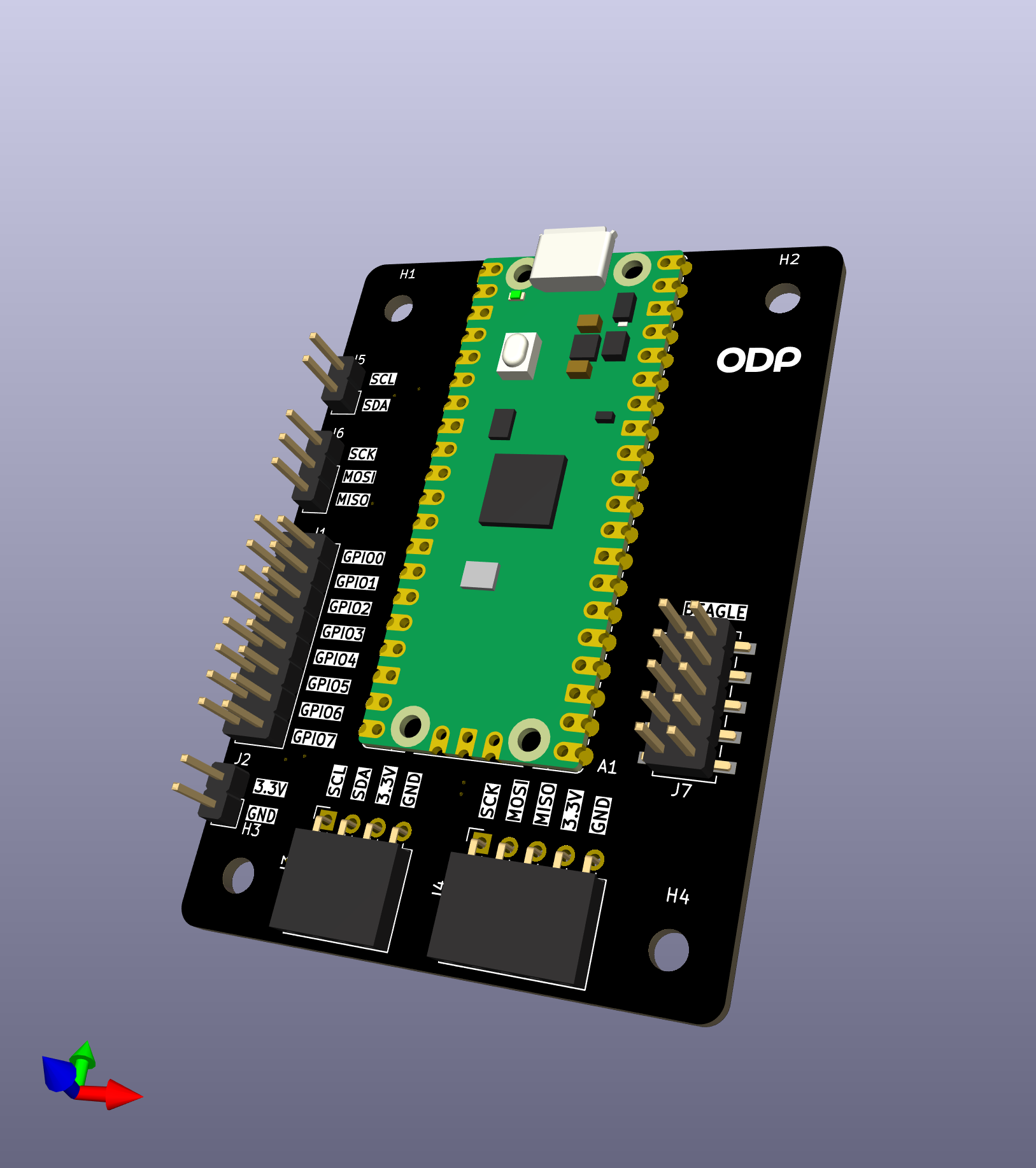 Pico de Gallo v1.0 |
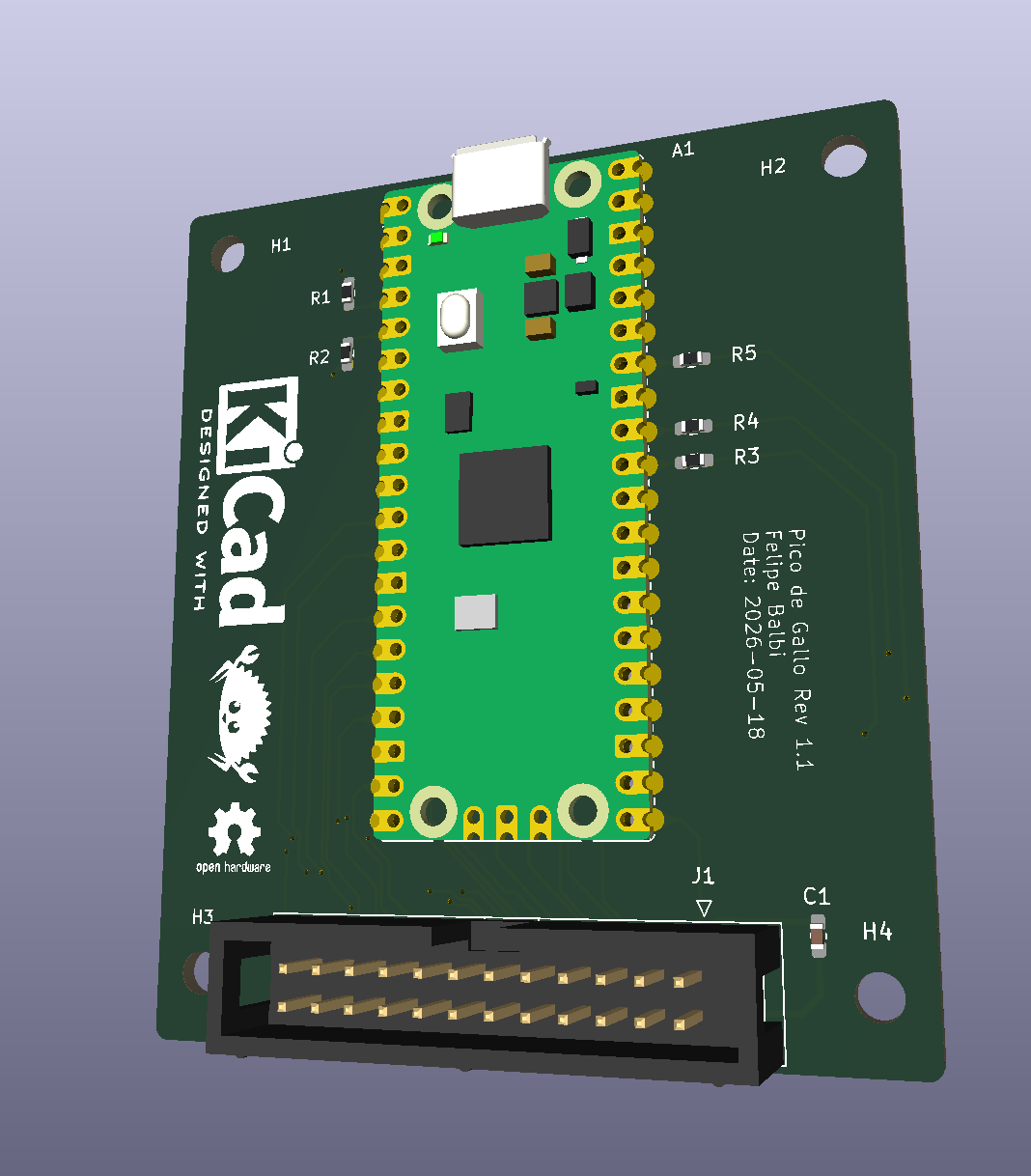 Pico de Gallo v1.1 |
Hardware Revisions at a Glance
| Revision | Firmware feature | Connector | Capabilities |
|---|---|---|---|
| v1.0 | hw-rev1 (deprecated) | seven pin headers | I²C, SPI, GPIO, PWM |
| v1.1 | hw-rev2 (default) | one keyed 2×12 box | I²C, SPI, UART, GPIO, PWM, ADC, 1-Wire |
| v2 (WIP) | hw-rev2 (default) | 2×12 box + level Tx | same as v1.1, plus variable VREF |
You’ll want v1.1 or later if you need UART, ADC, or 1-Wire.
hw-rev2 is the default firmware feature; hw-rev1 is deprecated
but still supported, with removal no earlier than 2031-09-01. See
Revisions: v1.0 vs v1.1.
How to Read This Book
The book is laid out as six parts plus appendices:
- The Hardware — what’s on the PCB, which revision to pick, how to flash firmware.
- Getting Started — install the toolchain and verify your device.
- The Interfaces — one chapter per peripheral. Each follows the same template: overview, pin mapping, CLI usage, Rust, C, Python, error handling.
- The Crates — reference for each crate in the workspace.
- Writing a Device Driver — the longest part. A TMP102 walkthrough showing the dev loop, the blocking/async parity, and how to write hardware-in-the-loop tests that run on your laptop.
- Under the Hood — the wire protocol, schema versioning, firmware architecture, and the release cadence.
Read top-to-bottom for a tour, or jump straight to the chapter you need — each chapter stands on its own.
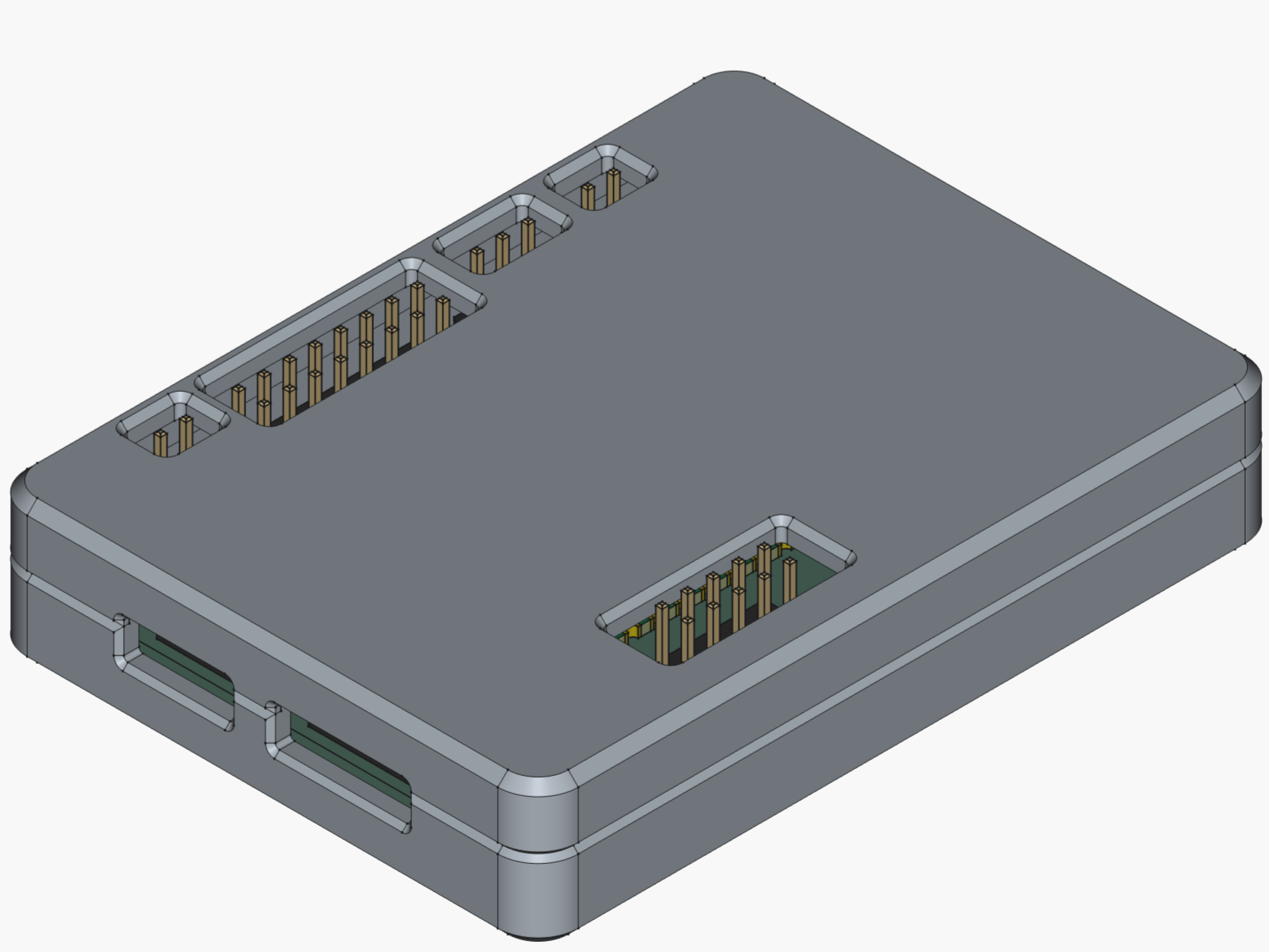
The Optional Case
A 3D-printable, snap-fit enclosure lives in the
case/
folder of the repository if you want to keep the board safe on your
bench.
Hardware Overview
v1.0 — seven pin headers |
v1.1 — keyed 2×12 box header |
Pico de Gallo is a small landing-board PCB designed to host a Raspberry Pi Pico 2 module via castellated edge pads. The landing board exists for one reason: to make the pin-to-function mapping predictable and labeled, so the firmware always knows where to look for SDA, SCK, UART TX, and friends, and so you don’t have to keep a pinout chart taped to your monitor.
Everything Pico de Gallo can do, a bare Pico 2 with the same firmware can also do — but the landing board adds:
- silkscreened labels for every signal,
- pull-ups for I²C (4.7 kΩ on v1.1+),
- series resistors on ADC inputs (100 Ω on v1.1+),
- decoupling on VREF,
- and a keyed connector so cables only go in one way (v1.1+).
The Pico 2 itself supplies the RP2350 MCU, the USB connector, the BOOTSEL button, and the 3.3 V regulator. Pico de Gallo just brings the right signals to the right places.
Block Diagram
        ┌──────────────────────────────────────────┐
        │              Pico de Gallo PCB           │
        │                                          │
USB ────│──► Pico 2 (RP2350) ──► castellated pads ─┼──► I²C / SPI
        │        │                  │              │      UART / GPIO
        │        │                  │              │      PWM / ADC
        │        │                  │              │      1-Wire
        │        │                  ▼              │
        │        │     pull-ups, series R,         │
        │        │     decoupling, header(s)       │
        │        ▼                                 │
        │  defmt RTT (debug)                       │
        └──────────────────────────────────────────┘
What’s on the PCB
| Component | v1.0 | v1.1+ | Purpose |
|---|---|---|---|
| Pico 2 pads | ✓ | ✓ | Castellated landing for the MCU |
| I²C pull-ups | external | 4.7 kΩ | Required for I²C operation |
| ADC series R | — | 100 Ω | Input protection / RC filter |
| VREF decoupling | — | 100 nF | Stabilises ADC reference |
| Pin headers | 7× | — | Per-bus 0.1″ pin headers |
| Box header | — | 1× 2×12 | Single keyed shrouded connector |
| BOOTSEL button | on Pico | on Pico | Boot to UF2 mass-storage mode |
The Three Ways to Get a Board
- Order a fabricated PCB from any house that accepts gerbers
(JLCPCB, PCBWay, OSH Park, Aisler, …). Our gerbers are on the
Releases
page under
hardware-v*tags. Most houses will also assemble the board if you upload the BOM and pick-and-place files; this is the easiest path and we recommend it. - Hand-solder the Pico 2 and headers yourself. The board has no fine-pitch components — it’s a comfortable first SMT-ish project. See Assembly & Flashing.
- Skip the board entirely and wire a bare Pico 2 directly, matching the pinout in Pinout & Connector. The firmware doesn’t care whether the signals come from a landing board or a breadboard.
What’s Next
- Revisions: v1.0 vs v1.1 — pick the right board for what you want to do.
- Pinout & Connector — every pin, every signal, every revision.
- Assembly & Flashing — get the Pico 2 onto the PCB and the firmware onto the Pico 2.
Revisions: v1.0 vs v1.1
The Pico de Gallo PCB has shipped in two revisions, with a third planned. The revision determines two things:
- Which firmware feature flag you flash (
hw-rev1orhw-rev2). - Which peripherals the firmware exposes.
| Revision | Feature flag | Connector | Capabilities |
|---|---|---|---|
| v1.0 | hw-rev1 (deprecated) | 7 separate pin headers | I²C, SPI, GPIO, PWM |
| v1.1 | hw-rev2 (default) | one keyed 2×12 shrouded header | I²C, SPI, UART, GPIO, PWM, ADC, 1-Wire |
| v2 (future) | hw-rev2 (default) | 2×12 shrouded header + level translators | same as v1.1, plus variable VREF rail |
Important
The capability set is enforced by firmware, not by the hardware. Flashing
hw-rev1firmware onto a v1.1 board still gives you only the v1.0 capability set. Match the firmware to the board you actually have.
hw-rev1 Is Deprecated
hw-rev2 is the default firmware feature. Building the firmware
with no feature flags produces a rev2 image:
$ cargo build --release --target thumbv8m.main-none-eabihf
hw-rev1 is deprecated and must now be requested explicitly:
$ cargo build --release --target thumbv8m.main-none-eabihf \
    --no-default-features --features hw-rev1
Deprecated does not mean unsupported:
- rev1 boards keep working.
hw-rev1is still built and linted in CI on every push, andfirmware-rev1.uf2is still attached to every firmware release. - Removal will not happen before 2031-09-01. That is a floor — five years’ notice — not a commitment to remove on that date.
Two signals fire when you enable it. The build script prints a
cargo:warning naming the removal floor, and the firmware logs a
defmt::warn! over RTT on every boot, so a rev1 image is
identifiable from the device as well as from the build log.
If you are fabricating a board today, fabricate v1.1 and use the
default hw-rev2 firmware.
Which One Should I Pick?
- You only need I²C, SPI, GPIO, or PWM → an existing v1.0 board
is fine and keeps working, but
hw-rev1is deprecated (see above); don’t fabricate a new one. - You need UART, ADC, or 1-Wire → you want v1.1 (or later).
Calling an unsupported endpoint on v1.0 firmware returns
Unsupported. - You’re starting from scratch today → fabricate v1.1. It’s the same effort and a strict superset.
What v1.1 Adds Over v1.0
- Single keyed box header. One cable, one orientation, no ambiguity. Adapter boards (informally called “toppings”) can be designed against a stable connector instead of wrangling seven separate jumper bundles.
- All implemented peripheral signals routed. UART, 1-Wire, and the three ADC inputs are physically absent on v1.0. v1.1 also routes the PCB’s SPI_CS net from RP2350 GPIO 5, but that net is a label only — current firmware never claims or drives that pad.
- On-board passives.
- 4.7 kΩ pull-ups on I²C (no more dangling resistors).
- 100 Ω series resistors on each ADC input for protection and a mild RC roll-off.
- 100 nF decoupling on VREF.
What v2 Will Add
Planned but not yet released:
- Variable VREF rail on header pin 1: selectable 1.8 V / 3.3 V / 5 V. On v1.1 this pin is hardwired to 3.3 V.
- Level translators on the digital signals so the same board can talk to 1.8 V, 3.3 V, and 5 V peripherals without an external level shifter.
- Same firmware feature flag as v1.1 (
hw-rev2).
Note
Adapter boards designed for the v1.1 box-header pinout will plug into v2 unchanged. On v1.1 they will see 3.3 V on pin 1; on v2 they will see whatever VREF is set to. Design your topping with that in mind.
v1.0 — Best Effort
The v1.0 board predates the consolidated header and lacks routing
for UART (GPIO 0-1), 1-Wire (GPIO 16), and ADC (GPIO 26-28).
Firmware validates those endpoints and returns Unsupported, so
calling them won’t crash — you just won’t get data.
If you’re stuck on v1.0 and need one of the missing signals, you can solder a wire directly to the corresponding Pico 2 castellated pad. It’s not pretty, but it works for UART, 1-Wire, and ADC.
SPI_CS is different. Its physical GPIO 5 net is present on the v1.1
header but absent on v1.0, and current firmware does not claim or
drive GPIO 5 on either revision. Soldering to that pad does not make
it usable as firmware-controlled chip-select; use a user GPIO index
reported by device/info instead.
Note that SPI_CS on the v1.1 silkscreen and in the KiCad schematic
is a net label, not a feature. Neither revision provides a working
dedicated chip-select signal, and the misleading label can only be
retired by a future board revision. See
issue #99.
Identifying Your Board
The fastest way to tell what revision firmware you’re running:
$ gallo version
╭─────────────┬──────────────────────────────╮
│ Firmware    │ v0.12.0                      │
│ Schema      │ v0.8.0                       │
│ HW revision │ 2                            │
│ GPIOs       │ 4                            │
│ Build       │ firmware-v0.12.0-42-g1a2b3c4 │
╰─────────────┴──────────────────────────────╯
╭─────┬─────┬──────┬──────┬─────┬─────┬────────╮
│ I2C │ SPI │ UART │ GPIO │ PWM │ ADC │ 1-Wire │
├─────┼─────┼──────┼──────┼─────┼─────┼────────┤
│ ✓   │ ✓   │ ✓    │ ✓    │ ✓   │ ✓   │ ✓      │
╰─────┴─────┴──────┴──────┴─────┴─────┴────────╯
HW revision 1 corresponds to hw-rev1; 2 corresponds to
hw-rev2. The capability table tells you exactly which peripherals
this firmware will serve.
Migrating from v1.0 to v1.1
Code-wise, nothing changes. The wire protocol is the same; the host crates are the same; the CLI is the same. The only thing that moves is which physical pins your peripheral cables plug into — see Pinout & Connector.
If you have driver code that detects capabilities at runtime, use
device_info() (host) / gallo_get_device_info (FFI) and gate on
the capabilities bitfield. That way the same binary works
unmodified on both boards.
Pinout & Connector
This is the authoritative pin map for both PCB revisions. Refer to it whenever you wire up a peripheral.
Firmware Pin Map
The firmware always uses the same RP2350 GPIOs, regardless of which revision PCB they’re routed to.
| Function | RP2350 GPIO | Available on | Notes |
|---|---|---|---|
| UART TX | GPIO 0 | v1.1+ | UART0 TX, buffered |
| UART RX | GPIO 1 | v1.1+ | UART0 RX |
| I²C SDA | GPIO 2 | v1.0+ | I²C1, async DMA |
| I²C SCL | GPIO 3 | v1.0+ | |
| SPI RX (MISO) | GPIO 4 | v1.0+ | SPI0, DMA full-duplex |
| SPI_CS net | GPIO 5 | v1.1+ | PCB net name only; firmware never claims or drives it |
| SPI SCK | GPIO 6 | v1.0+ | |
| SPI TX (MOSI) | GPIO 7 | v1.0+ | |
| GPIO 0 | GPIO 8 | v1.0+ | User pin, in/out/edge |
| GPIO 1 | GPIO 9 | v1.0+ | User pin, in/out/edge |
| GPIO 2 | GPIO 10 | v1.0+ | User pin, in/out/edge |
| GPIO 3 | GPIO 11 | v1.0+ | User pin, in/out/edge |
| PWM 0 | GPIO 12 | v1.0+ | Slice 6 channel A |
| PWM 1 | GPIO 13 | v1.0+ | Slice 6 channel B |
| PWM 2 | GPIO 14 | v1.0+ | Slice 7 channel A |
| PWM 3 | GPIO 15 | v1.0+ | Slice 7 channel B |
| 1-Wire | GPIO 16 | v1.1+ | PIO0/SM0, open-drain |
| ADC 0 | GPIO 26 | v1.1+ | 12-bit, 0–3.3 V nominal |
| ADC 1 | GPIO 27 | v1.1+ | 12-bit |
| ADC 2 | GPIO 28 | v1.1+ | 12-bit |
The user-facing GPIO numbering in the CLI, library, FFI, and Python
bindings (0–3) maps to RP2350 GPIO 8–11. Same goes for ADC
channels (0–2 → GPIO 26–28) and PWM channels (0–3 → GPIO
12–15).
v1.0 Pin Headers
v1.0 uses seven separate 0.1″ pin headers, one per logical bus. Refer to the silkscreen on the board for the exact layout. Signals not brought out on v1.0: UART TX/RX, 1-Wire, and ADC 0–2. The physical SPI_CS net to GPIO 5 is also absent; on v1.1 it is routed to the header, but current firmware does not drive it.
v1.1 Box Header
v1.1 consolidates everything onto a single keyed 2×12 (0.1″ pitch) shrouded box header. Viewed from above with the USB connector pointing up, pin 1 is at the top-right. The shroud key notch faces right. Even-numbered pins (bottom row) are on the left; odd-numbered pins (top row) are on the right.
 Pin 2  GND          ┃ VREF (+3V3) Pin 1
 Pin 4  I2C_SCL      ┃ I2C_SDA     Pin 3
 Pin 6  SPI_MOSI     ┃ SPI_MISO    Pin 5
 Pin 8  SPI_CS *      ┃ SPI_SCK     Pin 7
 Pin 10 UART_RX      ┃ UART_TX     Pin 9
 Pin 12 GPIO1        ┃ GPIO0       Pin 11
 Pin 14 GPIO3        ┃ GPIO2       Pin 13
 Pin 16 PWM1         ┃ PWM0        Pin 15
 Pin 18 PWM3         ┃ PWM2        Pin 17
 Pin 20 ADC0         ┃ ONEWIRE     Pin 19
 Pin 22 ADC2         ┃ ADC1        Pin 21
 Pin 24 GND          ┃ +3V3        Pin 23
* The silkscreen and schematic label pin 8 SPI_CS, but that name
describes the PCB net only. No firmware claims GPIO 5, so the pin is
not a working chip select — see below.
Full v1.1 Pinout Table
| Header Pin | Net | RP2350 GPIO | Direction | Notes |
|---|---|---|---|---|
| 1 | VREF | — | Power out | 3.3 V (hardwired on v1.1) |
| 2 | GND | — | Power | Ground |
| 3 | SDA | GPIO 2 | Bidir | I²C1 SDA, 4.7 kΩ pull-up |
| 4 | SCL | GPIO 3 | Bidir | I²C1 SCL, 4.7 kΩ pull-up |
| 5 | SPI_MISO | GPIO 4 | Input | SPI0 RX |
| 6 | SPI_MOSI | GPIO 7 | Output | SPI0 TX |
| 7 | SPI_SCK | GPIO 6 | Output | SPI0 SCK |
| 8 | SPI_CS (unused) | GPIO 5 | Not driven by firmware | PCB net name only; GPIO 5 remains in its reset state |
| 9 | UART_TX | GPIO 0 | Output | UART0 TX |
| 10 | UART_RX | GPIO 1 | Input | UART0 RX |
| 11 | GPIO0 | GPIO 8 | Bidir | User GPIO 0 |
| 12 | GPIO1 | GPIO 9 | Bidir | User GPIO 1 |
| 13 | GPIO2 | GPIO 10 | Bidir | User GPIO 2 |
| 14 | GPIO3 | GPIO 11 | Bidir | User GPIO 3 |
| 15 | PWM0 | GPIO 12 | Output | PWM slice 6A |
| 16 | PWM1 | GPIO 13 | Output | PWM slice 6B |
| 17 | PWM2 | GPIO 14 | Output | PWM slice 7A |
| 18 | PWM3 | GPIO 15 | Output | PWM slice 7B |
| 19 | ONEWIRE | GPIO 16 | Bidir | PIO0/SM0, open-drain |
| 20 | ADC0 | GPIO 26 | Input | Via 100 Ω series resistor |
| 21 | ADC1 | GPIO 27 | Input | Via 100 Ω series resistor |
| 22 | ADC2 | GPIO 28 | Input | Via 100 Ω series resistor |
| 23 | +3V3 | — | Power out | Direct 3.3 V |
| 24 | GND | — | Power | Ground |
Header pin 8 carries the PCB’s SPI_CS net to RP2350 GPIO 5, but
current firmware never claims or drives that pad. It is not a valid
spi/batch chip-select index or user GPIO index. Use firmware GPIO
indices 0–3, which map to RP2350 GPIO 8–11, for chip-select instead.
No pull or stable inactive level is guaranteed on GPIO 5.
The SPI_CS name is a silkscreen and schematic net label, not a
capability. It records what the net was routed for, not what the
firmware does with it, and the board offers no working dedicated
chip-select signal. The label cannot be corrected without a new board
revision, so treat this page — not the silkscreen — as authoritative.
See issue #99.
The device currently reports num_gpios == 4, so host validation
refuses --cs 5 before transmitting anything. If that validation is
bypassed, firmware returns SpiError::InvalidCsPin without touching
a pin.
Note
Pin 1 (VREF) is hardwired to 3.3 V on v1.1. On the future v2 board it becomes a switchable rail (1.8 V / 3.3 V / 5 V). Adapter boards designed today against the v1.1 header will see 3.3 V; they’ll continue to plug into v2 with the same key orientation.
Electrical Notes
- All digital I/O is 3.3 V CMOS. Do not drive 5 V signals directly into Pico de Gallo without a level translator.
- The on-board I²C pull-ups (v1.1+) are sized for moderate bus capacitance. For long cables or many devices, add external pull-ups in parallel and treat the on-board value as a minimum.
- The ADC inputs see a 100 Ω series resistor on v1.1+. Keep that in mind for source-impedance budgeting if you care about absolute accuracy.
- 3.3 V and VREF on v1.1 share the Pico 2’s regulator. Don’t pull hundreds of milliamps from the header.
Assembly & Flashing
Getting a working Pico de Gallo on your desk takes two steps:
- Get a populated PCB.
- Flash the firmware.
Step 1 has three options, ordered from easiest to most hands-on. Step 2 is the same regardless of how you got the board.
Step 1: Get a Populated PCB
Option A — Have the PCB house assemble it
Most modern PCB fabrication services (JLCPCB, PCBWay, OSH Park
with their assembly partners, Aisler, etc.) will both fabricate
and assemble the board for you. Upload the gerbers, BOM, and
pick-and-place files from the
hardware-v*
release, choose your solder mask color, and a fully-built board
arrives at your door. This is the recommended path — it’s cheap
at small quantities, and your time is worth more than the
assembly fee.
Note
Pico de Gallo PCB assembly is not affiliated with any specific PCB house. Any cost, mistake, or damage associated with PCB fabrication and assembly is your responsibility.
Option B — Fabricate bare, solder yourself
If you’d rather solder, the board uses through-hole and medium-pitch components only — there’s nothing exotic.
Order of operations:
- Solder the Pico 2 first. It’s the lowest component on the board. Tack one corner pad, check alignment, tack the opposite corner, then run a bead along all remaining pads. A bit of no-clean flux makes this much easier — solder follows flux onto exposed copper.
- Right-angle headers next. Hold them in place with a piece of polyimide (“Kapton”) tape or a third hand, tack one pin, verify the header sits flush, then solder the rest.
- Straight headers last. Same approach — one pin first, check alignment, finish the rest.
- Clean off the flux with 99% IPA and an ESD-safe brush in a well-ventilated area.
Caution
Isopropyl alcohol is flammable. Don’t smoke or have open flames near it. Use it in a well-ventilated area.
After cleanup, eyeball the board for solder bridges between adjacent pins before applying USB power.
Option C — Skip the PCB, wire a bare Pico 2
The firmware works on a bare Pico 2 too. Wire your peripherals directly to the RP2350 GPIOs listed in Pinout & Connector. You’ll need to provide your own I²C pull-ups (4.7 kΩ to 3.3 V on SDA and SCL) if you want I²C to work.
Step 2: Flash the Firmware
The Pico 2 ships with a built-in UF2 bootloader, so you don’t need a programmer, a debug probe, or any extra software. Just a USB cable.
- Download the latest
firmware.uf2from the Releases page (look for a tag likefirmware-v0.8.0). Pick the build that matches your board revision:firmware-rev2.uf2for the v1.1 board — this is the defaultfirmware-rev1.uf2for the v1.0 board —hw-rev1is deprecated but still built and published; removal not before 2031-09-01
- With the Pico 2 unplugged, press and hold the
BOOTSELbutton on top of the module. - Plug the USB cable in while still holding
BOOTSEL, then release. - A USB mass-storage drive named
RP2350appears on your host. - Drag-and-drop the
firmware.uf2onto that drive (orcp/Copy-Itemfrom a shell). - The drive vanishes; the Pico 2 reboots into the new firmware automatically.
That’s it — no command-line flashing tool required.
Tip
If the
RP2350drive doesn’t show up, the Pico 2 didn’t enter bootloader mode. Unplug, holdBOOTSEL, plug back in. Don’t releaseBOOTSELuntil you see the drive.
Step 3: Verify
Confirm the firmware is alive by running gallo version. See
Verifying Your Device for the
expected output and what each field means.
When Things Go Wrong
- Drive doesn’t appear in BOOTSEL mode — try a different USB cable (some “charge-only” cables don’t carry data) or a different USB port.
gallocan’t find the device after flashing — on Linux you may need a udev rule; on Windows the WinUSB driver may need to be installed via Zadig. See USB & OS Notes.- You flashed
hw-rev1onto a v1.1 board (or vice versa) — no damage done; just re-enter BOOTSEL and flash the right build.
Installing the Toolchain
To use Pico de Gallo from a host PC, you need the gallo
command-line tool. That’s it — gallo will speak to the firmware
over USB and you don’t need any extra drivers on most platforms.
There are two ways to get it: pre-built binaries (fastest), or building from source.
Option A — Pre-built Binaries
Pre-built binaries are attached to every application-v* release
on the
Releases
page. Supported triples:
| OS | Architectures |
|---|---|
| Linux | x86_64, aarch64 |
| Windows | x86_64, aarch64 |
| macOS | aarch64 |
Download the right archive for your system, unzip, and put gallo
(or gallo.exe) somewhere on your PATH.
$ gallo --version
gallo 0.8.0
Option B — Build from Source
If your platform isn’t in the table above, or you want to live on
main:
- Install Rust (stable toolchain, 1.90 or newer — the workspace pins MSRV to 1.90).
- Clone the repo:
$ git clone https://github.com/OpenDevicePartnership/pico-de-gallo $ cd pico-de-gallo/crates - Build the CLI:
$ cargo build --release -p gallo - The binary lives at
target/release/gallo(orgallo.exeon Windows). Move or symlink it into a directory on yourPATH.
Tip
On Linux you may want to install the
libudevheaders first sonusbbuilds without extra steps:$ sudo apt install libudev-dev pkg-config
Optional Extras
You only need these if you’re working on Pico de Gallo, not just with it:
- The mdBook source for this book lives under
book/. Build withmdbook build book. - The C FFI library (
pico-de-gallo-ffi) builds a.so/.dylib/.dllshared library plus a generatedpico_de_gallo.hheader. Seecrates/ffi.md. - The Python bindings (
pyco-de-gallo) build with maturin:
See$ pip install maturin $ cd crates/pyco-de-gallo $ maturin develop --releasecrates/python.md.
Next
Now verify your device is talking to the host.
Verifying Your Device
Plug the freshly-flashed Pico de Gallo into your host and run:
$ gallo version
╭─────────────┬──────────────────────────────╮
│ Firmware    │ v0.12.0                      │
│ Schema      │ v0.8.0                       │
│ HW revision │ 2                            │
│ GPIOs       │ 4                            │
│ Build       │ firmware-v0.12.0-42-g1a2b3c4 │
╰─────────────┴──────────────────────────────╯
╭─────┬─────┬──────┬──────┬─────┬─────┬────────╮
│ I2C │ SPI │ UART │ GPIO │ PWM │ ADC │ 1-Wire │
├─────┼─────┼──────┼──────┼─────┼─────┼────────┤
│ ✓   │ ✓   │ ✓    │ ✓    │ ✓   │ ✓   │ ✓      │
╰─────┴─────┴──────┴──────┴─────┴─────┴────────╯
If you see that block, you’re done. Success 🎉.
What Each Field Means
| Field | What it tells you |
|---|---|
Firmware | The firmware semver. Lockstepped with the wire crate at release time. |
Schema | The wire-protocol schema version. The host crate must understand this. |
HW revision | 1 if you flashed hw-rev1 firmware, 2 for hw-rev2. |
GPIOs | Number of user-controllable GPIO pins this firmware exposes. This is the authoritative bound for a GPIO index and for an SPI chip-select pin. |
Build | Firmware build identity from git describe. A trailing -dirty means the image was built from a modified working tree. Informational only — it never affects whether a command succeeds. Quote this when reporting a bug or reproducing a measurement. |
| Capability table | Which peripherals this firmware build exposes. A ✗ means the endpoint returns Unsupported. |
Important
The
HW revisionline reflects the firmware build, not the PCB you have. If you flashed the wrong build, re-enter BOOTSEL and flash the right one. See Assembly & Flashing.
Ping
For a quick round-trip sanity check:
$ gallo ping
Ping OK
ping sends a random u32 to the firmware and asserts the echo
matches. If you can ping, USB and the wire protocol are fully
functional.
The payload is randomised per invocation, so a stale or default-initialised response can’t pass as a healthy round trip. If the round trip completes but the value comes back wrong, you get the mismatch instead of a generic transport error:
$ gallo ping
Error: ping echo mismatch: sent 0x9f2c41ab, received 0x00000000
Note
pingandversionare the only device subcommands that skip the up-front schema check described below. That is deliberate: a board whose schema doesn’t match yourgallobuild should still be able to prove its USB path works.
Listing Multiple Devices
If you have more than one Pico de Gallo connected, gallo list
shows them:
$ gallo list
Serial Number         Bus    Address
E6633861A34B8C24      2      14
E6633861A34B9F17      1      8
Pick a specific device with -s (or --serial-number):
$ gallo -s E6633861A34B8C24 version
Without -s, gallo uses the first device it finds — which is
non-deterministic if you have more than one plugged in.
Schema Mismatch
If the firmware and your host CLI disagree on the wire protocol,
gallo version will tell you:
$ gallo version
Error: schema mismatch (firmware v0.5.0, host expects v0.4.x)
The fix is to update whichever side is behind. See Releases & Compatibility for the rules on which versions are compatible.
Next
You’re up and running. Pick an interface to play with — start with I²C or GPIO, or skip to Writing a Device Driver for the guided tour.
USB & OS Notes
The Pico de Gallo firmware uses a generic WinUSB-compatible descriptor, so most operating systems pick it up without a custom driver. The notes below cover the cases where you need to nudge the OS.
Linux
Out-of-the-box, libusb (and therefore nusb) requires root to
open arbitrary USB devices. To let your regular user account talk
to Pico de Gallo, drop a udev rule:
# /etc/udev/rules.d/99-pico-de-gallo.rules
SUBSYSTEM=="usb", ATTR{idVendor}=="045e", ATTR{idProduct}=="067d", MODE="0666"
Then reload udev:
$ sudo udevadm control --reload-rules
$ sudo udevadm trigger
Unplug and replug the device. gallo version should now work
without sudo.
Note
The device enumerates with VID
045e(Microsoft) and PID067d, defined by the firmware (MICROSOFT_VID/PICO_DE_GALLO_PIDinpico-de-gallo-internal). They may change across firmware versions, so avoid hard-coding them in long-lived tooling.
Windows
The firmware advertises a Microsoft OS 2.0 descriptor that tells
Windows to bind the WinUSB driver automatically. The first time
you plug in a Pico de Gallo, you may see a brief “installing
device” notification — that’s normal. After that, gallo works
without any extra setup.
If for some reason WinUSB doesn’t bind (e.g., a stale Zadig override, or driver-signing policy on a corporate machine), use Zadig to manually install the WinUSB driver against the Pico de Gallo interface.
Important
Zadig lists two Pico de Gallo interfaces, because the device exposes a second vendor-class interface to carry its WebUSB descriptor. Bind WinUSB to interface 0 — the one with the bulk endpoints. Interface 1 has no endpoints, and binding it leaves
gallounable to reach the device.
macOS
No extra setup. macOS picks the device up automatically.
If gallo list returns nothing, check System Information →
USB and confirm the device enumerates. If it shows up there but
gallo can’t find it, you might have a code-signing issue with a
locally-built gallo binary — try the pre-built release artifact.
Browsers (WebUSB)
The firmware advertises a WebUSB platform capability in its BOS descriptor, along with a landing-page URL. Chrome and Edge use this to show a notification pointing at https://balbi.sh/pico-de-gallo/ when you plug the device in.
Two browser requirements are worth knowing up front, because neither is something the firmware can influence:
- Secure context.
navigator.usbonly exists on pages served over HTTPS, or onlocalhost. - User gesture.
navigator.usb.requestDevice()must be called from a click or keypress handler. There is no way to connect automatically on page load; the user picks the device from a browser dialog every time a new origin asks.
const device = await navigator.usb.requestDevice({
  filters: [{ vendorId: 0x045e, productId: 0x067d }],
});
await device.open();
// The OS does not always configure the device during enumeration.
if (device.configuration === null) await device.selectConfiguration(1);
await device.claimInterface(0);
Interface 0 is the vendor-specific interface carrying the two bulk
endpoints that the RPC protocol uses. The device also exposes a second,
endpoint-less vendor interface that exists only to carry the WebUSB
capability descriptor — do not claim it.
Note
These descriptors are a convenience, not a gate. WebUSB can talk to any vendor-class device, so a browser could already reach Pico de Gallo without them. What they add is the landing-page notification and explicit signalling that the device is WebUSB-aware.
The same OS-level permissions still apply: a Linux udev rule is required (see above), and on Windows the device must be bound to WinUSB, which the Microsoft OS 2.0 descriptor handles automatically.
Troubleshooting
gallo: device not found— Is the device plugged in? Did you flash firmware? Trygallo list.Permission deniedon Linux — udev rule missing or not reloaded. See above.gallo versionsucceeds butgallo i2c scanhangs — the bus has no pull-ups, or your peripheral is clock-stretching forever. Add 4.7 kΩ pull-ups (v1.0 boards lack them on-board).- Device disappears after a write — likely a brown-out from trying to source too much current through the on-board 3.3 V rail. Power the peripheral externally.
See also: Troubleshooting for the full list.
I²C
Pico de Gallo provides a single I²C bus on the RP2350’s hardware I²C1 controller. SDA is on GPIO 2 and SCL on GPIO 3. The v1.1 PCB includes on-board 4.7 kΩ pull-ups; on v1.0 you must supply your own.
Operations
| Operation | Description |
|---|---|
| Read | Read N bytes from a device at the given address |
| Write | Write bytes to a device at the given address |
| Write-Read | Write then read on the same target (repeated start, no STOP between) |
| Scan | Probe every address on the bus |
| Batch | One I²C transaction; repeated START on direction change; final STOP only |
| Set Config | Change the bus clock frequency at runtime |
| Get Config | Query the current bus configuration |
Bus Frequencies
| Variant | Value | Standard name |
|---|---|---|
Standard | 100 kHz | I²C Standard mode |
Fast | 400 kHz | I²C Fast mode |
FastPlus | 1 MHz | I²C Fast-mode Plus |
The firmware defaults to Standard mode.
CLI
$ gallo i2c --help
I2C access methods

Usage: gallo i2c <COMMAND>

Commands:
  scan        Scan I2C bus for existing devices
  read        Read bytes through the I2C bus from device at given address
  write       Write bytes through I2C bus to device at given address
  write-read  Write bytes follwed by read bytes
  set-config  Set I2C bus parameters
  get-config  Query the current I2C bus configuration
  batch       Execute multiple I2C operations in a single USB transfer
  help        Print this message or the help of the given subcommand(s)

Options:
  -h, --help  Print help
Scanning
Warning
The RP235x I²C controller doesn’t expose a pure address-probe primitive, so
gallo i2c scandoes a 1-byte read at each address. Devices that ACK a read are reported as present. A handful of peripherals may end up in an unexpected state after being probed this way — usually a power cycle clears it.
$ gallo i2c scan
╭────┬────┬────┬────┬────┬────┬────┬────┬────┬────┬────┬────┬────┬────┬────┬────┬────╮
│    │  0 │  1 │  2 │  3 │  4 │  5 │  6 │  7 │  8 │  9 │  a │  b │  c │  d │  e │  f │
├────┼────┼────┼────┼────┼────┼────┼────┼────┼────┼────┼────┼────┼────┼────┼────┼────┤
│ 0  │ RR │ RR │ RR │ RR │ RR │ RR │ RR │ RR │ -- │ -- │ -- │ -- │ -- │ -- │ -- │ -- │
│ 1  │ -- │ -- │ -- │ -- │ -- │ -- │ -- │ -- │ -- │ -- │ -- │ -- │ -- │ -- │ -- │ -- │
│ 2  │ -- │ -- │ -- │ -- │ -- │ -- │ -- │ -- │ -- │ -- │ -- │ -- │ -- │ -- │ -- │ -- │
│ 3  │ -- │ -- │ -- │ -- │ -- │ -- │ -- │ -- │ -- │ -- │ -- │ -- │ -- │ -- │ -- │ -- │
│ 4  │ -- │ -- │ -- │ -- │ -- │ -- │ -- │ -- │ 48 │ -- │ -- │ -- │ -- │ -- │ -- │ -- │
│ 5  │ -- │ -- │ -- │ -- │ -- │ -- │ -- │ -- │ -- │ -- │ -- │ -- │ -- │ -- │ -- │ -- │
│ 6  │ -- │ -- │ -- │ -- │ -- │ -- │ -- │ -- │ 68 │ -- │ -- │ -- │ -- │ -- │ -- │ -- │
│ 7  │ -- │ -- │ -- │ -- │ -- │ -- │ -- │ -- │ RR │ RR │ RR │ RR │ RR │ RR │ RR │ RR │
╰────┴────┴────┴────┴────┴────┴────┴────┴────┴────┴────┴────┴────┴────┴────┴────┴────╯
RR marks reserved I²C addresses. Pass -r (--include-reserved)
to probe them anyway.
Read / Write / Write-Read
$ gallo i2c read --address 0x48 --count 2
6b 15

$ gallo i2c write --address 0x48 --bytes 0x01 0xe0 0xa0

$ gallo i2c write-read --address 0x48 --bytes 0x00 --count 2
6b 15
Read output supports -f hex (default), -f binary, and
-f ascii.
Config
$ gallo i2c set-config --frequency fast
$ gallo i2c get-config
Frequency: Fast (400 kHz)
Batch
One USB round-trip carries one multi-operation I²C transaction. A START and address precede the first operation. Adjacent operations in the same direction run back to back without a STOP or repeated START, so adjacent writes form one gather write. A direction change emits a documented repeated START and re-addressing, and only the final operation is followed by a STOP.
This bus framing requires firmware from schema 0.7 or newer. Older firmware executes each operation as a separate transaction.
$ gallo i2c batch -a 0x48 --op write:0x00 --op read:2
Read data (2 bytes):
  0000: 19 80                                              ..
See Transaction Batching for the full mechanism.
Measured Transfer Limits
I²C uses independent directional ceilings. i2c_read and the read half of
i2c_write_read may return at most MAX_RESPONSE_PAYLOAD (1014 bytes).
i2c_write and the write half of i2c_write_read may send at most
MAX_TRANSFER_SIZE (4096 bytes). Every host surface refuses an over-ceiling
argument with BufferTooLong before transmitting.
The response ceiling is derived from the host transport, not fitted to the
measurement: 1024 bytes of inbound USB transfer − 7 bytes of response header −
1 postcard Result discriminant − 2 bytes of varint length prefix = 1014.
Before issue #158 added those local guards, the schema-0.7 measurement behind
issue #146 found that an I²C read of 1014 bytes after a one-byte write returned
exactly the requested length. The 1015-byte probe failed in about 99 ms; larger
tested lengths returned the same host-side response decode error,
Postcard(DeserializeUnexpectedEnd), with increasing latency, reaching 391 ms
at 4096. No truncation was found at checked lengths of 1, 64, 256, 512, 1000,
1013 and 1014 bytes.
No failing write request length was observed through 4096 bytes. Every probe
crossed USB intact, was decoded, initiated a bus transaction and returned the
expected address NACK. The target address was unpopulated, so no payload byte
was clocked: this verifies request framing at 4096, not successful bus-level
clocking of a 4096-byte payload. The probe could go no higher because 4096 is
MAX_TRANSFER_SIZE.
No hang was found at any tested I²C length, but that does not prove that no I²C hang window exists. The combined write/read frontier remains unmeasured beyond a one-byte write because the available TMP102 rejects longer writes. Issue #158 superseded the earlier inference about independent bounds by deriving and enforcing them explicitly according to direction.
The Zephyr driver and every direct host surface now enforce the same values
locally. Zephyr returns -EMSGSIZE; the other surfaces report their
BufferTooLong mapping. See
troubleshooting.
Rust Library
All PicoDeGallo methods are async. PicoDeGallo::new() is
not async.
use pico_de_gallo_lib::{I2cBatchOp, I2cFrequency, PicoDeGallo};

#[tokio::main]
async fn main() -> Result<(), Box<dyn std::error::Error>> {
    let pg = PicoDeGallo::new();

    pg.i2c_set_config(I2cFrequency::Fast).await?;

    // Plain write-read
    let data = pg.i2c_write_read(0x48, &[0x00], 2).await?;
    let raw = u16::from_be_bytes([data[0], data[1]]);
    println!("raw = 0x{raw:04x}");

    // Same bus framing as i2c_write_read above: write, repeated START, read, STOP.
    let ops = [
        I2cBatchOp::Write { data: &[0x00] },
        I2cBatchOp::Read { len: 2 },
    ];
    let _ = pg.i2c_batch(0x48, &ops).await?;
    Ok(())
}
HAL
The HAL exposes the bus as an
[embedded_hal::i2c::I2c] / [embedded_hal_async::i2c::I2c]
implementor — so any driver written against those traits Just
Works:
#![allow(unused)]
fn main() {
use embedded_hal::i2c::I2c;
use pico_de_gallo_hal::Hal;

fn read_tmp102(hal: &Hal) {
    let mut i2c = hal.i2c();
    let mut buf = [0u8; 2];
    i2c.write_read(0x48, &[0x00], &mut buf).unwrap();
    let raw = u16::from_be_bytes(buf);
    let celsius = (raw >> 4) as f32 * 0.0625;
    println!("Temperature: {celsius:.2} °C");
}
}
I2c::transaction() sends all operations in one USB round-trip and,
with schema 0.7 or newer firmware, executes them as one I²C transaction.
Adjacent same-direction operations run without an intervening STOP; a
direction change emits a documented repeated START. See
Transaction Batching.
C (FFI)
#include "pico_de_gallo.h"
#include <stdio.h>

void read_tmp102(PicoDeGallo *gallo) {
    uint8_t tx[] = {0x00};
    uint8_t rx[2];
    Status s = gallo_i2c_write_read(gallo, 0x48, tx, 1, rx, 2);
    if (s != Ok) { fprintf(stderr, "write-read failed: %d\n", s); return; }
    uint16_t raw = ((uint16_t)rx[0] << 8) | rx[1];
    printf("raw = 0x%04x\n", raw);
}
I²C frequency is passed as uint8_t: 0 = Standard, 1 = Fast,
2 = FastPlus. See crates/ffi.md.
Python
from pyco_de_gallo import PycoDeGallo, I2cFrequency

pg = PycoDeGallo()
pg.i2c_set_config(I2cFrequency.Fast)

data = pg.i2c_write_read(0x48, [0x00], 2)
raw = (data[0] << 8) | data[1]
print(f"raw = 0x{raw:04x}")
Error Handling
I²C operations return PicoDeGalloError<I2cError> on the Rust
side; FFI returns negative Status values:
| Variant | Meaning |
|---|---|
Bus | Unexpected condition on the I²C bus |
NoAcknowledge | Target did not acknowledge |
ArbitrationLoss | Lost arbitration to another master |
Overrun | Data overrun on read |
BufferTooLong | Argument exceeds its directional payload ceiling |
AddressOutOfRange | Address outside the 7-bit range |
Other | Unspecified firmware error |
ZeroLengthWrite | Write requested with an empty payload |
The full status-code mapping for FFI lives in
appendix/status-codes.md.
ZeroLengthWrite maps to InvalidArgument (-5).
Zero-Length Writes Are Not Supported
A write with an empty payload — the address-only START + ADDR + STOP
probe that some I²C stacks use for bus scanning — is rejected by the
firmware with ZeroLengthWrite. This applies to i2c/write and to any
Write operation inside an i2c/batch; the batch is refused as a whole
during validation, so no earlier operation in it reaches the bus.
Every host surface also refuses it locally, before the request is transmitted, so the call fails immediately instead of spending a USB round-trip to be told no. The Zephyr module is not a host surface — it is an FFI consumer — but it refuses the same shape locally, and is listed here alongside them:
| Surface | Refusal |
|---|---|
pico-de-gallo-lib | PicoDeGalloError::Endpoint(I2cError::ZeroLengthWrite) |
pico-de-gallo-hal | I2cHalError::I2c(ZeroLengthWrite), whose ErrorKind is Other |
| C FFI | Status::InvalidArgument (-5); for a batch, *out_failed_op names the operation |
pyco-de-gallo | RuntimeError carrying the same message |
gallo-mcp | An invalid-argument error naming the offending operation |
gallo CLI | Unreachable: the byte arguments require at least one value |
| Zephyr module | -ENOTSUP; set CONFIG_I2C_PICO_DE_GALLO_PROBE_WITH_READ to substitute a 1-byte read instead. See zephyr/README.md |
Except for the Zephyr opt-in, which substitutes a read rather than refusing, the local refusal returns the identical error the firmware would have returned, so callers need not distinguish the two.
Note that i2c/write-read is not affected: an empty write phase
there is legal, because that transfer does not terminate with a STOP.
Probing with i2c_write_read(addr, &[], n) works.
The restriction is a hardware limitation, not a firmware policy choice.
The RP2040/RP2350 DW_apb_i2c block drives the address phase only as a
side effect of pushing data into IC_DATA_CMD, so there is no way to
emit an address without at least one payload byte. See
rp-rs/rp-hal#678 and
embassy-rs/embassy#4474.
To probe for a device, use a 1-byte read instead:
gallo i2c read --address 0x48 --count 1   # NoAcknowledge => absent
gallo i2c scan                            # or scan the whole bus
i2c/scan already probes this way. Note that a read probe is not
semantically identical to a write probe: a write-only device may
acknowledge its write address while refusing a read address.
SPI
Pico de Gallo drives the RP2350’s SPI0 controller in DMA-backed full-duplex mode.
| Signal | RP2350 GPIO | Available on | Driven by firmware |
|---|---|---|---|
| SCK | GPIO 6 | v1.0+ | Yes |
| MOSI (TX) | GPIO 7 | v1.0+ | Yes |
| MISO (RX) | GPIO 4 | v1.0+ | Yes |
| SPI_CS net | GPIO 5 | v1.1+ | No — net label only, not a chip select |
There is no dedicated chip-select signal. Despite the
SPI_CSsilkscreen on header pin 8, GPIO 5 is physically routed on v1.1 but firmware never claims or drives it on either revision. The only firmware-managed chip-select mechanism uses user GPIO indices in0..num_gpios, wherenum_gpiosis device-reported and currently 4. Those indices map to RP2350 GPIO 8–11 and work withspi/batch, the falliblespi_device(cs_pin)HAL accessor, and equivalent host surfaces. Manually toggling a GPIO around separate SPI operations is also possible, but it does not hold chip-select atomically across the sequence asspi/batchdoes. See issue #99.
Operations
| Operation | Description |
|---|---|
| Read | Clock in N bytes (MISO only) |
| Write | Clock out bytes (MOSI only) |
| Transfer | Full-duplex: simultaneous TX and RX |
| Flush | Wait for any in-flight transactions to complete |
| Batch | Sequence of ops under a single chip-select |
| Set Config | Change frequency / CPHA / CPOL at runtime |
| Get Config | Query the current configuration |
SPI Mode
SPI mode is the (CPOL, CPHA) tuple. Mode is set via
set-config / spi_set_config():
| Mode | CPOL | CPHA | Idle clock | Sample edge |
|---|---|---|---|---|
| 0 | 0 | 0 | low | rising |
| 1 | 0 | 1 | low | falling |
| 2 | 1 | 0 | high | falling |
| 3 | 1 | 1 | high | rising |
The firmware defaults to mode 0.
CLI
$ gallo spi --help
SPI access methods

Usage: gallo spi <COMMAND>

Commands:
  read        Read bytes through SPI bus
  write       Write bytes through SPI bus
  transfer    Full-duplex SPI transfer (simultaneous write and read)
  write-read  Write bytes followed by read bytes (half-duplex)
  set-config  Set SPI bus parameters
  get-config  Query the current SPI bus configuration
  batch       Execute multiple SPI operations atomically under chip-select
  help        Print this message or the help of the given subcommand(s)

Options:
  -h, --help  Print help
Read / Write / Transfer
$ gallo spi read --count 4
00 00 00 00

$ gallo spi write --bytes 0x9f

$ gallo spi transfer --bytes 0x01 0x02 0x03 0x04
00 00 00 00
transfer clocks out the given bytes on MOSI and simultaneously
clocks in the same number of bytes on MISO — true full-duplex.
Direction determines the limit. spi_write sends data only and accepts up to
MAX_TRANSFER_SIZE (4096 bytes). spi_read returns data and accepts up to
MAX_RESPONSE_PAYLOAD (1014 bytes). spi_transfer is full duplex, so every
argument byte also has to return; the tighter MAX_RESPONSE_PAYLOAD ceiling
therefore limits the whole transfer to 1014 bytes. Every host surface checks
these limits before transmitting and reports BufferTooLong for an
over-ceiling call.
This asymmetry is intentional and measured: issue #158 observed spi/write
succeeding with 1015 bytes at the same boundary where spi/transfer fails.
Config
Mode is selected with a single --mode flag, defaulting to 0:
$ gallo spi set-config -h
Set SPI bus parameters

Usage: gallo spi set-config [OPTIONS] --frequency <FREQUENCY>

Options:
      --frequency <FREQUENCY>  SPI frequency in Hz
      --mode <MODE>            SPI mode 0-3, the conventional (CPOL, CPHA) pairing [default: 0]
  -h, --help                   Print help (see more with '--help')
The default matches the firmware’s power-on configuration, so setting only the clock leaves the mode alone:
$ gallo spi set-config --frequency 1000000
$ gallo spi get-config
SPI frequency: 1000000 Hz
SPI phase:     CaptureOnFirstTransition (CPHA=0)
SPI polarity:  IdleLow (CPOL=0)
Any other mode is one flag away, and out-of-range values are rejected rather than silently masked:
$ gallo spi set-config --frequency 1000000 --mode 3
$ gallo spi set-config --frequency 1000000 --mode 4
error: invalid value '4' for '--mode <MODE>': 4 is not in 0..=3
--first-transition and --idle-low are presence-only boolean flags; neither
takes a value, and each defaults to false when omitted.
Batch (Atomic Under CS)
A single transaction with chip-select held low for the duration:
$ gallo spi batch --cs 0 --op write:0x9f --op read:3
Read data (3 bytes):
  0000: ef 40 18                                           .@.
The --cs flag picks which user GPIO drives chip-select. Firmware validates
the encoded operations first, then requires the index to be inside
0..DeviceInfo::num_gpios, not monitored for GPIO events, and not explicitly
configured as an input. These refusals occur before chip-select is driven:
an invalid index does not touch any pin, and the other refusals leave the
selected pin’s direction, level, and pull unchanged.
For an accepted transaction, firmware configures the pin as an output, drives
it high, asserts it low for the batch, and deasserts it high after execution
even when an SPI operation fails. The prior direction and level are not
restored, but a pull configured through gpio/set-config is preserved.
Firmware predating this contract may instead reconfigure an explicit input
pin. See Transaction Batching.
Zephyr chip select: standard cs-gpios
The Zephyr SPI controller driver does not use the batch endpoint. It uses
spi/transfer and drives every chip-select edge through the
odp,pico-de-gallo-gpio child, using ordinary Zephyr cs-gpios. A child
node’s reg therefore has its standard Zephyr meaning: an index into the
controller’s cs-gpios array.
#include <zephyr/dt-bindings/gpio/gpio.h>

&pdg0 {
	status = "okay";
	serial-number = "REPLACE_WITH_YOUR_PICO_DE_GALLO_SERIAL";
};

&pdg_gpio0 {
	status = "okay";
};

&pdg_spi0 {
	status = "okay";
	cs-gpios = <&pdg_gpio0 0 GPIO_ACTIVE_LOW>;
};
The SPI controller is a direct child of the pdg0 multi-function-device
parent: pdg0 owns the board selection and the USB connection, and the SPI
controller borrows that connection rather than opening its own.
cs-gpios is required on every enabled controller; there is no native-CS
fallback and a missing property fails devicetree processing. Every entry must
target an enabled odp,pico-de-gallo-gpio controller under the same
odp,pico-de-gallo parent. A foreign GPIO controller, a disabled sibling, and
a Pico de Gallo GPIO controller belonging to a different parent are each
rejected at build time with an assertion naming the cs-gpios array index. The
cross-parent case is the important one: it is a real, enabled Pico de Gallo
GPIO port on a different physical board, so chip select would be driven on
one board while data was clocked on another. Because chip select actuates a
pin, the parent of an enabled controller must also declare serial-number.
The pin cell is a firmware user GPIO index in the same namespace this page
describes — 0–3 on current firmware, not an RP2350 GPIO number and not a header
pin number. GPIO_ACTIVE_LOW is typical; GPIO_ACTIVE_HIGH is permitted,
because GPIO logical polarity determines the physical edge. The SPI operation
flag SPI_CS_ACTIVE_HIGH remains rejected with -ENOTSUP.
What this costs
Chip select is no longer atomic with the data phase. An ordinary successful transceive is four USB round trips:
spi/set-config -> gpio/put(assert) -> spi/transfer -> gpio/put(deassert)
Any of them can fail independently, and host death after the assert can leave chip select asserted; a fresh session can deassert ordinary residue. Issue #178 now bounds every host RPC with a timeout, and issue #157 added a firmware dispatch-progress supervisor as a backstop. If a timed-out request asserted chip select, its device-side fate can still be unknown, so do not assume the timeout deasserted the line.
Historical context still matters: an earlier 1015-byte TX-only request
reproduced a device-wide dispatcher wedge, recoverable in that run by USB
re-enumeration. Issue #158 could not reproduce that wedge on firmware
62dd64e710fd after #157 and #178 landed: the call returned a clean error in
12 ms and the board stayed responsive. That single-build non-reproduction does
not prove the earlier wedge never existed.
Zephyr also collapses a child’s spi-cs-setup-delay-ns and
spi-cs-hold-delay-ns into a single
DIV_ROUND_UP(MAX(setup_ns, hold_ns), 1000) microsecond value and applies that
same delay after the assert and before the deassert. Microsecond waits between
millisecond USB round trips cannot provide meaningful nanosecond timing.
Read-only and write-only transfers become full-duplex transfers of
max(tx_len, rx_len) bytes, with zero-filled TX or discarded RX respectively.
Declaring a pin in cs-gpios makes the SPI driver the sole driver path for
that pin’s mode; it is not an ownership reservation. The application must give
SPI exclusive ownership of every declared chip-select pin, because a direct
GPIO consumer can otherwise reconfigure or drive it between SPI operations.
Holding chip select, and the fault latch
SPI_HOLD_ON_CS requires SPI_LOCK_ON and returns -ENOTSUP without it:
holding chip select while another configuration could select a second slave
would leave two peripherals selected at once. A successful hold commits the
received data and keeps both the line asserted and the bus locked until
spi_release() is called with that same configuration. A thread or process
that never releases strands both. A transceive using a different configuration
then blocks forever; there is no timeout and no watchdog recovery. HOLD without
LOCK is rejected because it would release the controller while CS remained
asserted, allowing a second peripheral to be selected and causing MISO
contention. On the M5 fixture MOSI and MISO are shorted, so this is not
hypothetical.
Received data is committed only after the deassert that ends the transaction is acknowledged, or immediately on a successful deliberate hold. A transfer that succeeds but whose deassert fails returns the deassert errno and does not commit RX: the peripheral may still be selected.
If a forced deassert returns an error the driver cannot tell whether the line
went inactive, so the controller latches. Every later transceive then
returns -EHOSTDOWN before issuing any configuration, chip-select edge or
clocking. Only a spi_release() whose checked deassert succeeds clears it.
Other errors a caller can see include -ENODEV, -EINVAL, -ENOTSUP,
-ENOMEM, -EIO / -ECOMM / -EPROTO, -EACCES (a chip-select pin the
firmware records as an explicit input), -EBUSY (a chip-select pin under a live
firmware GPIO event subscription), and -EMSGSIZE (over
PDG_SPI_MAX_BUFFER, 1014 bytes). Issue #158 superseded the old 1013-byte
containment and 512-byte documented-safe duplex limit by measuring
spi/transfer at the exact boundary: 1014 works and 1015 fails cleanly.
PDG_SPI_MAX_BUFFER now lives in pdg_spi_bottom.h, and a _Static_assert
ties it to GALLO_MAX_RESPONSE_PAYLOAD; it is not the 4096-byte send-only
GALLO_MAX_TRANSFER_SIZE. Stacked drivers collapse these errors into a generic
not-ready error — jedec,spi-nor, for instance, reports -ENODEV for any
transfer failure — so the controller’s own log line is the only authoritative
diagnosis.
gallo spi batch and the host spi_batch APIs described above are unchanged
and remain fully supported; only the Zephyr module stopped using them.
zephyr/README.md in the repository remains the detailed module guide.
Note
The Zephyr driver and every direct host surface enforce the directional limits locally. Zephyr returns
-EMSGSIZE; Rust, C, Python, CLI, and MCP use theirBufferTooLongmapping.spi_writeaccepts 4096 bytes, but any SPI operation that returns bytes is limited to 1014; see troubleshooting.
Rust Library
use pico_de_gallo_lib::{PicoDeGallo, SpiBatchOp, SpiPhase, SpiPolarity};

#[tokio::main]
async fn main() -> Result<(), Box<dyn std::error::Error>> {
    let pg = PicoDeGallo::new();

    // Mode 0: sample on the first transition, clock idles low.
    pg.spi_set_config(
        1_000_000,
        SpiPhase::CaptureOnFirstTransition,
        SpiPolarity::IdleLow,
    )
    .await?;

    // Read JEDEC ID under CS on GPIO 0
    let ops = [
        SpiBatchOp::Write { data: &[0x9F] },
        SpiBatchOp::Read { len: 3 },
    ];
    let result = pg.spi_batch(0, &ops).await?;
    println!(
        "JEDEC: mfr=0x{:02x} type=0x{:02x} cap=0x{:02x}",
        result[0], result[1], result[2]
    );
    Ok(())
}
HAL
The HAL provides two flavours of SPI access:
hal.spi()— a rawembedded_hal::spi::SpiBus/embedded_hal_async::spi::SpiBusimplementor. You manage chip-select yourself.hal.spi_device(cs_pin)— anSpiDevicethat automatically drives the given GPIO as chip-select around every transaction.
Host chip-select preflight
Every host surface checks the chip-select index against the GPIO count
the connected device reports in device/info, before the pin is driven
and before any spi/batch request is transmitted. The bound is therefore
runtime-authoritative: it comes from the board, not from a compile-time
constant.
The count is resolved lazily. The first call that needs it performs one
implicit validated device/info round-trip — bounded at 300 seconds —
and caches the result for the lifetime of the connection; handles cloned
from the same connection share that cache. A failed lookup is not cached,
so the next call retries.
The failure modes stay disjoint, which is the point:
- the index is at or beyond the reported count → invalid chip-select;
- the device reports zero GPIOs → its own distinct error, for every index;
- the count could not be established (transport failure, 300-second timeout, legacy firmware, schema mismatch) → a communications / compatibility error, never an invalid chip-select. Misreporting a metadata failure as a bad argument would send you hunting for a bug in your own code.
A refused chip-select drives no pin and transmits nothing, so the pin keeps whatever direction you configured.
#![allow(unused)]
fn main() {
use embedded_hal::spi::{Operation, SpiDevice};
use pico_de_gallo_hal::Hal;

fn read_jedec(hal: &Hal) -> [u8; 3] {
    // `spi_device` returns a Result: the chip-select is validated against
    // the device-reported GPIO count before the pin is driven.
    let mut spi = hal.spi_device(0).expect("CS 0 is valid on this board");
    let mut id = [0u8; 3];

    // One transaction; CS asserted for the whole thing; batched into
    // one USB round-trip transparently.
    spi.transaction(&mut [
        Operation::Write(&[0x9F]),
        Operation::Read(&mut id),
    ])
    .unwrap();
    id
}
}
C (FFI)
#include "pico_de_gallo.h"
#include <stdio.h>

void read_jedec(PicoDeGallo *gallo) {
    /* mode 0, 1 MHz */
    gallo_spi_set_config(gallo, 1000000, /*phase=*/false, /*polarity=*/false);

    uint8_t cmd[] = {0x9F};
    gallo_spi_write(gallo, cmd, 1);

    uint8_t id[3];
    gallo_spi_read(gallo, id, sizeof(id));
    printf("JEDEC: %02x %02x %02x\n", id[0], id[1], id[2]);
}
For atomic chip-select transactions, batch operations are
available — see the gallo_spi_batch_* family in the generated
pico_de_gallo.h.
Python
from pyco_de_gallo import PycoDeGallo, SpiPhase, SpiPolarity

pg = PycoDeGallo()
# Mode 0: sample on the first transition, clock idles low.
pg.spi_set_config(
    1_000_000, SpiPhase.CaptureOnFirstTransition, SpiPolarity.IdleLow
)

pg.spi_write(bytes([0x9F]))
id_bytes = pg.spi_read(3)
print("JEDEC:", id_bytes.hex())
Error Handling
| Variant | Meaning |
|---|---|
BufferTooLong | Request exceeds a local operation limit or framed transport budget; usable payload is shape-dependent |
Other | Catch-all for firmware-reported SPI failure |
InvalidCsPin | Chip-select index outside 0..DeviceInfo::num_gpios |
CsPinUnavailable | Chip-select pin is explicitly configured as an input |
CsPinMonitored | Chip-select pin is monitored for GPIO events |
See appendix/status-codes.md for
the FFI mapping.
UART
Hardware revision note: UART requires hw-rev2 firmware. On v1 hardware, UART endpoints return
UartError::Unsupported.
Pico de Gallo provides UART support through the RP2350’s hardware UART0 peripheral. The TX pin is on GPIO 0 and RX is on GPIO 1. The UART is buffered and interrupt-driven, so reads and writes do not block the firmware’s main loop.
Operations
| Operation | Description |
|---|---|
| Read | Reads up to N bytes from the receive buffer with an optional timeout |
| Write | Writes raw bytes to the transmit buffer |
| Flush | Flushes the transmit buffer, blocking until all bytes are sent |
| Set Config | Replaces the baud rate and framing configuration |
| Get Config | Returns the current UART configuration |
Framing Configuration
The firmware initializes UART0 to 115200 8N1: 115200 bits per second,
eight data bits, no parity, and one stop bit. At runtime, set-config can
change the baud rate and every supported framing parameter.
The RP2350 UART0 capability envelope is:
| Parameter | Values | Result |
|---|---|---|
| Data bits | 5, 6, 7, 8 | Supported |
| Data bits | 9 | Not available |
| Parity | None, odd, even | Supported |
| Parity | Mark, space | Supported as stick parity |
| Stop bits | 1, 2 | Supported |
| Stop bits | 0.5, 1.5 | Not available |
| Flow control | None | Supported |
| Flow control | RTS/CTS | Not available |
| Flow control | DTR/DSR | Not available |
| Flow control | RS-485 | Not available |
The mark parity setting always means a parity bit of 1; the space parity
setting always means 0. These modes are not exposed by embassy’s Parity
enum, so the firmware configures the PL011 framing register directly.
Warning
Reconfiguration is not atomic at the UART pins. The device applies the baud divisor first and the framing second, and drains neither direction. There is a window in which the new divisor is active with the old framing. Quiesce transmit and receive traffic while changing the configuration.
Warning
set-configreplaces the complete configuration. In the CLI, omitting a framing flag selects its 8N1 power-on value and overwrites the previous setting. A baud-only change must therefore repeat all framing flags.
For example, configure 9600 baud with seven data bits, even parity, and two stop bits:
gallo uart set-config --baud-rate 9600 \
    --data-bits 7 --parity even --stop-bits 2
gallo uart get-config
get-config reports the last successfully requested configuration. This is
a software shadow, not a UART register read-back, so the reported baud rate
does not reflect divisor rounding.
Loopback Example
The simplest way to verify UART operation is a loopback test: connect GPIO 0 (TX) directly to GPIO 1 (RX) with a jumper wire. Everything you write will be received back.
CLI
# 1. Check the current configuration
gallo uart get-config

# 2. Set the complete configuration to 115200 8N1 (default)
gallo uart set-config --baud-rate 115200 \
    --data-bits 8 --parity none --stop-bits 1

# 3. Write "Hello" (ASCII bytes)
gallo uart write --bytes 0x48 0x65 0x6C 0x6C 0x6F

# 4. Read back 5 bytes with a 100ms timeout
gallo uart read --count 5 --timeout 100

# 5. Flush the transmit buffer
gallo uart flush
Rust Library
#![allow(unused)]
fn main() {
use pico_de_gallo_lib::{
    PicoDeGallo, UartDataBits, UartParity, UartStopBits,
};

async fn uart_loopback(gallo: &PicoDeGallo) {
    // Configure 115200 8N1
    gallo
        .uart_set_config(
            115_200,
            UartDataBits::Eight,
            UartParity::None,
            UartStopBits::One,
        )
        .await
        .unwrap();

    // Verify configuration
    let config = gallo.uart_get_config().await.unwrap();
    println!("Baud rate: {}", config.baud_rate);

    // Write "Hello"
    gallo.uart_write(&[0x48, 0x65, 0x6C, 0x6C, 0x6F]).await.unwrap();

    // Flush to ensure all bytes are transmitted
    gallo.uart_flush().await.unwrap();

    // Read back with 100ms timeout
    let data = gallo.uart_read(5, 100).await.unwrap();
    assert_eq!(&data, &[0x48, 0x65, 0x6C, 0x6C, 0x6F]);
    println!("Received: {:?}", String::from_utf8_lossy(&data));
}
}
C (FFI)
#include "pico_de_gallo.h"
#include <stdio.h>
#include <string.h>

void uart_loopback(const PicoDeGallo *gallo) {
    /* Configure 115200 8N1 */
    Status rc = gallo_uart_set_config(
        gallo,
        115200,
        GalloUartDataBits_Eight,
        GalloUartParity_None,
        GalloUartStopBits_One);
    if (rc != Ok) {
        fprintf(stderr, "set-config failed: %d\n", rc);
        return;
    }

    /* Read back current config */
    uint32_t baud_rate;
    uint8_t data_bits;
    uint8_t parity;
    uint8_t stop_bits;
    rc = gallo_uart_get_config(
        gallo, &baud_rate, &data_bits, &parity, &stop_bits);
    if (rc != Ok) {
        fprintf(stderr, "get-config failed: %d\n", rc);
        return;
    }
    printf("Baud rate: %u\n", baud_rate);

    /* Write "Hello" */
    uint8_t tx[] = {0x48, 0x65, 0x6C, 0x6C, 0x6F};
    rc = gallo_uart_write(gallo, tx, sizeof(tx));
    if (rc != Ok) {
        fprintf(stderr, "write failed: %d\n", rc);
        return;
    }

    /* Flush */
    gallo_uart_flush(gallo);

    /* Read back */
    uint8_t rx[5];
    uint16_t out_read;
    rc = gallo_uart_read(gallo, rx, sizeof(rx), 100, &out_read);
    if (rc != Ok) {
        fprintf(stderr, "read failed: %d\n", rc);
        return;
    }

    printf("Received %u bytes: %.*s\n", out_read, out_read, rx);
}
HAL
The HAL layer implements the standard embedded_io and embedded_io_async
traits, so the UART can be used with any driver that accepts generic
readers or writers.
The embedded-io-06 Cargo feature remains enabled by default, while
embedded-io-07 can be enabled additively. See
Feature Flags for the details. The
snippets below are identical either way.
Blocking — embedded_io::Read + embedded_io::Write:
#![allow(unused)]
fn main() {
use embedded_io::{Read, Write};
use pico_de_gallo_hal::Hal;

fn uart_loopback_blocking(hal: &Hal) {
    let mut uart = hal.uart();

    // Write "Hello"
    uart.write_all(&[0x48, 0x65, 0x6C, 0x6C, 0x6F]).unwrap();
    uart.flush().unwrap();

    // Read back
    let mut buf = [0u8; 5];
    uart.read_exact(&mut buf).unwrap();
    assert_eq!(&buf, b"Hello");
}
}
Async — embedded_io_async::Read + embedded_io_async::Write:
#![allow(unused)]
fn main() {
use embedded_io_async::{Read, Write};
use pico_de_gallo_hal::Hal;

async fn uart_loopback_async(hal: &Hal) {
    let mut uart = hal.uart();

    uart.write_all(&[0x48, 0x65, 0x6C, 0x6C, 0x6F]).await.unwrap();
    uart.flush().await.unwrap();

    let mut buf = [0u8; 5];
    uart.read_exact(&mut buf).await.unwrap();
    assert_eq!(&buf, b"Hello");
}
}
Connecting an External Device
To communicate with an external UART device (e.g., a GPS module or microcontroller), connect:
Pico de Gallo          External Device
──────────────         ───────────────
GPIO 0 (TX) ────────── RX
GPIO 1 (RX) ────────── TX
GND ────────────────── GND
Note
Cross the TX/RX lines: the transmit pin of one device connects to the receive pin of the other.
Non-blocking Read
A timeout of 0 performs a single non-blocking poll and returns whatever bytes are already in the receive buffer (possibly none). This is a deliberate exception to GPIO wait semantics. Non-zero values above the firmware’s 30-minute ceiling are clamped to that ceiling:
# Non-blocking: return whatever is buffered right now
gallo uart read --count 64 --timeout 0
#![allow(unused)]
fn main() {
use pico_de_gallo_lib::PicoDeGallo;

async fn drain_buffer(gallo: &PicoDeGallo) -> Vec<u8> {
    // timeout_ms = 0 → one non-blocking poll
    gallo.uart_read(64, 0).await.unwrap()
}
}
Error Handling
UART direction determines the payload ceiling. uart_read may return at most
MAX_RESPONSE_PAYLOAD (1014 bytes), while uart_write may send at most
MAX_TRANSFER_SIZE (4096 bytes). Every host surface checks this before
transmitting and reports BufferTooLong for an over-ceiling call.
UART operations return PicoDeGalloError<UartError> on failure. The
UartError variants cover both protocol-level and configuration errors:
| Variant | Description |
|---|---|
BufferTooLong | Read exceeds the response ceiling or write exceeds the transfer ceiling |
Overrun | Receive buffer overflowed before host read the data |
Break | Break condition detected on the line |
Parity | Parity check failed |
Framing | Invalid stop bit detected |
InvalidBaudRate | Requested baud rate is out of range or unsupported |
Other | Catch-all for unexpected firmware errors |
Unsupported | UART is not available on this hardware revision |
API Reference
Lib Methods
All methods are async and available on PicoDeGallo:
| Method | Signature |
|---|---|
uart_read | uart_read(count: u16, timeout_ms: u32) -> Result<Vec<u8>, PicoDeGalloError<UartError>> |
uart_write | uart_write(contents: &[u8]) -> Result<(), PicoDeGalloError<UartError>> |
uart_flush | uart_flush() -> Result<(), PicoDeGalloError<UartError>> |
uart_set_config | uart_set_config(baud_rate: u32, data_bits: UartDataBits, parity: UartParity, stop_bits: UartStopBits) -> Result<(), PicoDeGalloError<UartError>> |
uart_get_config | uart_get_config() -> Result<UartConfigurationInfo, PicoDeGalloError<UartError>> |
Note
PicoDeGallo::new()is not async. Only the peripheral methods listed above are async.
FFI Functions
All FFI functions return a Status code:
Status gallo_uart_read(const PicoDeGallo *gallo,
                       uint8_t *buf, uint16_t buf_len,
                       uint32_t timeout_ms, uint16_t *out_read);

Status gallo_uart_write(const PicoDeGallo *gallo,
                        const uint8_t *buf, uint16_t len);

Status gallo_uart_flush(const PicoDeGallo *gallo);

Status gallo_uart_set_config(const PicoDeGallo *gallo,
                             uint32_t baud_rate,
                             uint8_t data_bits,
                             uint8_t parity,
                             uint8_t stop_bits);

Status gallo_uart_get_config(const PicoDeGallo *gallo,
                             uint32_t *out_baud_rate,
                             uint8_t *out_data_bits,
                             uint8_t *out_parity,
                             uint8_t *out_stop_bits);
CLI Commands
gallo uart read       --count <N> --timeout <MS>
gallo uart write      --bytes <BYTE>...
gallo uart flush
gallo uart set-config --baud-rate <BAUD_RATE> [--data-bits <5|6|7|8>] \
                      [--parity <none|odd|even|mark|space>] \
                      [--stop-bits <1|2>]
gallo uart get-config
gallo uart help
Pin Mapping
| Function | GPIO | RP2350 Peripheral |
|---|---|---|
| TX | 0 | UART0 TX |
| RX | 1 | UART0 RX |
GPIO
Pico de Gallo exposes 4 general-purpose I/O pins (GPIO 0–3) mapped to RP2350 GPIO 8–11.
Pin Mapping
| Gallo Pin | RP2350 GPIO |
|---|---|
| 0 | 8 |
| 1 | 9 |
| 2 | 10 |
| 3 | 11 |
Operations
| Operation | Description |
|---|---|
| Get | Read the current pin state (High or Low) |
| Put | Drive a pin High or Low |
| Set Config | Configure pin direction (input/output) and pull resistor (none/up/down) |
| Monitor | Subscribe to edge events on a pin (rising, falling, or any) |
Pin Configuration
Before using a GPIO pin, configure its direction and pull resistor. After
power-on a pin is in the firmware’s LegacyAuto mode: it has no explicit
direction, and the firmware lazily selects one per operation — a read switches
the pad to input, a write drives it. An explicit set-config leaves that mode
and pins the direction, after which a write to an explicit input, or a read of
an explicit output, is rejected.
Warning. Do not use the RP2350 internal pull-down as proof that an input is low. It can hold a node that was previously driven low, but may not discharge a node that is already high; an unpulled floating input can also drift high within seconds. For a deterministic low state, drive the node low first and verify it before releasing it to pull-down, or use an external pull-down. Configuring pull-down alone does not guarantee that
gpio/getreturns Low.
CLI
# Configure pin 0 as input with pull-up
gallo gpio set-config --pin 0 --direction input --pull up

# Configure pin 2 as output with no pull
gallo gpio set-config --pin 2 --direction output --pull none
Rust Library
#![allow(unused)]
fn main() {
use pico_de_gallo_lib::{PicoDeGallo, GpioDirection, GpioPull};

fn configure_pins(gallo: &PicoDeGallo) {
    // Configure pin 0 as input with pull-up
    smol::block_on(async {
        gallo
            .gpio_set_config(0, GpioDirection::Input, GpioPull::Up)
            .await
            .unwrap();

        // Configure pin 2 as output with no pull
        gallo
            .gpio_set_config(2, GpioDirection::Output, GpioPull::None)
            .await
            .unwrap();
    });
}
}
C (FFI)
#include "pico_de_gallo.h"

void configure_pins(PicoDeGallo *gallo) {
    /* Configure pin 0 as input with pull-up */
    GalloStatus rc = gallo_gpio_set_config(
        gallo, 0, GpioDirection_Input, GpioPull_Up
    );
    if (rc != GalloStatus_Ok) {
        fprintf(stderr, "set-config failed: %d\n", rc);
    }

    /* Configure pin 2 as output with no pull */
    gallo_gpio_set_config(gallo, 2, GpioDirection_Output, GpioPull_None);
}
Reading and Writing Pins
CLI
# Read the state of pin 0
gallo gpio get --pin 0
# Output: Pin 0: High

# Drive pin 2 high
gallo gpio put --pin 2 --level high

# Drive pin 2 low
gallo gpio put --pin 2 --level low
--level is required and takes high or low; there is no short option
for it, because -h is --help.
Rust Library
#![allow(unused)]
fn main() {
use pico_de_gallo_lib::{PicoDeGallo, GpioState};

async fn read_write(gallo: &PicoDeGallo) {
    // Read pin 0
    let state = gallo.gpio_get(0).await.unwrap();
    println!("Pin 0 is {:?}", state);

    // Drive pin 2 high
    gallo.gpio_put(2, GpioState::High).await.unwrap();

    // Drive pin 2 low
    gallo.gpio_put(2, GpioState::Low).await.unwrap();
}
}
C (FFI)
#include "pico_de_gallo.h"
#include <stdio.h>

void read_write(PicoDeGallo *gallo) {
    /* Read pin 0 */
    bool high;
    GalloStatus rc = gallo_gpio_get(gallo, 0, &high);
    if (rc == GalloStatus_Ok) {
        printf("Pin 0: %s\n", high ? "High" : "Low");
    }

    /* Drive pin 2 high */
    gallo_gpio_put(gallo, 2, true);

    /* Drive pin 2 low */
    gallo_gpio_put(gallo, 2, false);
}
Waiting for Pin State Changes
The library provides async methods that block until a pin reaches the requested state or edge transition. These are useful for waiting on external signals without polling.
Timeout semantics
All five gpio/wait-* endpoints carry a firmware-side timeout. A
timeout_ms value of 0 selects the firmware’s 30-minute ceiling; it
does not wait forever. Values above 30 minutes are clamped to that same
ceiling. If the requested state or edge does not arrive before the effective
timeout, the endpoint returns GpioError::Timeout.
The Rust methods without a _with_timeout suffix and the C functions without
a _with_timeout_ms suffix send 0, so they also expire at the 30-minute
ceiling. Use the explicit timeout variants when a shorter bound is appropriate.
Rust Library
#![allow(unused)]
fn main() {
use pico_de_gallo_lib::PicoDeGallo;

async fn wait_for_button(gallo: &PicoDeGallo) {
    // Wait until pin 1 goes high
    gallo.gpio_wait_for_high(1).await.unwrap();
    println!("Pin 1 is now high");

    // Wait until pin 1 goes low
    gallo.gpio_wait_for_low(1).await.unwrap();
    println!("Pin 1 is now low");

    // Wait for a rising edge on pin 1
    gallo.gpio_wait_for_rising_edge(1).await.unwrap();
    println!("Rising edge detected on pin 1");

    // Wait for a falling edge on pin 1
    gallo.gpio_wait_for_falling_edge(1).await.unwrap();
    println!("Falling edge detected on pin 1");

    // Wait for any edge on pin 1
    gallo.gpio_wait_for_any_edge(1).await.unwrap();
    println!("Edge detected on pin 1");
}
}
C (FFI)
#include "pico_de_gallo.h"
#include <stdio.h>

void wait_for_button(PicoDeGallo *gallo) {
    /* These calls wait up to the firmware's 30-minute ceiling. */
    gallo_gpio_wait_for_high(gallo, 1);
    printf("Pin 1 is now high\n");

    gallo_gpio_wait_for_low(gallo, 1);
    printf("Pin 1 is now low\n");

    gallo_gpio_wait_for_rising_edge(gallo, 1);
    printf("Rising edge detected on pin 1\n");

    gallo_gpio_wait_for_falling_edge(gallo, 1);
    printf("Falling edge detected on pin 1\n");

    gallo_gpio_wait_for_any_edge(gallo, 1);
    printf("Edge detected on pin 1\n");
}
Edge Event Monitoring
For continuous monitoring, subscribe to GPIO edge events on a pin. The
firmware streams GpioEvent structs to the host whenever the subscribed
edge is detected. Each event carries:
pub struct GpioEvent {
    pub pin: u8,
    pub edge: GpioEdge,
    pub state: GpioState,
    pub timestamp_us: u64,
}pin— the Gallo pin number (0–3)edge— the edge that triggered the event (RisingorFalling)state— the pin state after the edgetimestamp_us— firmware timestamp in microseconds
CLI
The monitor subcommand subscribes to edge events and prints them until
you press Ctrl+C:
# Monitor rising edges on pin 0
gallo gpio monitor --pin 0 --edge rising

# Monitor any edge on pin 1
gallo gpio monitor --pin 1 --edge any
Example output:
[  12345 µs] Pin 0: Rising  → High
[  12890 µs] Pin 0: Rising  → High
[  45012 µs] Pin 0: Rising  → High
^C
Unsubscribed from pin 0.
Rust Library
#![allow(unused)]
fn main() {
use pico_de_gallo_lib::{PicoDeGallo, GpioEdge};

async fn monitor_pin(gallo: &PicoDeGallo) {
    // Subscribe to rising edges on pin 0
    gallo.gpio_subscribe(0, GpioEdge::Rising).await.unwrap();

    // Open a subscription to receive GpioEvent values (buffer depth 16)
    let mut sub = gallo.subscribe_gpio_events(16).await.unwrap();

    // Process events
    for _ in 0..100 {
        let event = sub.recv().await.unwrap();
        println!(
            "[{:>8} µs] Pin {}: {:?} → {:?}",
            event.timestamp_us, event.pin, event.edge, event.state
        );
    }

    // Unsubscribe when done
    gallo.gpio_unsubscribe(0).await.unwrap();
}
}
C (FFI)
#include "pico_de_gallo.h"
#include <stdio.h>

void monitor_pin(PicoDeGallo *gallo) {
    /* Subscribe to rising edges on pin 0 */
    gallo_gpio_subscribe(gallo, 0, GpioEdge_Rising);

    /* ... receive events via topic subscription API ... */

    /* Unsubscribe when done */
    gallo_gpio_unsubscribe(gallo, 0);
}
HAL Usage
The pico-de-gallo-hal crate implements the standard embedded-hal
traits over the GPIO pins, providing a familiar interface for portable
device drivers.
Blocking Traits
The HAL implements these blocking traits from embedded-hal:
OutputPin—set_high()/set_low()InputPin—is_high()/is_low()StatefulOutputPin—is_set_high()/is_set_low()
#![allow(unused)]
fn main() {
use embedded_hal::digital::{InputPin, OutputPin, StatefulOutputPin};
use pico_de_gallo_hal::Hal;

fn blink_and_read(hal: &Hal) {
    let mut led = hal.output_pin(2);
    let button = hal.input_pin(0);

    // Drive pin 2 high
    led.set_high().unwrap();

    // Read pin 0
    if button.is_high().unwrap() {
        println!("Button pressed");
    }

    // Check what we're currently driving
    if led.is_set_high().unwrap() {
        println!("LED is on");
    }

    led.set_low().unwrap();
}
}
Async Trait
The HAL implements the embedded-hal-async Wait trait for
non-blocking edge/level detection:
#![allow(unused)]
fn main() {
use embedded_hal_async::digital::Wait;
use pico_de_gallo_hal::Hal;

async fn wait_for_signal(hal: &Hal) {
    let mut pin = hal.input_pin(1);

    pin.wait_for_high().await.unwrap();
    println!("Pin went high");

    pin.wait_for_rising_edge().await.unwrap();
    println!("Rising edge detected");
}
}
Complete Example: Button-Controlled LED
This example configures pin 0 as an input (button with pull-up) and pin 2 as an output (LED). It toggles the LED on each button press.
CLI
# Configure pins
gallo gpio set-config --pin 0 --direction input --pull up
gallo gpio set-config --pin 2 --direction output --pull none

# Read button, toggle LED manually
STATE=$(gallo gpio get --pin 0)
gallo gpio put --pin 2 --level high

# Or monitor button presses
gallo gpio monitor --pin 0 --edge falling
Rust Library
#![allow(unused)]
fn main() {
use pico_de_gallo_lib::{
    PicoDeGallo, GpioDirection, GpioPull, GpioState, GpioEdge,
    PicoDeGalloError, GpioError,
};

async fn button_led() -> Result<(), PicoDeGalloError<GpioError>> {
    let gallo = PicoDeGallo::new();

    // Configure pin 0 as input with pull-up (button)
    gallo.gpio_set_config(0, GpioDirection::Input, GpioPull::Up).await?;

    // Configure pin 2 as output (LED)
    gallo.gpio_set_config(2, GpioDirection::Output, GpioPull::None).await?;

    let mut led_on = false;

    loop {
        // Wait for button press (falling edge because of pull-up)
        gallo.gpio_wait_for_falling_edge(0).await?;

        led_on = !led_on;
        let state = if led_on { GpioState::High } else { GpioState::Low };
        gallo.gpio_put(2, state).await?;
    }
}
}
C (FFI)
#include "pico_de_gallo.h"
#include <stdbool.h>

int button_led(void) {
    PicoDeGallo *gallo = gallo_new();
    if (!gallo) return -1;

    /* Configure pin 0 as input with pull-up (button) */
    gallo_gpio_set_config(gallo, 0, GpioDirection_Input, GpioPull_Up);

    /* Configure pin 2 as output (LED) */
    gallo_gpio_set_config(gallo, 2, GpioDirection_Output, GpioPull_None);

    bool led_on = false;

    for (;;) {
        /* Wait for button press (falling edge) */
        gallo_gpio_wait_for_falling_edge(gallo, 0);

        led_on = !led_on;
        gallo_gpio_put(gallo, 2, led_on);
    }

    return 0;
}
Error Handling
All GPIO operations return errors through the standard PicoDeGalloError
wrapper. GPIO-specific errors are represented as
PicoDeGalloError<GpioError>:
#![allow(unused)]
fn main() {
use pico_de_gallo_lib::{PicoDeGallo, PicoDeGalloError, GpioError, GpioState};

async fn safe_read(gallo: &PicoDeGallo) {
    match gallo.gpio_get(0).await {
        Ok(state) => println!("Pin 0: {:?}", state),
        Err(PicoDeGalloError::Rpc(e)) => {
            eprintln!("RPC error: {e:?}");
        }
        Err(PicoDeGalloError::Endpoint(gpio_err)) => {
            eprintln!("GPIO error: {gpio_err:?}");
        }
        Err(e) => {
            eprintln!("Other error: {e:?}");
        }
    }
}
}
API Reference
Lib Methods
All methods are async and available on PicoDeGallo:
| Method | Returns | Description |
|---|---|---|
gpio_get(pin: u8) | Result<GpioState, ...> | Read pin state |
gpio_put(pin: u8, state: GpioState) | Result<(), ...> | Set pin state |
gpio_set_config(pin, direction, pull) | Result<(), ...> | Configure direction and pull |
gpio_wait_for_high(pin: u8) | Result<(), ...> | Wait until pin is high |
gpio_wait_for_low(pin: u8) | Result<(), ...> | Wait until pin is low |
gpio_wait_for_rising_edge(pin: u8) | Result<(), ...> | Wait for low→high transition |
gpio_wait_for_falling_edge(pin: u8) | Result<(), ...> | Wait for high→low transition |
gpio_wait_for_any_edge(pin: u8) | Result<(), ...> | Wait for any transition |
gpio_subscribe(pin: u8, edge: GpioEdge) | Result<(), ...> | Subscribe to edge events on a pin |
gpio_unsubscribe(pin: u8) | Result<(), ...> | Unsubscribe from edge events |
subscribe_gpio_events(depth) | Result<Subscription<GpioEvent>, ...> | Open a subscription to receive GPIO events |
FFI Functions
All functions return GalloStatus:
| Function | Description |
|---|---|
gallo_gpio_get(gallo, pin, out_high) | Read pin state into *out_high |
gallo_gpio_put(gallo, pin, high) | Set pin state |
gallo_gpio_set_config(gallo, pin, direction, pull) | Configure direction and pull |
gallo_gpio_wait_for_high(gallo, pin) | Block until pin is high |
gallo_gpio_wait_for_low(gallo, pin) | Block until pin is low |
gallo_gpio_wait_for_rising_edge(gallo, pin) | Block until rising edge |
gallo_gpio_wait_for_falling_edge(gallo, pin) | Block until falling edge |
gallo_gpio_wait_for_any_edge(gallo, pin) | Block until any edge |
gallo_gpio_subscribe(gallo, pin, edge) | Subscribe to edge events |
gallo_gpio_unsubscribe(gallo, pin) | Unsubscribe from edge events |
CLI Commands
| Command | Description |
|---|---|
gallo gpio get --pin N | Read pin state |
gallo gpio put --pin N --level high | Drive pin high |
gallo gpio put --pin N --level low | Drive pin low |
gallo gpio set-config --pin N --direction DIR --pull PULL | Configure pin |
gallo gpio monitor --pin N --edge EDGE | Stream edge events until Ctrl+C |
Zephyr
The pico-de-gallo/zephyr module ships an odp,pico-de-gallo-gpio controller
so a Zephyr application running on native_sim can drive these pins through
the standard Zephyr GPIO API. Full build instructions live in
zephyr/README.md.
Topology. The controller is a direct child of the odp,pico-de-gallo MFD
parent, which owns the USB connection. Enable both:
&pdg0 {
	status = "okay";
	serial-number = "E6614C311B8C9E37";
};

&pdg_gpio0 {
	status = "okay";
};
serial-number on the parent is mandatory for an enabled GPIO child and is
enforced at build time. GPIO actuates physical pins, and a connection opened
without a selector cannot report which attached board it chose. Presence is not
uniqueness: two parents naming the same serial still alias to one board.
Pin indices are the firmware GPIO indices 0–3 above, not RP2350 numbers.
ngpios must equal the firmware-reported GPIO count or initialization fails
with -EINVAL.
Supported flags: GPIO_INPUT, GPIO_OUTPUT, GPIO_PULL_UP,
GPIO_PULL_DOWN, GPIO_OUTPUT_INIT_LOW, GPIO_OUTPUT_INIT_HIGH and
GPIO_ACTIVE_LOW.
Rejected: GPIO_DISCONNECTED and GPIO_INPUT | GPIO_OUTPUT together
(-ENOTSUP); single-ended, open-source and open-drain (-ENOTSUP);
interrupt-mode flags including GPIO_INT_WAKEUP (-ENOTSUP); any flag bit
outside the supported set (-ENOTSUP); both pulls, both init levels, or an
init level without GPIO_OUTPUT (-EINVAL).
Blocking. Every operation that reaches hardware is a USB round trip. Calls from interrupt context
return -EWOULDBLOCK; transport failure is -EIO.
Configuration and writes may return -EBUSY when a live firmware event
subscription owns the pin. Write paths may return -EACCES when firmware
records the pin as an explicit input. During a read, gpio_pin_get() normalizes
subscription -EBUSY to -EIO and treats -EACCES from an explicit output as
a zero bit.
Reads are destructive on unconfigured pins. gpio_port_get_raw() scans
every pin. Firmware gpio/get switches a LegacyAuto pad to input, so
gpio_pin_get() can reconfigure unrelated unconfigured pins as a side effect.
Configure all pins explicitly and do not treat reads as state-neutral queries.
Non-atomic. Multi-pin writes are ascending per-pin round trips with no rollback: on failure the acknowledged prefix definitely changed, the failed pin is indeterminate, and later pins were never issued. Output initialization is two round trips, so the previous level can briefly appear before the requested one.
No toggle, no interrupts. gpio_pin_toggle() returns -ENOTSUP, because
an explicit output cannot be read back and the driver deliberately caches no
pin state. Interrupt configuration, callback management and the
pending-interrupt query return -ENOSYS. Generic toggle consumers — blinky,
the GPIO shell, the TPS382x watchdog and the LS0xx display —
therefore do not work with this controller.
Serving as SPI chip select
This controller is also how the odp,pico-de-gallo-spi controller drives chip
select. Each cs-gpios entry on an enabled SPI controller must name an
enabled odp,pico-de-gallo-gpio controller under the same
odp,pico-de-gallo parent; a foreign controller, a disabled sibling, or a
Pico de Gallo GPIO controller belonging to a different parent is rejected at
build time with an assertion naming the cs-gpios array index. Enabling
pdg_gpio0 is therefore now a prerequisite for using SPI, not an optional
extra. See SPI.
At initialization the SPI controller configures every declared chip-select pin
as an explicit output, inactive, in ascending array order. That is two USB
round trips per pin (set-config, then put), and there is no rollback: if a pin
fails, earlier entries are acknowledged inactive, that entry’s state is
indeterminate, and later entries were never issued. A pin under a live firmware
GPIO event subscription fails with -EBUSY; reset it explicitly with
gallo_system_reset_subscriptions() after a strict open, then reinitialize, or
power-cycle the board.
A declared chip-select pin must be owned exclusively by SPI. The GPIO child being the sole driver path for the pin’s mode is not an ownership reservation: a direct GPIO consumer in the same application can reconfigure or drive that pin between SPI operations, and nothing detects it.
Limitations
- 4 pins only — GPIO 0–3 (RP2350 GPIO 8–11).
- Shared with Logic Capture — pins used by an active capture session cannot be used for GPIO operations. They are returned automatically when capture stops.
- No analog — all pins are digital only.
- Edge event timestamps come from the firmware’s microsecond timer, not the host clock. Events are timestamped when the edge is detected on the RP2350.
PWM
Pico de Gallo provides 4 PWM output channels through the RP2350’s hardware PWM slices. Each channel maps to a specific GPIO pin and slice/channel combination.
Pin Mapping
| PWM Channel | GPIO | Slice | Slice Channel |
|---|---|---|---|
| 0 | 12 | 6 | A |
| 1 | 13 | 6 | B |
| 2 | 14 | 7 | A |
| 3 | 15 | 7 | B |
The total number of available channels is defined by the constant
NUM_PWM_CHANNELS = 4. Channel indices are 0–3 in all APIs.
Operations
| Operation | Description |
|---|---|
| Set Duty | Sets the duty cycle for a channel (0–65535) |
| Get Duty | Returns current and maximum duty cycle |
| Enable | Enables PWM output on a channel |
| Disable | Disables PWM output on a channel |
| Set Config | Configures frequency and phase-correct mode |
| Get Config | Returns current configuration |
LED Brightness Example
A common use case is driving an LED at variable brightness. Connect an LED (with appropriate current-limiting resistor) to one of the PWM pins and control its brightness through the duty cycle.
CLI
# 1. Configure channel 0 for 1 kHz, normal (not phase-correct) mode
gallo pwm set-config --channel 0 --frequency 1000

# 2. Enable PWM output on channel 0
gallo pwm enable --channel 0

# 3. Set duty cycle to 50% (32768 out of 65535)
gallo pwm set-duty --channel 0 --duty 32768

# 4. Read back the current duty cycle
gallo pwm get-duty --channel 0

# 5. Dim the LED to ~25%
gallo pwm set-duty --channel 0 --duty 16384

# 6. Read back the current configuration
gallo pwm get-config --channel 0

# 7. Switch to phase-correct mode at 500 Hz
gallo pwm set-config --channel 0 --frequency 500 --phase-correct

# 8. Disable the channel when done
gallo pwm disable --channel 0
Rust Library
#![allow(unused)]
fn main() {
use pico_de_gallo_lib::PicoDeGallo;

async fn led_brightness(gallo: &PicoDeGallo) {
    // Configure channel 0: 1 kHz, no phase-correct
    gallo.pwm_set_config(0, 1_000, false).await.unwrap();

    // Enable PWM output
    gallo.pwm_enable(0).await.unwrap();

    // Set 50% duty cycle
    gallo.pwm_set_duty_cycle(0, 32_768).await.unwrap();

    // Read back duty info
    let duty_info = gallo.pwm_get_duty_cycle(0).await.unwrap();
    println!(
        "Duty: {}/{} ({:.1}%)",
        duty_info.current_duty,
        duty_info.max_duty,
        duty_info.current_duty as f32 / duty_info.max_duty as f32 * 100.0
    );

    // Read back configuration
    let config = gallo.pwm_get_config(0).await.unwrap();
    println!(
        "Frequency: {} Hz, Phase-correct: {}, Enabled: {}",
        config.frequency_hz, config.phase_correct, config.enabled
    );

    // Disable when done
    gallo.pwm_disable(0).await.unwrap();
}
}
C (FFI)
#include "pico_de_gallo.h"
#include <stdio.h>

void led_brightness(PicoDeGallo *gallo) {
    /* Configure channel 0: 1 kHz, no phase-correct */
    gallo_pwm_set_config(gallo, 0, 1000, false);

    /* Enable PWM output */
    gallo_pwm_enable(gallo, 0);

    /* Set 50% duty cycle */
    gallo_pwm_set_duty_cycle(gallo, 0, 32768);

    /* Read back duty info */
    GalloPwmDutyCycleInfo duty_info;
    gallo_pwm_get_duty_cycle(gallo, 0, &duty_info);
    printf("Duty: %u/%u\n", duty_info.current_duty, duty_info.max_duty);

    /* Read back configuration */
    GalloPwmConfigurationInfo config_info;
    gallo_pwm_get_config(gallo, 0, &config_info);
    printf("Frequency: %u Hz, Phase-correct: %d, Enabled: %d\n",
           config_info.frequency_hz, config_info.phase_correct,
           config_info.enabled);

    /* Disable when done */
    gallo_pwm_disable(gallo, 0);
}
HAL
The HAL crate exposes individual PWM channels as embedded_hal::pwm::SetDutyCycle
implementors, allowing use with any driver that accepts the standard trait.
#![allow(unused)]
fn main() {
use pico_de_gallo_hal::Hal;
use embedded_hal::pwm::SetDutyCycle;

fn servo_control(hal: &Hal) {
    let mut pwm = hal.pwm_channel(0);

    // SetDutyCycle trait methods
    pwm.set_duty_cycle(32_768).unwrap();

    let max = pwm.max_duty_cycle();
    println!("Max duty: {max}");

    // 75% duty cycle
    pwm.set_duty_cycle(max * 3 / 4).unwrap();

    // Fully on / fully off
    pwm.set_duty_cycle_fully_on().unwrap();
    pwm.set_duty_cycle_fully_off().unwrap();

    // Percentage-based (if available via trait extension)
    pwm.set_duty_cycle_percent(50).unwrap();
}
}
Lib API Reference
All library methods are async and return Result types. The
PicoDeGallo instance is created with PicoDeGallo::new() (which is
not async).
| Method | Return Type |
|---|---|
pwm_set_duty_cycle(channel: u8, duty: u16) | Result<(), PicoDeGalloError<PwmError>> |
pwm_get_duty_cycle(channel: u8) | Result<PwmDutyCycleInfo, PicoDeGalloError<PwmError>> |
pwm_enable(channel: u8) | Result<(), PicoDeGalloError<PwmError>> |
pwm_disable(channel: u8) | Result<(), PicoDeGalloError<PwmError>> |
pwm_set_config(channel: u8, frequency_hz: u32, phase_correct: bool) | Result<(), PicoDeGalloError<PwmError>> |
pwm_get_config(channel: u8) | Result<PwmConfigurationInfo, PicoDeGalloError<PwmError>> |
Response Types
PwmDutyCycleInfo
| Field | Type | Description |
|---|---|---|
max_duty | u16 | Maximum duty cycle value (65535) |
current_duty | u16 | Currently configured duty cycle |
PwmConfigurationInfo
| Field | Type | Description |
|---|---|---|
frequency_hz | u32 | Configured PWM frequency in Hz |
phase_correct | bool | Whether phase-correct mode is enabled |
enabled | bool | Whether the channel is currently enabled |
FFI Reference
All FFI functions follow the gallo_pwm_* naming convention and return
a Status code.
Status gallo_pwm_set_duty_cycle(PicoDeGallo *gallo, uint8_t channel, uint16_t duty);
Status gallo_pwm_get_duty_cycle(PicoDeGallo *gallo, uint8_t channel, GalloPwmDutyCycleInfo *out_info);
Status gallo_pwm_enable(PicoDeGallo *gallo, uint8_t channel);
Status gallo_pwm_disable(PicoDeGallo *gallo, uint8_t channel);
Status gallo_pwm_set_config(PicoDeGallo *gallo, uint8_t channel, uint32_t frequency, bool phase_correct);
Status gallo_pwm_get_config(PicoDeGallo *gallo, uint8_t channel, GalloPwmConfigurationInfo *out_info);
Hardware Setup
Connect an LED (or other PWM-compatible load) to one of the PWM pins with a current-limiting resistor:
GPIO 12 (PWM 0) ── 330Ω ──┬── LED ── GND
                           │
GPIO 13 (PWM 1) ── 330Ω ──┘  (or separate LEDs)
For servo motors, connect the signal wire directly to a PWM pin and configure for the servo’s expected frequency (typically 50 Hz). Adjust the duty cycle to control the servo position.
ADC (Analog-to-Digital Converter)
Hardware revision note: ADC requires hw-rev2 firmware. On v1 hardware, ADC endpoints return
AdcError::Unsupported.
Pico de Gallo exposes the RP2350’s ADC peripheral for single-shot analog reads. Four GPIO-based channels are available, each providing 12-bit resolution over a 0–3.3 V nominal input range.
Channel Mapping
| Channel | GPIO | Enum Variant |
|---|---|---|
| 0 | 26 | Adc0 |
| 1 | 27 | Adc1 |
| 2 | 28 | Adc2 |
| 3 | 29 | Adc3 |
Constants
| Constant | Value | Description |
|---|---|---|
NUM_ADC_GPIO_CHANNELS | 4 | Number of GPIO-based ADC channels |
ADC_RESOLUTION_BITS | 12 | Bits of resolution per sample |
ADC_NOMINAL_REFERENCE_MV | 3300 | Nominal reference voltage in millivolts |
Operations
| Operation | Description |
|---|---|
| Read | Reads a single 12-bit sample from the specified channel |
| Info | Returns ADC configuration (resolution, reference voltage, channel count) |
Voltage Conversion
The ADC returns a raw 12-bit unsigned value (0–4095). Convert to millivolts with:
voltage_mv = (raw * 3300) / 4095
For example, a raw reading of 2048 corresponds to approximately
1649 mV.
Types
AdcChannel
#![allow(unused)]
fn main() {
enum AdcChannel {
    Adc0,
    Adc1,
    Adc2,
    Adc3,
}
}
AdcConfigurationInfo
#![allow(unused)]
fn main() {
struct AdcConfigurationInfo {
    resolution_bits: u8,
    nominal_reference_mv: u16,
    num_gpio_channels: u8,
}
}
AdcError
#![allow(unused)]
fn main() {
enum AdcError {
    ConversionFailed,
    Other,
    Unsupported,
}
}
CLI
# Read a single sample from channel 0
gallo adc read --channel 0

# Read from channel 2
gallo adc read --channel 2

# Show ADC configuration
gallo adc info
Example output for gallo adc read --channel 0:
ADC channel 0: raw 2048 (≈ 1649 mV)
Example output for gallo adc info:
ADC Configuration:
  Resolution:       12 bits
  Reference:        3300 mV
  GPIO channels:    4
Rust Library
All library methods are async. PicoDeGallo::new() is not async.
use pico_de_gallo_lib::{PicoDeGallo, AdcChannel};

fn main() {
    let gallo = PicoDeGallo::new().unwrap();

    smol::block_on(async {
        // Read a single sample from channel 0
        let raw = gallo.adc_read(AdcChannel::Adc0).await.unwrap();
        let voltage_mv = (raw as u32 * 3300) / 4095;
        println!("ADC0: raw {raw}, ~{voltage_mv} mV");

        // Query ADC configuration
        let config = gallo.adc_get_config().await.unwrap();
        println!(
            "Resolution: {} bits, Reference: {} mV, Channels: {}",
            config.resolution_bits,
            config.nominal_reference_mv,
            config.num_gpio_channels,
        );
    });
}
Error Handling
adc_read returns Result<u16, PicoDeGalloError<AdcError>>. The
AdcError variants are:
ConversionFailed— the ADC hardware reported a conversion error.Other— an unspecified ADC error.Unsupported— ADC is not available on this hardware revision.
#![allow(unused)]
fn main() {
use pico_de_gallo_lib::{PicoDeGallo, AdcChannel, AdcError, PicoDeGalloError};

async fn read_adc(gallo: &PicoDeGallo) {
    match gallo.adc_read(AdcChannel::Adc1).await {
        Ok(raw) => println!("ADC1: {raw}"),
        Err(PicoDeGalloError::Endpoint(AdcError::ConversionFailed)) => {
            eprintln!("ADC conversion failed");
        }
        Err(e) => eprintln!("Unexpected error: {e:?}"),
    }
}
}
C (FFI)
#include "pico_de_gallo.h"
#include <stdio.h>

void read_adc(PicoDeGallo *gallo) {
    uint16_t raw;
    GalloStatus rc = gallo_adc_read(gallo, ADC_CHANNEL_0, &raw);
    if (rc != GALLO_STATUS_OK) {
        fprintf(stderr, "ADC read failed: %d\n", rc);
        return;
    }

    uint32_t voltage_mv = ((uint32_t)raw * 3300) / 4095;
    printf("ADC0: raw %u, ~%u mV\n", raw, voltage_mv);
}

void adc_info(PicoDeGallo *gallo) {
    GalloAdcConfigurationInfo info;
    GalloStatus rc = gallo_adc_get_config(gallo, &info);
    if (rc != GALLO_STATUS_OK) {
        fprintf(stderr, "ADC config failed: %d\n", rc);
        return;
    }

    printf("Resolution: %u bits\n", info.resolution_bits);
    printf("Reference:  %u mV\n", info.nominal_reference_mv);
    printf("Channels:   %u\n", info.num_gpio_channels);
}
HAL
At the HAL layer the ADC is accessed directly on the Hal struct
(no sub-object needed):
#![allow(unused)]
fn main() {
use pico_de_gallo_hal::Hal;
use pico_de_gallo_internal::AdcChannel;

fn read_adc(hal: &Hal) {
    let raw = hal.adc_read(AdcChannel::Adc0).unwrap();
    let voltage_mv = (raw as u32 * 3300) / 4095;
    println!("ADC0: raw {raw}, ~{voltage_mv} mV");

    let config = hal.adc_get_config().unwrap();
    println!("Resolution: {} bits", config.resolution_bits);
}
}
1-Wire Bus
Hardware revision note: 1-Wire requires hw-rev2 firmware. On v1 hardware, 1-Wire endpoints return
OneWireError::Unsupported.
Pico de Gallo provides 1-Wire bus support through the RP2350’s PIO (Programmable I/O) state machine hardware. The 1-Wire data pin is on GPIO 16, configured in open-drain mode.
Operations
| Operation | Description |
|---|---|
| Reset | Resets the bus and detects device presence |
| Read | Reads N bytes from the bus |
| Write | Writes raw bytes to the bus |
| Write Pullup | Writes bytes then applies strong pullup for parasitic-power devices |
| Search | Starts a new ROM search and returns the first device |
| Search Next | Continues the current ROM search |
Direction determines the payload ceiling. onewire_read may return at most
MAX_RESPONSE_PAYLOAD (1014 bytes). onewire_write and
onewire_write_pullup may send at most MAX_TRANSFER_SIZE (4096 bytes).
Every host surface checks these limits before transmitting and reports
BufferTooLong for an over-ceiling call.
DS18B20 Temperature Sensor Example
The DS18B20 is the most popular 1-Wire device. Here’s how to read its temperature using each interface.
Protocol Refresher
- Skip ROM (
0xCC): addresses all devices (single-device bus) - Convert T (
0x44): starts temperature conversion (needs 750ms with strong pullup for parasitic power) - Read Scratchpad (
0xBE): reads 9 bytes of sensor data - Temperature is in bytes 0–1 (signed 16-bit, little-endian, 1/16°C resolution)
CLI
# 1. Discover devices on the bus
gallo onewire search

# 2. Reset the bus
gallo onewire reset

# 3. Start temperature conversion with 750ms strong pullup
gallo onewire write-pullup --data cc44 --duration 750

# 4. Reset again before reading
gallo onewire reset

# 5. Send Read Scratchpad command
gallo onewire write --data ccbe

# 6. Read 9-byte scratchpad
gallo onewire read --len 9

# Parse temperature from the first 2 bytes:
# e.g., bytes [50, 01] → 0x0150 = 336 → 336 / 16.0 = 21.0°C
Rust Library
#![allow(unused)]
fn main() {
use pico_de_gallo_lib::PicoDeGallo;

async fn read_ds18b20_temperature(gallo: &PicoDeGallo) -> f32 {
    // Reset bus, check presence
    let present = gallo.onewire_reset().await.unwrap();
    assert!(present, "No device on bus");

    // Skip ROM + Convert Temperature, strong pullup for 750ms
    gallo.onewire_write_pullup(&[0xCC, 0x44], 750).await.unwrap();

    // Reset again
    gallo.onewire_reset().await.unwrap();

    // Skip ROM + Read Scratchpad
    gallo.onewire_write(&[0xCC, 0xBE]).await.unwrap();

    // Read 9-byte scratchpad
    let data = gallo.onewire_read(9).await.unwrap();

    // Temperature is in bytes 0–1 (little-endian, 12-bit signed fixed-point)
    let raw = i16::from_le_bytes([data[0], data[1]]);
    raw as f32 / 16.0
}
}
C (FFI)
#include "pico_de_gallo.h"
#include <stdio.h>

float read_ds18b20(PicoDeGallo *gallo) {
    bool present;
    gallo_onewire_reset(gallo, &present);
    if (!present) {
        fprintf(stderr, "No device on bus\n");
        return -999.0f;
    }

    // Skip ROM + Convert T with 750ms strong pullup
    uint8_t convert_cmd[] = {0xCC, 0x44};
    gallo_onewire_write_pullup(gallo, convert_cmd, 2, 750);

    // Reset before reading
    gallo_onewire_reset(gallo, &present);

    // Skip ROM + Read Scratchpad
    uint8_t read_cmd[] = {0xCC, 0xBE};
    gallo_onewire_write(gallo, read_cmd, 2);

    // Read 9-byte scratchpad
    uint8_t buf[9];
    uint16_t out_len;
    gallo_onewire_read(gallo, buf, 9, &out_len);

    // Temperature from bytes 0–1
    int16_t raw = (int16_t)(buf[0] | (buf[1] << 8));
    return raw / 16.0f;
}
HAL
#![allow(unused)]
fn main() {
use pico_de_gallo_hal::Hal;

fn read_ds18b20_blocking(hal: &Hal) -> f32 {
    let ow = hal.onewire();

    let present = ow.reset().unwrap();
    assert!(present, "No device on bus");

    ow.write_pullup(&[0xCC, 0x44], 750).unwrap();
    ow.reset().unwrap();
    ow.write(&[0xCC, 0xBE]).unwrap();
    let data = ow.read(9).unwrap();

    let raw = i16::from_le_bytes([data[0], data[1]]);
    raw as f32 / 16.0
}
}
Bus Scanning
To enumerate all devices on the 1-Wire bus:
gallo onewire search
Output:
Found 2 device(s):
  1: ROM ID 0x28FF123456780012 (family 0x28)
  2: ROM ID 0x28FF9ABCDE340056 (family 0x28)
The family code 0x28 identifies DS18B20 sensors. Each ROM ID is a unique
64-bit address: family code (1 byte) + serial number (6 bytes) + CRC (1 byte).
Hardware Setup
Connect a DS18B20 (or other 1-Wire device) to GPIO 16 with a 4.7kΩ pull-up resistor to 3.3V:
3.3V ──┬── 4.7kΩ ──┬── GPIO 16 (data)
       │            │
       │          DS18B20
       │            │
      GND ─────── GND
For parasitic power mode (no separate VDD), use the write-pullup command
which drives the data line high after sending commands to supply power
through the bus itself.
Transaction Batching
When talking to I2C or SPI devices, a single logical transaction often requires multiple bus operations — for example, writing a register address and then reading back its value. Without batching, each operation is a separate USB round-trip:
Host ──write──▸ USB ──▸ Firmware ──▸ I²C bus    (~1 ms)
Host ◂──ack──── USB ◂── Firmware ◂── I²C bus    (~1 ms)
Host ──read───▸ USB ──▸ Firmware ──▸ I²C bus    (~1 ms)
Host ◂──data─── USB ◂── Firmware ◂── I²C bus    (~1 ms)
                                            Total: ~4 ms
Transaction batching packs all operations into a single USB transfer and preserves one bus-level transaction. For I2C, the firmware sends one START before the first operation, repeated STARTs only when the direction changes, and one STOP after the last operation. It returns all results at once:
Host ──[write, read]──▸ USB ──▸ Firmware ──▸ I²C bus    (~1 ms)
Host ◂──[data]──────── USB ◂── Firmware ◂── I²C bus    (~1 ms)
                                            Total: ~2 ms
For transactions with many operations, this is a 10–50× speedup — USB latency dominates, not bus time.
Using Batched Transactions from the CLI
The gallo CLI exposes batch operations directly. Each --op flag
specifies one bus operation.
I2C Batch
Write a register address, then read back 2 bytes:
$ gallo i2c batch -a 0x48 --op write:0x00 --op read:2
Read data (2 bytes):
  0000: 19 80                                              ..
Send a two-byte EEPROM address and three data bytes as one gather write:
$ gallo i2c batch -a 0x50 --op write:0x00,0x10 --op write:0xab,0xcd,0xef
Batch complete (no read data)
The adjacent writes above produce the byte sequence 00 10 ab cd ef
under one address phase; there is no STOP or repeated START between them.
In general, the operations execute as a single I2C transaction:
the bus is not released until the batch completes, and each direction
change (write-to-read or read-to-write) produces a documented repeated
START and re-addressing. This requires firmware from schema 0.7 or newer.
Older firmware executes every operation as a separate transaction.
Available I2C operations
| Operation | Syntax | Description |
|---|---|---|
| Read | read:N | Read N bytes from the device |
| Write | write:B1,B2,... | Write the given bytes (hex 0x.. or decimal) |
SPI Batch
Read a JEDEC ID from a SPI flash (command 0x9F, 3-byte response):
$ gallo spi batch --cs 0 --op write:0x9f --op read:3
Read data (3 bytes):
  0000: ef 40 18                                           .@.
Full-duplex transfer followed by a delay:
$ gallo spi batch --cs 1 --op transfer:0x01,0x02,0x03 --op delay:1000 --op read:4
Read data (7 bytes):
  0000: ff ff ff 00 00 00 00                               .......
The --cs flag specifies which GPIO pin is used as chip-select. Valid
values are 0..num_gpios, where num_gpios is the count the connected
device reports in device/info — not a fixed range baked into the CLI.
gallo validates the firmware on startup and checks --cs against that
reported count before parsing the operations or transmitting anything,
so an out-of-range chip-select drives no pin. A device reporting zero
GPIOs produces its own distinct error rather than an out-of-range one.
The firmware asserts CS low before the first operation and deasserts it after the last — all operations run atomically under chip-select.
Available SPI operations
| Operation | Syntax | Description |
|---|---|---|
| Read | read:N | Clock in N bytes (MISO only) |
| Write | write:B1,B2,... | Clock out the given bytes (MOSI only) |
| Transfer | transfer:B1,B2,... | Full-duplex: send on MOSI, receive same count on MISO |
| DelayNs | delay:NS | Delay for NS nanoseconds (best-effort, firmware resolution) |
Using the Lib Crate Directly
If you need batch transactions from Rust code, use the
i2c_batch and spi_batch methods on the PicoDeGallo client. These
accept typed operation slices (&[I2cBatchOp] / &[SpiBatchOp])
directly — no manual encoding needed.
I2C batch example
use pico_de_gallo_lib::{PicoDeGallo, I2cBatchOp};

#[tokio::main]
async fn main() -> Result<(), Box<dyn std::error::Error>> {
    let pg = PicoDeGallo::new();

    // Build a "write register pointer, then read 2 bytes" transaction
    let ops = [
        I2cBatchOp::Write { data: &[0x00] },       // pointer register
        I2cBatchOp::Read { len: 2 },                // read temperature
    ];

    let result = pg.i2c_batch(0x48, &ops).await?;
    let temp_raw = u16::from_be_bytes([result[0], result[1]]);
    let celsius = (temp_raw >> 4) as f32 * 0.0625;
    println!("Temperature: {celsius:.2} °C");

    Ok(())
}
SPI batch example
use pico_de_gallo_lib::{PicoDeGallo, SpiBatchOp};

#[tokio::main]
async fn main() -> Result<(), Box<dyn std::error::Error>> {
    let pg = PicoDeGallo::new();

    // Read JEDEC ID: send command 0x9F, then read 3 bytes
    let ops = [
        SpiBatchOp::Write { data: &[0x9F] },
        SpiBatchOp::Read { len: 3 },
    ];

    let result = pg.spi_batch(0, &ops).await?;
    println!(
        "JEDEC ID: manufacturer=0x{:02x}, type=0x{:02x}, capacity=0x{:02x}",
        result[0], result[1], result[2]
    );

    Ok(())
}
Transparent Batching via the HAL Crate
The most powerful aspect of transaction batching is that you don’t
need to use it explicitly. The HAL crate’s embedded-hal trait
implementations use batch endpoints automatically.
When you call I2c::transaction() or SpiDevice::transaction() from
the HAL crate, the implementation encodes all operations into a single
batch request, sends it over USB, and unpacks the results — all
transparently. The firmware also preserves the corresponding bus-level
transaction: I2C operations follow the START, repeated-START,
and STOP rules above, while SPI operations remain under one chip-select
assertion.
This means any existing device driver that uses the standard
embedded-hal transaction API gets the bus-level transaction semantics
and the performance benefit for free:
#![allow(unused)]
fn main() {
use embedded_hal::i2c::I2c;
use embedded_hal::i2c::Operation;
use pico_de_gallo_hal::Hal;

fn read_tmp102(hal: &Hal) -> Result<f32, Box<dyn std::error::Error>> {
    let mut i2c = hal.i2c();
    let mut buf = [0u8; 2];

    // This is one USB round-trip and one I2C transaction
    i2c.transaction(
        0x48,
        &mut [
            Operation::Write(&[0x00]),   // set pointer to temperature register
            Operation::Read(&mut buf),   // read 2-byte temperature
        ],
    )?;

    let raw = u16::from_be_bytes(buf);
    Ok((raw >> 4) as f32 * 0.0625)
}
}
Similarly, SpiDevice::transaction() batches all SPI operations and
manages chip-select automatically:
#![allow(unused)]
fn main() {
use embedded_hal::spi::SpiDevice;
use embedded_hal::spi::Operation;
use pico_de_gallo_hal::Hal;

fn read_spi_jedec(hal: &Hal) -> Result<[u8; 3], Box<dyn std::error::Error>> {
    // `spi_device` returns a Result: the chip-select is checked against
    // the device-reported GPIO count before the pin is driven, so an
    // out-of-range pin is refused here rather than reconfigured.
    let mut spi = hal.spi_device(0)?;  // CS on GPIO 0
    let mut id = [0u8; 3];

    // One USB round-trip: CS asserted, command sent, ID read, CS deasserted
    spi.transaction(&mut [
        Operation::Write(&[0x9F]),
        Operation::Read(&mut id),
    ])?;

    Ok(id)
}
}
Before vs. After
Consider a logical bus transaction containing three operations:
| Approach | USB Round-Trips | Approx. Latency |
|---|---|---|
| Without batching (3 × write/read) | 6 | ~6 ms |
| With batching (1 × batch) | 2 | ~2 ms |
The latency improvement grows with the number of operations. Unlike separate calls, the batch also preserves one bus-level transaction.
Wire Format Details
For those interested in the protocol internals, batch operations use
postcard serialization. Each I2cBatchOp or SpiBatchOp is serialized
individually using postcard::to_slice, and the resulting bytes are
concatenated into the ops field. The firmware decodes them one at a
time using postcard::take_from_bytes.
I2C operation encoding (postcard)
| Variant | Encoding |
|---|---|
Read { len } | varint 0 (variant index) + varint len |
Write { data } | varint 1 + varint data length + raw bytes |
SPI operation encoding (postcard)
| Variant | Encoding |
|---|---|
Read { len } | varint 0 + varint len |
Write { data } | varint 1 + varint data length + raw bytes |
Transfer { data } | varint 2 + varint data length + raw bytes |
DelayNs { ns } | varint 3 + varint ns |
The count field in each batch request struct tells the firmware how
many operations to expect, providing an additional safety check during
decoding.
The response for both I2C and SPI is simply the concatenated read (and transfer) data. The host already knows the expected lengths from the request, so no framing is needed in the response.
Limits
| Parameter | Value |
|---|---|
| Maximum operations per batch | 64 (MAX_BATCH_OPS) |
| Maximum size of an individual operation | None — bounded only by the totals below |
| Total bytes a batch may return | 1014 (MAX_RESPONSE_PAYLOAD) |
| Total bytes a batch may send | Bounded by the whole request frame: 5119 bytes (MAX_REQUEST_FRAME), header and encoding overhead included — see The request-frame ceiling |
| Protocol packet-buffer/argument bound | 4096 bytes (MAX_TRANSFER_SIZE) |
| Plain read/duplex endpoint bound | 1014 bytes (MAX_RESPONSE_PAYLOAD) |
| Plain write endpoint bound | 4096 bytes (MAX_TRANSFER_SIZE) |
| Direct I²C RPC measurements | Read: 1014 bytes after a 1-byte write; write: no failure through 4096 bytes |
| Batch measurements | Reads totalling 1014 bytes return in full; 1015 is refused with BufferTooLong, on both i2c/batch and spi/batch. A request frame of 5119 bytes is executed; 5120 is refused with BufferTooLong |
| Demonstrated SPI payload (send direction) | Shape-dependent and below 4096; no general ceiling is published |
| Zero-length I²C writes | Rejected with ZeroLengthWrite before bus access |
If a batch violates these constraints, the firmware returns an error indicating which constraint was violated. Validation failures report the exact zero-indexed operation; an I2C bus failure applies to the atomic transaction as a whole and reports operation index 0. An aggregate-length overflow is not attributable to any single operation, so it reports index 0 as well.
MAX_TRANSFER_SIZE is a buffer and argument bound, not a guarantee that 4096
bytes of application data fit through postcard-rpc and COBS framing. Request
shape and response size both matter. The direct-RPC I²C measurements used
i2c/write and i2c/write-read; the batch row was measured separately,
through i2c/batch and spi/batch. See the measured I²C and SPI evidence in
Troubleshooting.
Issue #179 introduced the aggregate returned-data bound for batches. Issue
#158 applies the same directional rule to the plain endpoints and every host
surface: reads and full-duplex transfers use MAX_RESPONSE_PAYLOAD, while
send-only writes use MAX_TRANSFER_SIZE. Issue #186 completed the pair by
bounding a batch’s aggregate outgoing bytes against MAX_REQUEST_FRAME. In
every case an over-ceiling call is refused before transmission.
The response ceiling
MAX_RESPONSE_PAYLOAD bounds what a batch may send back, not what the
firmware can buffer. For I2C only Read counts towards it; for SPI,
Read and Transfer both do, because a transfer returns as many bytes as it
sends. Write and DelayNs contribute nothing.
The number is a property of the host transport rather than of the device: a
postcard-rpc response frame is read into a 1024-byte buffer, of which 7 bytes
are the header, 1 is the Result discriminant, and 2 are the payload’s length
prefix. The firmware enforces it anyway. Until this was fixed, a batch whose
reads totalled between 1015 and 4096 bytes was accepted and executed — for
I2C the whole transaction ran, including every Write; for SPI
chip-select was asserted and deasserted and the clock was driven — and only
then lost its response to truncation. The caller received
Comms(Postcard(DeserializeUnexpectedEnd)), which looks like a transport
fault and invites a retry that repeats every write.
Refusing up front costs the 1015–4096 range, which never worked anyway, and buys the guarantee that a batch the device accepts is a batch whose result the caller can actually see. Split larger reads across several batches.
The request-frame ceiling
MAX_REQUEST_FRAME (5119) bounds what a batch may send out, and it is the
only thing that does. A batch’s Write (and SPI Transfer) bytes all travel
in one request frame, and that frame has to fit in the firmware’s 5120-byte
receive buffer, less one byte that an exactly-filling frame cannot use.
Wire Protocol
derives both numbers term by term.
Unlike the response ceiling, this one is not the firmware’s to enforce. An
over-ceiling frame is discarded by postcard-rpc’s receiver before any handler
runs, so the device cannot refuse what it never sees. The bound is applied
host-side, before transmission, in check_i2c_batch_ops and
check_spi_batch_ops; an over-ceiling batch is rejected with
BufferTooLong and failed_op = 0, the same aggregate-overflow convention the
response ceiling uses.
It bounds the aggregate, not any single operation. Two consequences worth stating plainly:
- A batch of individually modest writes can still overrun it. The hardware
measurement below tripped it with eight 635-byte writes, none of them
anywhere near
MAX_TRANSFER_SIZE. - Conversely, a single batch
Writeis allowed pastMAX_TRANSFER_SIZE, which a plaini2c_writewould refuse. That is deliberate: a batch write streams straight out of the received frame and never enters the firmware’s 4096-byte scratch buffer, so the argument bound does not apply to it. The frame is its real limit.
Sizing a batch exactly means accounting for postcard overhead — a variant byte
and a length varint per operation, plus a header, a selector byte and two more
varints for the request. pico-de-gallo-lib exports
i2c_batch_request_frame_len and spi_batch_request_frame_len so callers can
compute it rather than model it. Callers who would rather not: keep a batch’s
total payload comfortably under 5000 bytes, or split it.
Why the bound is slightly conservative
The frame’s header is 13 bytes until the client has received its first reply and 7 bytes afterwards, because postcard-rpc narrows the key width only once a reply comes back (see Wire Protocol). The host cannot ask which state it is in — the field is private to postcard-rpc — so the bound assumes the wider header. On a connection that has already received a reply, six more payload bytes would in fact have fitted.
That is the price of an answer that does not depend on connection state. The alternative is worse: a bound computed from the narrow header would accept a batch that is silently dropped whenever it happens to be the first request a process sends.
Measurements
Measured through pico-de-gallo-lib’s i2c_batch on board
49742081C885AC69 (hw-rev2), one Write operation against a non-responding
address, from a fresh process so the header is the wide one:
| Payload | Encoded ops | Request frame | Result before #186 | Result now |
|---|---|---|---|---|
| 5099 | 5102 | 5119 | NoAcknowledge — the batch ran | unchanged |
| 5100 | 5103 | 5120 | Timeout after 5 s — the frame never arrived | BufferTooLong, immediately |
Re-measured on firmware firmware-v0.11.0-88-gfcb38de3a1ff for issue #186,
with the host guard deliberately stubbed out to exercise the device alone; the
edge was identical to the original -79-gc3c6a3e07bec run. The multi-operation
arm, eight writes against the same address, tripped at 635 bytes each and
passed at 634.
The pre-#186 failure was worse on SPI than on I²C. A batch carrying no
DelayNs operation is bounded by the firmware’s 30-minute handler ceiling
rather than the ordinary call timeout, so an over-ceiling spi/batch left the
caller waiting over half an hour — confirmed still running after 90 seconds in
the same control arm — for a request the device had never received. Nothing was
driven in either case: the bus stayed idle and chip-select never moved, which
is why this is a diagnosability defect rather than a corruption one.
Crate Map
Pico de Gallo is split into small crates on purpose. You can start at the surface that matches your language, and if you need to go deeper, the layers stack cleanly.
At a high level:
pico-de-gallo-internaldefines the wire protocol shared by host code and firmware.pico-de-gallo-libis the async Rust client that speaks that protocol over USB withtokio+nusb.pico-de-gallo-halturns that client intoembedded-hal/embedded-hal-asynctraits.pico-de-gallo-ffiexports a stable C ABI as acdylib.pyco-de-galloexposes the same device to Python via PyO3 + maturin.gallois the CLI built on top of the Rust library.gallo-mcpis an MCP server exposing the device to AI agents over stdio.pico-de-gallo-firmwareis the RP2350 no_std firmware running on the board.
Note
pico-de-gallo-firmwarelives in a separate Cargo workspace from the host crates. That split is deliberate: firmware targetsthumbv8m.main-none-eabihfand shares only the wire types with the host side.
Dependency Direction
                         You interact here

+---------------------+   +--------------------+   +-------------------+
| gallo               |   | pyco-de-gallo      |   | pico-de-gallo-ffi |
| CLI                 |   | Python bindings    |   | C ABI / cdylib    |
+----------+----------+   +----------+---------+   +---------+---------+
           \                         |                       /
            \                        |                      /
             +-----------------------+---------------------+
                                     |
                                     v
                       +-------------------------------+
                       | pico-de-gallo-lib             |
                       | async host client             |
                       | tokio + nusb + postcard-rpc   |
                       +---------------+---------------+
                                       |
                    +------------------+------------------+
                    |                                     |
                    v                                     v
      +-------------------------------+    +-------------------------------+
      | pico-de-gallo-hal             |    | pico-de-gallo-internal        |
      | embedded-hal bridge           |    | wire protocol types           |
      +-------------------------------+    +---------------+---------------+
                                                           |
                                                           v
                                      +-----------------------------------+
                                      | pico-de-gallo-firmware            |
                                      | RP2350 no_std firmware            |
                                      +-----------------------------------+
The important line is the one between pico-de-gallo-internal and firmware:
that crate is the contract. If request or response types change there, the host
and firmware must move together.
What Each Crate Is For
| Crate | What it gives you | Typical use |
|---|---|---|
pico-de-gallo-internal | Shared protocol types, endpoint definitions, schema version | Building host or firmware layers on top of the wire protocol |
pico-de-gallo-lib | Typed async Rust API | Writing Rust host tools and applications |
pico-de-gallo-hal | embedded-hal and embedded-hal-async traits backed by USB | Running driver crates on your laptop without reflashing firmware |
pico-de-gallo-ffi | C-compatible shared library and generated header | Using Pico de Gallo from C, C++, Zig, or other FFI-friendly languages |
pyco-de-gallo | Python module pyco_de_gallo | Quick experiments, test scripts, notebooks, lab automation |
gallo | Command-line utility | Interactive bring-up, one-off reads/writes, smoke tests, scripting |
gallo-mcp | MCP server (stdio) exposing one tool per peripheral op | Letting AI coding agents probe and drive real hardware |
pico-de-gallo-firmware | Device-side implementation for the RP2350 | Flashing the board, adding endpoints, changing hardware behavior |
Which crate do I want?
| If you want to… | Start here |
|---|---|
| Probe hardware from a shell | gallo |
| Let an AI agent drive hardware | gallo-mcp |
| Write a Rust host tool | pico-de-gallo-lib |
Test an embedded-hal driver on your laptop | pico-de-gallo-hal |
| Call Pico de Gallo from C or C++ | pico-de-gallo-ffi |
| Script from Python | pyco-de-gallo |
| Change the protocol itself | pico-de-gallo-internal |
| Change what runs on the board | pico-de-gallo-firmware |
If you are not sure, start with gallo for exploration, move to
pico-de-gallo-lib for Rust applications, and reach for pico-de-gallo-hal
when you want real driver code to run unchanged on the host.
gallo CLI
gallo is the fastest way to prove your board works, poke a device, and turn a
manual experiment into a repeatable command. It sits on top of
pico-de-gallo-lib, so the CLI and the Rust library speak the same protocol and
see the same capabilities.
Use it for:
- bring-up and smoke tests,
- one-off I2C / SPI / UART / GPIO / PWM / ADC / 1-Wire operations,
- shell scripting,
- discovering which board is which when several are plugged in.
Top-level Help
$ gallo -h
Access I2C/SPI devices through Pico De Gallo

Usage: gallo [OPTIONS] <COMMAND>

Commands:
  list     List all connected Pico de Gallo devices
  ping     Check device liveness with a round-trip echo
  version  Get firmware version
  i2c      I2C access methods
  spi      SPI access methods
  gpio     GPIO access methods
  uart     UART access methods
  pwm      PWM control methods
  adc      ADC access methods
  onewire  1-Wire bus access methods
  help     Print this message or the help of the given subcommand(s)

Options:
  -s, --serial-number <SERIAL_NUMBER>  Select a specific board by USB serial number
  -f, --format <FORMAT>                Output format for read data [default: hex] [possible values: hex, binary, ascii]
  -h, --help                           Print help (see more with '--help')
  -V, --version                        Print version
Tip
--helpprints the same thing with each option expanded — including the per-value descriptions for--format.
Global Options
-s, --serial-number
If more than one Pico de Gallo is attached, gallo would otherwise use the
first matching device the OS reports. Pass -s to make board selection
explicit.
$ gallo list
Serial Number         Bus    Address
E6633861A34B8C24      2      14
E6633861A34B9F17      1      8
Then target one of those serials explicitly:
gallo -s E6633861A34B9F17 version
-f, --format hex|binary|ascii
The global -f flag controls how read-style commands print data:
hex— hexadecimal bytes,binary— raw bytes to stdout,ascii— printable characters, with non-printable bytes shown as..
$ gallo -f ascii uart read --count 5 --timeout 100
Hello
Tip
binaryis the right choice when you want to pipe the output into another program without pretty-printing in the way.
Device Discovery Commands
list
Lists every connected Pico de Gallo device the host can see.
$ gallo list
Serial Number         Bus    Address
E6633861A34B8C24      2      14
version
Queries the connected board for firmware, schema, hardware revision, runtime GPIO count, build identity, and capabilities.
$ gallo version
╭─────────────┬──────────────────────────────╮
│ Firmware    │ v0.12.0                      │
│ Schema      │ v0.8.0                       │
│ HW revision │ 2                            │
│ GPIOs       │ 4                            │
│ Build       │ firmware-v0.12.0-42-g1a2b3c4 │
╰─────────────┴──────────────────────────────╯
╭─────┬─────┬──────┬──────┬─────┬─────┬────────╮
│ I2C │ SPI │ UART │ GPIO │ PWM │ ADC │ 1-Wire │
├─────┼─────┼──────┼──────┼─────┼─────┼────────┤
│ ✓   │ ✓   │ ✓    │ ✓    │ ✓   │ ✓   │ ✓      │
╰─────┴─────┴──────┴──────┴─────┴─────┴────────╯
ping
Round-trips a random u32 through the firmware’s ping endpoint and
checks that the same value comes back.
$ gallo ping
Ping OK
This is the lowest-level check gallo offers. It exercises USB
enumeration, the postcard-rpc framing, and the firmware dispatch loop
without touching a peripheral, so it is the right first move when a
board enumerates but a peripheral command misbehaves.
The payload is randomised per invocation so that a stale, duplicated, or
default-initialised response cannot pass as a healthy round trip. If the
round trip completes but the value comes back wrong, gallo reports the
mismatch with both values rather than a generic transport error:
$ gallo ping
Error: ping echo mismatch: sent 0x9f2c41ab, received 0x00000000
Note
pingandversionare the only device subcommands that skip the up-front schema-version check. A board whose schema does not match thisgallobuild should still be able to prove its USB path works — that is exactly the situationpingexists to diagnose. See Verifying Your Device.
Peripheral Command Groups
i2c
| Subcommand | Purpose |
|---|---|
scan | Probe the bus for responding addresses |
read | Read bytes from one target address |
write | Write bytes to one target address |
write-read | Write first, then read from the same target without releasing the bus |
set-config | Set the I2C frequency |
get-config | Show the active I2C frequency |
batch | Execute multiple I2C operations as a single transaction |
See the I2C chapter and Transaction Batching for examples.
spi
| Subcommand | Purpose |
|---|---|
read | Clock in bytes |
write | Clock out bytes |
transfer | Full-duplex SPI transfer |
write-read | Half-duplex write followed by read |
set-config | Set frequency and SPI mode (0–3) |
get-config | Show the active SPI configuration |
batch | Run atomic multi-step SPI transactions under chip-select |
Note
The CLI refuses over-ceiling payloads locally, before transmitting. Data returned by the device is limited to
MAX_RESPONSE_PAYLOAD(1014 bytes), while data sent to it is limited toMAX_TRANSFER_SIZE(4096 bytes). Full-duplexspi transferis therefore limited to 1014 bytes even thoughspi writeaccepts 4096. Abatchis bounded a third way: its aggregate outgoing bytes must fit oneMAX_REQUEST_FRAME(5119-byte) request frame. The command reportsBufferTooLong; see troubleshooting.
The read counts accepted by i2c read -c, i2c write-read -c, spi read -c,
and spi write-read -c are u16 values. Values above 65535 are rejected by
argument parsing rather than wrapping during conversion; the lower
MAX_RESPONSE_PAYLOAD limit is then enforced before transmission.
batch --cs <PIN> accepts any u8. The pin is checked at run time
against the GPIO count the connected device reports — not against a fixed
range — before the operations are parsed and before anything is
transmitted, so an out-of-range chip-select drives no pin:
invalid SPI chip-select pin 7; device reports 4 GPIOs (valid 0..4)
device reports num_gpios=0; no SPI chip-select pin is available
Every subcommand except list and version validates the firmware
before doing anything else, and that validation supplies the count. If it
fails — including a device/info timeout after 300 seconds — the error
appears under firmware validation failed, never as an invalid
chip-select.
See the SPI chapter and Transaction Batching.
gpio
| Subcommand | Purpose |
|---|---|
get | Read the current level of a pin |
put | Drive a pin high or low - put --pin <PIN> --level <high|low> |
set-config | Set direction and pull resistor |
monitor | Subscribe to edge events until you stop the process |
See the GPIO chapter.
uart
| Subcommand | Purpose |
|---|---|
read | Read bytes with a timeout |
write | Write raw bytes |
flush | Wait for the transmit buffer to drain |
set-config | Set baud rate, data bits, parity, and stop bits |
get-config | Show the active UART configuration |
Usage: gallo uart set-config [OPTIONS] --baud-rate <BAUD_RATE>

Options:
      --baud-rate <BAUD_RATE>   Baud rate in bits per second (e.g. 9600, 115200)
      --data-bits <DATA_BITS>   Data bits per character [default: 8]
                                [possible values: 5, 6, 7, 8]
      --parity <PARITY>         Parity mode [default: none]
                                [possible values: none, odd, even, mark, space]
      --stop-bits <STOP_BITS>   Stop bits [default: 1]
                                [possible values: 1, 2]
  -h, --help                    Print help
The framing options are long-only. set-config replaces the complete
configuration, so omitting them selects 8N1 and overwrites the active framing;
repeat all three when changing only the baud rate. Baud and framing are applied
together but not atomically: the divisor changes first and neither direction is
drained, so quiesce transmit and receive traffic while reconfiguring.
See the UART chapter.
pwm
| Subcommand | Purpose |
|---|---|
set-duty | Set a raw duty-cycle value |
get-duty | Read current and maximum duty |
enable | Enable the slice behind a channel |
disable | Disable the slice behind a channel |
set-config | Set frequency and phase-correct mode |
get-config | Show the active PWM configuration |
See the PWM chapter.
adc
| Subcommand | Purpose |
|---|---|
read | Read one ADC sample |
info | Show ADC resolution, reference, and channel count |
See the ADC chapter.
onewire
| Subcommand | Purpose |
|---|---|
reset | Reset the bus and report presence |
read | Read raw bytes |
write | Write raw bytes |
write-pullup | Write, then hold the line high for parasitic-power devices |
search | Enumerate ROM IDs on the bus |
See the 1-Wire chapter.
A Few Crisp Examples
$ gallo ping
$ gallo i2c get-config
$ gallo spi get-config
$ gallo uart set-config --baud-rate 115200 --data-bits 8 \
    --parity none --stop-bits 1
$ gallo gpio monitor --pin 0 --edge rising
$ gallo adc read --channel 0
$ gallo onewire search
That is the right mental model for gallo: short commands, explicit arguments,
and results you can immediately paste into a shell script or lab notebook.
pico-de-gallo-lib
pico-de-gallo-lib is the main Rust host
library. It gives you a typed async client, PicoDeGallo, for every endpoint
exposed by the firmware.
If you are writing a Rust application, this is usually the crate you want.
gallo, the HAL crate, the FFI crate, and the Python bindings all build on top
of it.
Connection Model
PicoDeGallo::new() and PicoDeGallo::new_with_serial_number() are synchronous
constructors. They enumerate USB when called and panic if no matching board
is present or the interface cannot be claimed; the fallible PicoDeGallo::try_new()
and PicoDeGallo::try_new_with_serial_number() return a Result<PicoDeGallo, String>
instead. They do not perform an async handshake up front — once constructed, the
client completes the connection in the background and per-RPC calls (not the
constructor) fail if the link drops later.
That gives you a simple startup story:
- create the client synchronously,
- call async methods for real work,
- optionally
validate()once if you want a strict compatibility check.
Constructors and discovery
| Item | What it does |
|---|---|
PicoDeGallo::new() | Targets the first matching board the host sees |
PicoDeGallo::new_with_serial_number(serial) | Targets one specific board by USB serial |
PicoDeGallo::try_new() | Fallible new() — Err instead of panic when absent/unclaimable |
PicoDeGallo::try_new_with_serial_number(serial) | Fallible new_with_serial_number() |
list_devices() | Returns DeviceDescription values for every attached board |
wait_closed().await | Resolves when the underlying USB connection closes |
use pico_de_gallo_lib::{PicoDeGallo, list_devices};

fn main() {
    for dev in list_devices() {
        println!(
            "serial={:?} manufacturer={:?} product={:?}",
            dev.serial_number,
            dev.manufacturer,
            dev.product,
        );
    }

    let _first = PicoDeGallo::new();
    let _named = PicoDeGallo::new_with_serial_number("E6633861A34B8C24");
}
Minimal Example
use pico_de_gallo_lib::PicoDeGallo;

#[tokio::main]
async fn main() -> Result<(), Box<dyn std::error::Error>> {
    let gallo = PicoDeGallo::new();

    let echoed = gallo.ping(0x1234_5678).await?;
    println!("ping: 0x{echoed:08x}");

    let version = gallo.version().await?;
    println!(
        "firmware v{}.{}.{}",
        version.major,
        version.minor,
        version.patch,
    );

    Ok(())
}
Note
The library is async because USB I/O is async. The constructor is not. Put the client inside your async application and await the operations that actually hit the device.
Error Model
Most methods return Result<T, PicoDeGalloError<E>>.
That split is deliberate:
PicoDeGalloError::Comms(...)means the transport failed: disconnect, wire decode issue, closed connection, and similar host-side problems.PicoDeGalloError::Endpoint(E)means the request made it to firmware and the endpoint itself reported an error.PicoDeGalloError::Timeout { waited }means the request was transmitted but no reply arrived within this call’s bound. See Call Timeouts.
The endpoint-specific E is one of the protocol error enums:
I2cErrorSpiErrorUartErrorGpioErrorPwmErrorAdcErrorOneWireError- plus
I2cBatchError/SpiBatchErrorfor batched operations
That means you can match exactly the layer you care about:
#![allow(unused)]
fn main() {
use pico_de_gallo_lib::{I2cError, PicoDeGallo, PicoDeGalloError};

async fn read_sensor(gallo: &PicoDeGallo) {
    match gallo.i2c_read(0x48, 2).await {
        Ok(bytes) => println!("got {bytes:?}"),
        Err(PicoDeGalloError::Endpoint(I2cError::NoAcknowledge)) => {
            eprintln!("device did not ACK");
        }
        Err(PicoDeGalloError::Comms(_)) => {
            eprintln!("USB or transport problem");
        }
        Err(err) => eprintln!("other error: {err}"),
    }
}
}
Call Timeouts
Every RPC is bounded. Without a bound, a request whose response is never produced parks the caller forever, because there is no lower layer that gives up. That is not hypothetical: a request frame larger than the firmware’s receive buffer is dropped before the dispatcher ever sees it, so the board stays perfectly healthy — measured answering 40 of 40 concurrent pings — while the call waits indefinitely.
The default is DEFAULT_CALL_TIMEOUT, 5 seconds, roughly twice the
slowest measured legitimate operation (a 4096-byte 1-Wire read, about 2.4 s).
Calls that can legitimately take longer are not bounded by that default. They derive their own bound from what the firmware itself allows, plus the configured call timeout as transport slack:
| Call | Firmware-side term |
|---|---|
i2c_scan | UNDECLARED_DISPATCH_BUDGET_MS (10 s) — it probes up to 128 addresses |
uart_read | the caller’s timeout_ms |
gpio_wait_*_with_timeout | the caller’s timeout_ms |
gpio_wait_* (no timeout) | MAX_HANDLER_TIMEOUT_MS (30 min) |
onewire_write_pullup | the caller’s pullup_duration_ms |
spi_batch | the sum of its DelayNs operations |
device_info, validate | DEVICE_INFO_TIMEOUT (300 s) |
Note that a timeout_ms of 0 selects the firmware’s 30-minute ceiling
rather than meaning “wait forever”; the host mirrors that clamp exactly.
Override the default with with_call_timeout, which also widens every
derived bound:
``rust,no_run use pico_de_gallo_lib::PicoDeGallo; use std::time::Duration;
let gallo = PicoDeGallo::try_new()?.with_call_timeout(Duration::from_secs(30));
Ok::<(), String>(())
``
A timed-out call leaves the handle usable: abandoning it drops the reply waiter, and sequence numbers are never reused, so a late reply is discarded rather than mismatched onto a later call.
Concurrency caveat
Firmware dispatch is serial — one handler runs at a time. A call issued while another is in flight waits for that one to finish before its own handler starts, and the host cannot observe when that happens.
So if you share one handle across tasks and one of them issues a long call (a
gpio_wait_*, or an spi_batch carrying large DelayNs operations),
concurrent calls can exceed the default through no fault of the device.
Sequential use — which is what the embedded-hal implementations produce,
and the overwhelmingly common pattern — is unaffected. If you do drive a board
concurrently alongside long calls, raise the bound.
validate() and Schema Compatibility
validate().await is the strict compatibility gate.
It calls the device/info endpoint and checks the firmware’s schema version
against the host library’s compiled-in schema version from
pico-de-gallo-internal.
Pre-1.0, schema minor version must match. If host and firmware were built
against different wire schemas, validate() fails instead of letting you debug
mysterious decoding problems later.
validate() returns the DeviceInfo on success, so you can immediately inspect
firmware version, hardware revision, capability bits, and the informational
firmware identity through DeviceInfo::build_id(). The build identity answers
which image is running, but validate() deliberately ignores it: only schema
major/minor compatibility determines whether validation succeeds.
The device/info round-trip is bounded at 300 seconds. On expiry
validate() returns ValidateError::Timeout, which is deliberately
distinct from ValidateError::Comms: nothing failed at the transport
layer, the request is simply still outstanding, so there is no transport
error to carry. The bound is generous because firmware dispatch is serial
and a legal maximum-length SPI batch can occupy it for about 275 seconds;
the point is that the wait is finite, not that it is short.
use pico_de_gallo_lib::PicoDeGallo;

#[tokio::main]
async fn main() {
    let gallo = PicoDeGallo::new();

    match gallo.validate().await {
        Ok(info) => println!(
            "fw {}.{}.{} schema {}.{}.{} hw={} capabilities={:?}",
            info.fw_major,
            info.fw_minor,
            info.fw_patch,
            info.schema_major,
            info.schema_minor,
            info.schema_patch,
            info.hw_version,
            info.capabilities,
        ),
        Err(err) => eprintln!("compatibility check failed: {err}"),
    }
}
The failure modes are explicit:
ValidateError::Comms— the host could not talk to the device,ValidateError::LegacyFirmware— firmware is too old fordevice/info,ValidateError::SchemaMismatch— host and firmware do not agree on the wire schema.
num_gpios() and the SPI Chip-Select Bound
num_gpios().await returns the GPIO count the connected device reports.
That is the runtime-authoritative bound for a chip-select index; prefer it
over the compile-time NUM_GPIOS, which is only this build’s default.
The value is resolved lazily. A cache miss performs one implicit
validate() — so the same 300-second bound and the same schema check
apply — and stores the result. Handles cloned from the same connection
share that cache, so a warm lookup costs no USB traffic. A failed lookup
is not cached, so the next call retries. A reported count of zero is a
legitimate, cacheable answer rather than a miss.
spi_batch(cs_pin, ops) uses that bound to refuse a bad chip-select
before it encodes anything or transmits an spi/batch request, and
returns SpiBatchCallError:
| Variant | Meaning |
|---|---|
DeviceInfo(ValidateError) | The count could not be established — transport, 300-second timeout, legacy firmware, or schema mismatch. Never a chip-select complaint. |
NoGpios | The device reports zero GPIOs. Distinct from an out-of-range index. |
InvalidCsPin { cs, num_gpios } | cs is at or beyond the reported count. Carries the caller’s index verbatim. |
Comms(HostErr) | The spi/batch request itself failed at the transport layer. |
Endpoint(SpiBatchError) | The firmware executed the batch and refused or failed an operation, with failed_op. |
A local refusal transmits nothing, drives no pin, and never fabricates a
failed_op index. A cached count belongs to the handle that learned it:
if the board is unplugged, that handle keeps the byte and a
plausible-looking request will reach the batch RPC and fail with Comms.
The client never rebinds itself to a different board, and a freshly
constructed handle starts cold.
GPIO Topic Subscriptions
GPIO edge events are push-based topics, not request/response endpoints.
The flow is:
- open a host-side subscription with
subscribe_gpio_events(depth).await, - tell firmware which pin to monitor with
gpio_subscribe(pin, edge).await, - receive
GpioEventvalues from the returnedMultiSubscription<GpioEvent>, - call
gpio_unsubscribe(pin).awaitwhen you are done.
use pico_de_gallo_lib::{GpioEdge, PicoDeGallo};

#[tokio::main]
async fn main() -> Result<(), Box<dyn std::error::Error>> {
    let gallo = PicoDeGallo::new();
    let mut events = gallo.subscribe_gpio_events(16).await?;

    gallo.gpio_subscribe(0, GpioEdge::Any).await?;

    if let Ok(event) = events.recv().await {
        println!("pin {} -> {:?}", event.pin, event.edge);
    }

    gallo.gpio_unsubscribe(0).await?;
    Ok(())
}
Tip
Open the topic subscription before you start monitoring pins. That way the host already has a buffer waiting when the first edge arrives.
Endpoint Catalog
The library exposes one typed async method per firmware capability.
| Method | Arguments | Purpose |
|---|---|---|
ping | id | Echo a u32 back from firmware |
i2c_read | address, count | Read bytes from an I2C target |
i2c_write | address, contents | Write bytes to an I2C target |
i2c_write_read | address, contents, count | Write, then read with a repeated start |
i2c_scan | include_reserved | Scan the I2C bus for responding addresses |
i2c_batch | address, ops | Execute one bus transaction: no STOP between adjacent same-direction operations, repeated START on direction changes, and one final STOP |
i2c_set_config | frequency | Set the I2C clock frequency |
i2c_get_config | — | Read back the active I2C frequency |
spi_read | count | Read bytes from the SPI bus |
spi_write | contents | Write bytes to the SPI bus |
spi_transfer | contents | Full-duplex SPI transfer |
spi_flush | — | Flush pending SPI traffic |
spi_batch | cs_pin, ops | Execute atomic multi-step SPI traffic under chip-select (see below) |
spi_set_config | spi_frequency, spi_phase, spi_polarity | Set SPI timing and mode |
spi_get_config | — | Read back the active SPI configuration |
uart_read | count, timeout_ms | Read up to count bytes; 0 performs a single non-blocking poll and returns whatever is already buffered (possibly nothing), while oversized non-zero timeouts clamp at 30 minutes |
uart_write | contents | Queue bytes for UART transmit |
uart_flush | — | Wait until UART TX has drained |
uart_set_config | baud_rate, data_bits, parity, stop_bits | Replace the complete UART configuration |
uart_get_config | — | Return UartConfigurationInfo with the last requested baud rate, data bits, parity, and stop bits |
gpio_get | pin | Read a GPIO level |
gpio_put | pin, state | Drive a GPIO high or low |
gpio_wait_for_high | pin | Wait until a pin reads high, bounded by the 30-minute firmware ceiling |
gpio_wait_for_low | pin | Wait until a pin reads low, bounded by the 30-minute firmware ceiling |
gpio_wait_for_rising_edge | pin | Wait for a rising edge, bounded by the 30-minute firmware ceiling |
gpio_wait_for_falling_edge | pin | Wait for a falling edge, bounded by the 30-minute firmware ceiling |
gpio_wait_for_any_edge | pin | Wait for either edge, bounded by the 30-minute firmware ceiling |
gpio_wait_for_*_with_timeout | pin, timeout | Use a shorter GPIO wait; zero and oversized values select the 30-minute ceiling, and expiry returns GpioError::Timeout |
gpio_set_config | pin, direction, pull | Set GPIO direction and pull resistor |
gpio_subscribe | pin, edge | Ask firmware to monitor a pin for edge events |
gpio_unsubscribe | pin | Stop firmware-side monitoring |
version | — | Read the firmware version |
device_info | — | Read firmware version, schema version, HW revision, capabilities, runtime GPIO count, and build identity |
validate | — | Perform a strict schema compatibility check and return DeviceInfo |
num_gpios | — | Read the device-reported GPIO count; validates lazily on the first call, then caches |
pwm_set_duty_cycle | channel, duty | Set a raw PWM duty-cycle value |
pwm_get_duty_cycle | channel | Read current and maximum PWM duty |
pwm_enable | channel | Enable the PWM slice behind a channel |
pwm_disable | channel | Disable the PWM slice behind a channel |
pwm_set_config | channel, frequency_hz, phase_correct | Set PWM frequency and phase-correct mode |
pwm_get_config | channel | Read the active PWM configuration |
adc_read | channel | Read one ADC sample |
adc_get_config | — | Read ADC capabilities and constants |
onewire_reset | — | Reset the 1-Wire bus and detect presence |
onewire_read | len | Read raw 1-Wire bytes |
onewire_write | data | Write raw 1-Wire bytes |
onewire_write_pullup | data, pullup_duration_ms | Write, then hold the line high for parasitic-power devices |
onewire_search | — | Start ROM search and return the first device |
onewire_search_next | — | Continue the current ROM search |
Note
The library refuses over-ceiling payloads locally, before transmitting. Data returned by the device is limited to
MAX_RESPONSE_PAYLOAD(1014 bytes); data sent to it is limited toMAX_TRANSFER_SIZE(4096 bytes). Full-duplexspi_transferis limited to 1014 bytes because the same length must fit in both directions.i2c_batchandspi_batchare bounded a third way: their aggregate outgoing bytes must fit oneMAX_REQUEST_FRAME(5119-byte) request frame, whichi2c_batch_request_frame_lenandspi_batch_request_frame_lencompute. A refusal isPicoDeGalloError::Endpoint(...::BufferTooLong); see troubleshooting.
uart_set_config takes UartDataBits, UartParity, and UartStopBits alongside
the baud rate. It has no partial-update form: read uart_get_config() and pass
the framing fields back when changing only the baud rate. The firmware applies
the divisor before the framing and drains neither direction, so serialize UART
access and quiesce both directions across reconfiguration.
#![allow(unused)]
fn main() {
use pico_de_gallo_lib::{PicoDeGallo, UartDataBits, UartParity, UartStopBits};

async fn configure(gallo: &PicoDeGallo) -> Result<(), Box<dyn std::error::Error>> {
gallo
    .uart_set_config(
        115_200,
        UartDataBits::Eight,
        UartParity::None,
        UartStopBits::One,
    )
    .await?;

let active = gallo.uart_get_config().await?;
println!(
    "{} {:?} {:?} {:?}",
    active.baud_rate, active.data_bits, active.parity, active.stop_bits,
);
Ok(())
}
}
For the full API surface, field docs, and current signatures, use the crate reference on docs.rs.
pico-de-gallo-hal
pico-de-gallo-hal lets you run real
embedded-hal driver code against a Pico de Gallo board on your laptop.
That is the whole value proposition:
- write your driver against standard traits,
- swap in
pico-de-gallo-halduring host-side testing, - iterate without cross-compiling, flashing, linker scripts, or probe tools.
If your driver already speaks embedded-hal, this crate turns Pico de Gallo
into a host-side transport layer instead of a custom test harness.
Runtime Model
Hal::new() works in both sync and async host code.
- Inside a Tokio runtime, the crate uses
tokio::task::block_in_place()for blocking trait calls. - Outside Tokio, it creates and owns its own runtime.
That means one Hal value can back ordinary tests, examples, and async host
applications.
Construction
| Method | Purpose |
|---|---|
Hal::new() | Connect to the first matching board |
Hal::new_with_serial_number(serial) | Connect to one specific board |
Accessors and Helpers
The current public API is:
| Method | Returns | Purpose |
|---|---|---|
i2c() | I2c | I2C bus handle implementing blocking and async traits |
spi() | Spi | Raw SPI bus handle |
spi_device(cs_pin) | Result<SpiDev, SpiHalError> | SPI device handle that manages chip-select for you; validates cs_pin before driving it |
num_gpios() | Result<u8, HalInitError> | Device-reported GPIO count — the runtime bound for a pin index or chip select |
uart() | Uart | UART handle implementing embedded_io and embedded_io_async (0.6 by default, additive 0.7 — see Feature Flags) |
gpio(pin) | Gpio | GPIO pin handle implementing digital traits |
pwm_channel(channel) | PwmChannel | PWM channel handle implementing SetDutyCycle |
delay() | Delay | Delay provider |
onewire() | OneWire | Project-specific 1-Wire handle |
adc_read(channel) | Result<u16, AdcHalError> | Single-shot ADC read |
adc_get_config() | Result<AdcConfigurationInfo, AdcHalError> | ADC capabilities/configuration |
i2c_set_config(frequency) | Result<(), I2cHalError> | Set I2C frequency |
i2c_get_config() | Result<I2cFrequency, I2cHalError> | Read I2C frequency |
spi_set_config(freq, phase, polarity) | Result<(), SpiHalError> | Set SPI mode and clock |
spi_get_config() | Result<SpiConfigurationInfo, SpiHalError> | Read SPI configuration |
pwm_set_config(channel, freq, phase_correct) | Result<(), PwmHalError> | Set PWM slice configuration |
pwm_get_config(channel) | Result<PwmConfigurationInfo, PwmHalError> | Read PWM slice configuration |
gpio_subscribe(pin, edge) | Result<(), GpioHalError> | Start firmware-side GPIO monitoring |
gpio_unsubscribe(pin) | Result<(), GpioHalError> | Stop GPIO monitoring |
Note
The source-of-truth API currently exposes
gpio(pin)anduart(). There are not separateoutput_pin(),input_pin(), oruart_async()constructors; the returned handles implement the relevant blocking and async traits directly.
Implemented Traits
| Peripheral | Blocking trait | Async trait |
|---|---|---|
| GPIO | OutputPin, InputPin, StatefulOutputPin | Wait |
| I2C | embedded_hal::i2c::I2c | embedded_hal_async::i2c::I2c |
| SPI | SpiBus, SpiDevice | SpiBus, SpiDevice |
| UART | embedded_io::Read, embedded_io::Write | embedded_io_async::Read, embedded_io_async::Write |
| PWM | SetDutyCycle | — |
| Delay | DelayNs | DelayNs |
The UART row is feature-gated by embedded-io major version — see
Feature Flags below.
The Uart handle uses the baud rate and framing currently configured on the
device; the HAL cannot change either. If a driver requires a particular UART
configuration, apply it before using hal.uart() through gallo uart set-config, pico-de-gallo-lib, the C FFI, or Python. Do not reconfigure the
same device concurrently with HAL reads or writes: firmware applies the baud
divisor before the framing and drains neither direction.
And two project-specific surfaces sit alongside the trait-based ones:
| Type / method | Why it exists |
|---|---|
OneWire via hal.onewire() | there is no standard embedded-hal 1-Wire trait |
adc_read() / adc_get_config() | there is no stable embedded-hal ADC trait in 1.0 |
Feature Flags
embedded-io 0.6 and 0.7 are both supported through additive features:
| Feature | Default | hal.uart() implements |
|---|---|---|
embedded-io-07 | no | embedded-io 0.7 + embedded-io-async 0.7 traits |
embedded-io-06 | yes | embedded-io 0.6 + embedded-io-async 0.6 traits |
# 0.6 only (default)
pico-de-gallo-hal = "0.7"

# 0.7 only
pico-de-gallo-hal = { version = "0.7", default-features = false, features = ["embedded-io-07"] }

# both majors at once
pico-de-gallo-hal = { version = "0.7", features = ["embedded-io-07"] }
Minimal Example
use embedded_hal::i2c::I2c;
use pico_de_gallo_hal::Hal;

fn main() -> Result<(), Box<dyn std::error::Error>> {
    let hal = Hal::new();
    let mut i2c = hal.i2c();

    let mut buf = [0u8; 2];
    i2c.write_read(0x48, &[0x00], &mut buf)?;

    println!("raw bytes: {:02x?}", buf);
    Ok(())
}
That same pattern is why this crate is so useful in driver development: the code above looks like ordinary embedded Rust because it is ordinary embedded Rust.
Transparent Transaction Batching
Two methods matter a lot for performance:
I2c::transaction()SpiDevice::transaction()
The HAL does not turn those into several USB round-trips. Instead, it encodes the operations into Pico de Gallo batch requests and sends them in one shot.
So if your driver already uses the transaction APIs from embedded-hal, you get
Pico de Gallo’s batching support automatically.
For I²C, the batch is also one transaction on the bus: adjacent operations of
the same type run back to back without a STOP, changing direction emits a
repeated START, and only the final operation is followed by a STOP. Two adjacent
writes therefore form one gather write. This requires firmware built from
schema 0.7 or newer; older firmware ran each operation as a separate
transaction. The crate implements only I2c::transaction() directly, so the
embedded-hal defaults for read, write, and write_read all use these same
semantics.
#![allow(unused)]
fn main() {
use embedded_hal::i2c::{I2c, Operation};
use pico_de_gallo_hal::Hal;

fn read_register(hal: &Hal) -> Result<[u8; 2], Box<dyn std::error::Error>> {
    let mut i2c = hal.i2c();
    let mut buf = [0u8; 2];

    i2c.transaction(
        0x48,
        &mut [
            Operation::Write(&[0x00]),
            Operation::Read(&mut buf),
        ],
    )?;

    Ok(buf)
}
}
For SPI devices, spi_device(cs_pin) wraps the same idea with automatic CS
assert/deassert around the whole transaction.
Chip-select bounds
spi_device(cs_pin) validates cs_pin against the GPIO count the
connected board reports before it drives the pin, so a refused
chip-select leaves the pin exactly as you configured it. Read the count
yourself with num_gpios(); prefer it over the compile-time
pico_de_gallo_lib::NUM_GPIOS, which is only this build’s default.
The first lookup performs one implicit validated device/info
round-trip, bounded at 300 seconds; the value is then cached and shared
by every handle cloned from the same connection. SpiHalError keeps the
outcomes disjoint:
| Variant | Meaning |
|---|---|
InvalidCsPin { cs, num_gpios } | index at or beyond the reported count |
NoGpios | the board reports zero GPIOs |
DeviceInfo(ValidateError) | the count could not be established — transport, 300-second timeout, legacy firmware, or schema mismatch |
Comms(String) | the CS-high drive or the batch transport failed |
Spi(SpiError) | the firmware refused or failed the transfer |
DeviceInfo(_) is never reported as an invalid chip-select: a failure to
learn the valid range is a connectivity or compatibility problem, not an
argument problem.
num_gpios() returns HalInitError::Validate(_) on failure, including
ValidateError::Timeout. Failures are not cached, so retrying is fine.
When to Reach for This Crate
Use pico-de-gallo-hal when you want to:
- validate a driver crate against real hardware behavior,
- keep one code path for host-side tests and MCU targets,
- avoid writing custom mocks before you know the driver is correct.
For a full walk-through, jump ahead to
Testing with pico-de-gallo-hal in Part V.
pico-de-gallo-ffi
pico-de-gallo-ffi is the C-facing surface for Pico de Gallo. It wraps
pico-de-gallo-lib behind an opaque pointer and a stable Status enum so
C, C++, Zig, and other FFI-friendly languages can use the device without
knowing anything about Rust internals.
At a glance:
- the device handle is opaque: C code only sees
const PicoDeGallo *, - the handle is safe to share across threads (
Send + Syncon the Rust side), - all FFI calls drive the async Rust client on a shared multi-threaded Tokio
runtime (required by the
postcard-rpcnusb transport), - the crate builds as a
cdylib:- Linux:
libpico_de_gallo_ffi.so - macOS:
libpico_de_gallo_ffi.dylib - Windows:
pico_de_gallo_ffi.dll
- Linux:
Lifecycle
Every FFI program follows the same three-step shape:
- create a handle,
- call
gallo_*functions, - free the handle.
#include "pico_de_gallo.h"

const PicoDeGallo *gallo = gallo_init();
uint32_t id = 42;
Status s = gallo_ping(gallo, &id);
gallo_free(gallo);
Initialization and teardown
| Function | Purpose |
|---|---|
const PicoDeGallo *gallo_init(void) | Connect to the first matching board (lazy — failures surface on first RPC) |
const PicoDeGallo *gallo_init_with_serial_number(const char *serial) | Connect to a board with a specific USB serial number (lazy) |
const PicoDeGallo *gallo_init_strict(void) | Like gallo_init but calls validate() before returning; returns NULL on schema mismatch or device-not-present |
const PicoDeGallo *gallo_init_strict_with_serial_number(const char *serial) | Like the above with serial-number selection; recommended in production |
void gallo_free(const PicoDeGallo *gallo) | Release the opaque handle; NULL is a safe no-op |
Status Codes
All operational functions return Status.
Status::Okis success.- All failures are negative values.
- The values are part of the stable C ABI.
Warning
Statusvalues are append-only. Do not renumber existing codes, and do not overload an old value with a new meaning. Existing C callers may already have those integers compiled intoswitchstatements.
The full status-code list lives in the Status Code Reference.
Limits and configuration enums
The header exports the firmware’s transfer limits and pin count, so C callers can size buffers and validate indices from the same numbers the firmware enforces instead of hard-coding copies:
#define GALLO_MAX_TRANSFER_SIZE 4096
#define GALLO_MAX_RESPONSE_PAYLOAD 1014
#define GALLO_MAX_REQUEST_FRAME 5119
#define GALLO_MAX_BATCH_OPS 64
#define GALLO_NUM_GPIOS 4
The direction of the bytes selects the limit. GALLO_MAX_TRANSFER_SIZE is the
4096-byte limit for data sent from the host to the device.
GALLO_MAX_RESPONSE_PAYLOAD is the 1014-byte limit for data the device must
return, including the aggregate returned by a batch. A full-duplex
gallo_spi_transfer uses the response limit for its entire length because each
byte travels in both directions. GALLO_MAX_REQUEST_FRAME is the 5119-byte
limit on a whole request frame; it binds only gallo_i2c_batch and
gallo_spi_batch, whose aggregate outgoing bytes nothing else bounds — an
individual batch Write is deliberately not capped at
GALLO_MAX_TRANSFER_SIZE. Exceeding any of the three yields
Status::BufferTooLong locally, before transmission. See
troubleshooting.
Exceeding GALLO_MAX_BATCH_OPS in gallo_i2c_batch or gallo_spi_batch
yields Status::InvalidArgument.
Note
gallo_spi_writeaccepts 4096 bytes, butgallo_spi_transferaccepts only 1014. Sizing both fromGALLO_MAX_TRANSFER_SIZEis incorrect: the latter must also fit its returned bytes inGALLO_MAX_RESPONSE_PAYLOAD.
GALLO_NUM_GPIOS bounds the valid pin indices, 0..GALLO_NUM_GPIOS, which
map to physical GPIO8-GPIO11 on the Pico 2 header. Anything at or above it
yields Status::GpioInvalidPin. The header pin silkscreened SPI_CS
(GPIO5) is a PCB net label, not a usable chip select: it is not one of
these indices and no firmware claims or drives it. See
issue #99.
For the SPI chip select in gallo_spi_batch, prefer the runtime count
from gallo_num_gpios over this compile-time constant — see below.
GALLO_NUM_GPIOS is only this build’s default, and the library checks
cs_pin against what the connected board actually reports.
All three mirror constants in pico-de-gallo-internal, and a compile-time
assertion in pico-de-gallo-ffi fails the build if they ever disagree.
The header also names the integer values that the gallo_* entry points
already accept and return as uint8_t:
| Enum | Values | Used by |
|---|---|---|
GalloI2cFrequency | _Standard 0, _Fast 1, _FastPlus 2 | gallo_i2c_set_config, gallo_i2c_get_config |
GalloGpioDirection | _Input 0, _Output 1 | gallo_gpio_set_config |
GalloGpioPull | _None 0, _Up 1, _Down 2 | gallo_gpio_set_config |
GalloGpioEdge | _Rising 0, _Falling 1, _Any 2 | gallo_gpio_subscribe |
GalloUartDataBits | _Five 0, _Six 1, _Seven 2, _Eight 3 | gallo_uart_set_config, gallo_uart_get_config |
GalloUartParity | _None 0, _Odd 1, _Even 2, _Mark 3, _Space 4 | gallo_uart_set_config, gallo_uart_get_config |
GalloUartStopBits | _One 0, _Two 1 | gallo_uart_set_config, gallo_uart_get_config |
GalloI2cBatchOpTag | _Read 0, _Write 1 | GalloI2cBatchOp::tag |
GalloSpiBatchOpTag | _Read 0, _Write 1, _Transfer 2, _DelayNs 3 | GalloSpiBatchOp::tag |
Variant names are prefixed with the enum name (GalloGpioPull_Up), because C
enum variants share a single global namespace and several of these would
otherwise collide — both batch-op tags define Read and Write.
Note
These enums are additive. The function signatures still take plain
uint8_t, so existing code that passes literals keeps working unchanged.
Warning
Like
Status, these values are stable C ABI and must match thepico-de-gallo-internalwire enums they mirror. Wire-enum variant order is itself ABI, because postcard serializes by variant index. A unit test (config_enums_match_wire_enums) asserts the two numberings agree.
Function Reference
The generated header is the canonical API surface, but these are the functions you will use most often.
Ping and device metadata
Status gallo_ping(const PicoDeGallo *gallo, uint32_t *id);

Status gallo_version(const PicoDeGallo *gallo,
                     uint16_t *major, uint16_t *minor, uint32_t *patch);

Status gallo_get_device_info(const PicoDeGallo *gallo, GalloDeviceInfo *info);

Status gallo_num_gpios(const PicoDeGallo *gallo, uint8_t *out_num_gpios);

Status gallo_system_reset_subscriptions(const PicoDeGallo *gallo,
                                        uint8_t *out_reset);
gallo_get_device_info returns firmware version, schema version, hardware
revision, a capability bitfield, and build_id, a NUL-terminated firmware
identity in the final member of GalloDeviceInfo. The buffer size is
GALLO_BUILD_ID_LEN (65 bytes: up to 64 bytes plus the terminator). The
identity is informational and never affects the return status. Inspect *info,
including its terminator, only after the function returns Ok; the output is
not written on any error path.
gallo_num_gpios returns the GPIO count the connected device reports —
the runtime-authoritative bound for a pin index and for the SPI chip
select. It performs one device/info round-trip on first use, bounded at
300 seconds, and caches the value per handle; the round-trip also
validates the firmware’s reported schema version. *out_num_gpios is
written only on Ok, including a successful zero.
gallo_system_reset_subscriptions tears down any GPIO subscriptions
left over from a previous host session and writes the reset count to
*out_reset (which may be NULL if the caller does not need the
count). Subscriptions are server-side state that outlives the USB
transport, so a host that crashed without calling
gallo_gpio_unsubscribe leaves the affected pins owned by firmware
monitor tasks. Call this once on connect, immediately after
gallo_init (or after validate() in the Rust library), to reclaim
those pins. The call is idempotent and cheap on a fresh device.
I2C
Status gallo_i2c_read(const PicoDeGallo *gallo,
                      uint8_t address, uint8_t *buf, size_t len);
Status gallo_i2c_write(const PicoDeGallo *gallo,
                       uint8_t address, const uint8_t *buf, size_t len);
Status gallo_i2c_write_read(const PicoDeGallo *gallo,
                            uint8_t address,
                            const uint8_t *txbuf, size_t txlen,
                            uint8_t *rxbuf, size_t rxlen);
Status gallo_i2c_scan(const PicoDeGallo *gallo,
                      bool include_reserved,
                      uint8_t *buf, size_t buf_len, size_t *found);
Status gallo_i2c_set_config(const PicoDeGallo *gallo, uint8_t frequency);
Status gallo_i2c_get_config(const PicoDeGallo *gallo, uint8_t *out_frequency);
frequency uses the wire enum encoding: 0 = Standard, 1 = Fast,
2 = FastPlus. The header also defines GalloI2cFrequency
(GalloI2cFrequency_Standard, _Fast, _FastPlus) if you would rather pass a
name than a number — see Limits and configuration enums.
I2C batch
typedef struct GalloI2cBatchOp {
    uint8_t       tag;       // 0 = Read, 1 = Write
    uint16_t      read_len;  // Read variant
    const uint8_t *data;     // Write variant (must be non-NULL; data_len > 0)
    size_t        data_len;  // Write variant
} GalloI2cBatchOp;

Status gallo_i2c_batch(const PicoDeGallo *gallo,
                       uint8_t address,
                       const GalloI2cBatchOp *ops, size_t ops_count,
                       uint8_t *out_buf, size_t out_capacity,
                       size_t *out_len,
                       uint16_t *out_failed_op);  // may be NULL
The batch executes as a single I2C transaction. A START and address precede the first operation; adjacent operations of the same type are sent back to back with no STOP and no repeated START between them, so two adjacent Write ops form one gather write; a direction change emits a repeated START and re-addresses the target; and only the last operation is followed by a STOP.
A Write op must carry at least one byte. gallo_i2c_batch rejects
data_len == 0 with InvalidArgument before contacting the device,
writing the offending operation’s index to *out_failed_op. Likewise
gallo_i2c_write rejects len == 0. This hardware cannot emit an
address-only transaction — see
Zero-length writes.
This requires firmware built from schema 0.7 or newer. Older firmware executes each operation as a separate transaction. Zero-length writes are rejected.
Concatenated read data is written to out_buf and the total length to
*out_len. On failure, *out_failed_op (if non-NULL) receives the zero-based
index of the operation that failed, and the status reflects the underlying
I2C error (I2cNack, I2cBusError, etc.). BufferTooLong means
either that the aggregate returned data exceeds
GALLO_MAX_RESPONSE_PAYLOAD or that out_buf was too small. In the latter
case, *out_len still receives the required capacity.
SPI
Status gallo_spi_read(const PicoDeGallo *gallo, uint8_t *buf, size_t len);
Status gallo_spi_write(const PicoDeGallo *gallo, const uint8_t *buf, size_t len);
Status gallo_spi_flush(const PicoDeGallo *gallo);
Status gallo_spi_set_config(const PicoDeGallo *gallo,
                            uint32_t frequency,
                            bool spi_phase, bool spi_polarity);
Status gallo_spi_get_config(const PicoDeGallo *gallo,
                            uint32_t *out_frequency,
                            bool *out_phase, bool *out_polarity);
SPI full-duplex transfer
Status gallo_spi_transfer(const PicoDeGallo *gallo,
                          const uint8_t *write_buf,
                          uint8_t       *read_buf,
                          size_t         len);
Simultaneously sends len bytes from write_buf on MOSI and receives
len bytes on MISO into read_buf. The two buffers may alias.
Returns BufferTooLong locally if len exceeds
GALLO_MAX_RESPONSE_PAYLOAD, or SpiTransferFailed on a generic SPI error.
SPI batch
typedef struct GalloSpiBatchOp {
    uint8_t       tag;       // 0 = Read, 1 = Write, 2 = Transfer, 3 = DelayNs
    uint16_t      read_len;  // Read variant
    const uint8_t *data;     // Write/Transfer variant (may be NULL when data_len == 0)
    size_t        data_len;  // Write/Transfer variant
    uint32_t      delay_ns;  // DelayNs variant
} GalloSpiBatchOp;

Status gallo_spi_batch(const PicoDeGallo *gallo,
                       uint8_t cs_pin,
                       const GalloSpiBatchOp *ops, size_t ops_count,
                       uint8_t *out_buf, size_t out_capacity,
                       size_t *out_len,
                       uint16_t *out_failed_op);  // may be NULL
The firmware asserts cs_pin low before the first operation and
deasserts it after the last (or on error), providing atomic
SpiDevice::transaction semantics. Read data from Read and
Transfer operations is concatenated into out_buf in order. On
per-op failure, *out_failed_op (if non-NULL) receives the zero-based
index. BufferTooLong means either that the aggregate returned data exceeds
GALLO_MAX_RESPONSE_PAYLOAD or that out_buf was too small. In the latter
case, *out_len still receives the required capacity.
Chip-select preflight
cs_pin is validated against the device-reported GPIO count before any
operation payload is translated and before anything is transmitted:
uint8_t n = 0;
Status s = gallo_num_gpios(gallo, &n);   // writes n only on Ok
gallo_num_gpios performs one device/info round-trip on first use —
which also validates the firmware’s reported schema version — and caches
the answer per handle. A device reporting zero is a success and writes
zero; every error leaves your buffer untouched, so a sentinel written
before the call is a reliable “was this populated?” check.
gallo_spi_batch returns:
| Status | Meaning |
|---|---|
SpiInvalidCsPin (−71) | cs_pin is at or beyond the reported count |
SpiNoGpios (−74) | the device reports zero GPIOs |
DeviceInfoFailed (−62) | the count could not be read (transport/decode) |
DeviceInfoTimeout (−75) | device/info did not answer within 300 seconds |
LegacyFirmware (−64) | the firmware has no device/info endpoint |
SchemaMismatch (−63) | host and firmware disagree on the wire version |
The last four mean the host could not establish the valid range at all;
they are never reported as an invalid chip-select. A refused chip-select
drives no pin, sends nothing, leaves *out_len at zero, and never writes
*out_failed_op — only a firmware-side per-operation failure does that.
Ordering inside gallo_spi_batch is fixed: validate gallo, validate
out_len, validate the top-level ops/ops_count/out_capacity shape,
write *out_len = 0, resolve the GPIO count, classify cs_pin, translate
the operation payloads, call the library once, then write outputs. A NULL
out_len is therefore never dereferenced, and an invalid op tag or NULL
data pointer is reported only after the device has been reached.
GPIO
Status gallo_gpio_get(const PicoDeGallo *gallo, uint8_t pin, bool *state);
Status gallo_gpio_put(const PicoDeGallo *gallo, uint8_t pin, bool state);
Status gallo_gpio_wait_for_high(const PicoDeGallo *gallo, uint8_t pin);
Status gallo_gpio_wait_for_low(const PicoDeGallo *gallo, uint8_t pin);
Status gallo_gpio_wait_for_rising_edge(const PicoDeGallo *gallo, uint8_t pin);
Status gallo_gpio_wait_for_falling_edge(const PicoDeGallo *gallo, uint8_t pin);
Status gallo_gpio_wait_for_any_edge(const PicoDeGallo *gallo, uint8_t pin);
Status gallo_gpio_set_config(const PicoDeGallo *gallo,
                             uint8_t pin, uint8_t direction, uint8_t pull);
Status gallo_gpio_subscribe(const PicoDeGallo *gallo, uint8_t pin, uint8_t edge);
Status gallo_gpio_unsubscribe(const PicoDeGallo *gallo, uint8_t pin);
The five wait functions above send timeout_ms == 0, which selects the
firmware’s 30-minute ceiling rather than waiting forever. Their
_with_timeout_ms variants accept an explicit timeout; 0 selects the same
ceiling, oversized values are clamped to it, and expiry returns
GpioTimeout (−70).
UART
Status gallo_uart_read(const PicoDeGallo *gallo,
                       uint8_t *buf, uint16_t count,
                       uint32_t timeout_ms, uint16_t *out_len);
Status gallo_uart_write(const PicoDeGallo *gallo,
                         const uint8_t *buf, uint16_t len);
Status gallo_uart_flush(const PicoDeGallo *gallo);
Status gallo_uart_set_config(const PicoDeGallo *gallo,
                             uint32_t baud_rate,
                             uint8_t data_bits,
                             uint8_t parity,
                             uint8_t stop_bits);
Status gallo_uart_get_config(const PicoDeGallo *gallo,
                             uint32_t *out_baud_rate,
                             uint8_t *out_data_bits,
                             uint8_t *out_parity,
                             uint8_t *out_stop_bits);
For gallo_uart_read, timeout_ms == 0 is a deliberate exception: it performs
a single non-blocking poll and returns whatever is already buffered (possibly
nothing). Non-zero values above the firmware’s 30-minute ceiling are clamped to
it; expiry returns success with *out_len == 0.
The three framing arguments and outputs use GalloUartDataBits,
GalloUartParity, and GalloUartStopBits; values outside those enums return
InvalidArgument. The C API has no defaults: gallo_uart_set_config replaces
the complete configuration, so a baud-only change must first read and then
repeat the active framing. The firmware applies the divisor before the framing
and drains neither direction, making the transition non-atomic; quiesce UART
traffic across the call.
PWM
Status gallo_pwm_set_duty_cycle(const PicoDeGallo *gallo,
                                uint8_t channel, uint16_t duty);
Status gallo_pwm_get_duty_cycle(const PicoDeGallo *gallo,
                                uint8_t channel,
                                uint16_t *out_duty, uint16_t *out_max_duty);
Status gallo_pwm_enable(const PicoDeGallo *gallo, uint8_t channel);
Status gallo_pwm_disable(const PicoDeGallo *gallo, uint8_t channel);
Status gallo_pwm_set_config(const PicoDeGallo *gallo,
                            uint8_t channel,
                            uint32_t frequency_hz, bool phase_correct);
Status gallo_pwm_get_config(const PicoDeGallo *gallo,
                            uint8_t channel,
                            uint32_t *out_frequency_hz,
                            bool *out_phase_correct, bool *out_enabled);
ADC
Status gallo_adc_read(const PicoDeGallo *gallo,
                      uint8_t channel, uint16_t *out_value);
Status gallo_adc_get_config(const PicoDeGallo *gallo,
                            uint8_t *out_resolution_bits,
                            uint16_t *out_nominal_reference_mv,
                            uint8_t *out_num_gpio_channels);
1-Wire
Status gallo_onewire_reset(const PicoDeGallo *gallo, bool *out_present);
Status gallo_onewire_read(const PicoDeGallo *gallo,
                          uint8_t *buf, uint16_t len, uint16_t *out_len);
Status gallo_onewire_write(const PicoDeGallo *gallo,
                           const uint8_t *buf, uint16_t len);
Status gallo_onewire_write_pullup(const PicoDeGallo *gallo,
                                  const uint8_t *buf, uint16_t len,
                                  uint16_t pullup_duration_ms);
Status gallo_onewire_search(const PicoDeGallo *gallo,
                            uint64_t *out_rom_ids, uint16_t max_count,
                            uint16_t *out_count);
Building and Linking
Build the shared library
cd crates/pico-de-gallo-ffi
cargo build --release
Outputs:
| Platform | Artifact |
|---|---|
| Linux | target/release/libpico_de_gallo_ffi.so |
| macOS | target/release/libpico_de_gallo_ffi.dylib |
| Windows | target/release/pico_de_gallo_ffi.dll and pico_de_gallo_ffi.dll.lib |
Static library
The crate also builds a staticlib, alongside the shared library rather than
instead of it:
| Platform | Artifact |
|---|---|
| Linux, macOS | target/release/libpico_de_gallo_ffi.a |
| Windows | target/release/pico_de_gallo_ffi.lib |
Link it when you want a self-contained executable and no runtime search-path
setup — the Zephyr module does exactly this so the native_sim runner carries
the FFI inside zephyr.exe and needs no -Wl,-rpath. Expect a substantially
larger binary, since the whole async runtime and USB stack come along.
A Rust staticlib does not carry its transitive system-library requirements,
so a manual link needs them spelled out. Ask the toolchain rather than
guessing:
cargo rustc --release --crate-type staticlib -- --print native-static-libs
On x86-64 Linux that currently reports:
-lgcc_s -lutil -lrt -lpthread -lm -ldl -lc
The list is platform-specific; re-run it on macOS or Windows instead of reusing the Linux one. Only the shared library is published as a release asset — see the release workflow for the exact asset names.
Generated header
The header is generated by cbindgen during the build. Look under Cargo’s
OUT_DIR for pico_de_gallo.h:
target/release/build/pico-de-gallo-ffi-<hash>/out/include/pico_de_gallo.h
Note
Do not hand-edit the header. It is generated from the Rust definitions and is supposed to stay in lockstep with them.
cbindgen notes
cbindgen.toml in the crate root controls generation. The important bits are:
- language: C,
- include guard:
PICO_DE_GALLO_H, - style: both tagged and typedef forms,
- line endings: LF,
- an
[export] includelist.
Two cbindgen behaviours are worth knowing before you add anything to the header, because both fail silently:
- Unreferenced types are pruned. cbindgen only emits types reachable from
an exported function signature. The configuration enums above appear in no
signature, so they must be listed in
[export] includeor they vanish from the header with no warning. - Const initializers must be literals. cbindgen folds them syntactically,
so
pub const A: usize = some::path::B;compiles cleanly and emits nothing. Write the literal and guard it with aconstassertion instead — that is whatGALLO_MAX_TRANSFER_SIZE,GALLO_MAX_BATCH_OPSandGALLO_NUM_GPIOSdo.
Complete Example
#include <stdint.h>
#include <stdio.h>
#include "pico_de_gallo.h"

int main(void) {
    const PicoDeGallo *gallo = gallo_init();
    if (!gallo) {
        fprintf(stderr, "Failed to connect to device\n");
        return 1;
    }

    uint32_t id = 0xDEADBEEF;
    Status s = gallo_ping(gallo, &id);
    if (s != Ok) {
        fprintf(stderr, "Ping failed: %d\n", s);
        gallo_free(gallo);
        return 1;
    }
    printf("Ping OK, got back: 0x%08X\n", id);

    uint16_t major, minor;
    uint32_t patch;
    s = gallo_version(gallo, &major, &minor, &patch);
    if (s == Ok) {
        printf("Firmware v%u.%u.%u\n", major, minor, patch);
    }

    GalloDeviceInfo info;
    s = gallo_get_device_info(gallo, &info);
    if (s == Ok) {
        printf("Schema v%u.%u.%u, HW rev %u\n",
               info.schema_major, info.schema_minor,
               info.schema_patch, info.hw_version);
    } else if (s == SchemaMismatch) {
        fprintf(stderr, "Schema mismatch — update firmware or host library\n");
    }

    uint8_t buf[2] = {0};
    s = gallo_i2c_read(gallo, 0x50, buf, sizeof(buf));
    if (s != Ok) {
        fprintf(stderr, "I2C read failed: %d\n", s);
        gallo_free(gallo);
        return 1;
    }

    printf("Read: 0x%02X 0x%02X\n", buf[0], buf[1]);
    gallo_free(gallo);
    return 0;
}
pyco-de-gallo
pyco-de-gallo exposes Pico de Gallo to Python as the pyco_de_gallo module.
It is built with PyO3 + maturin, and its API is intentionally boring in the
best way: open a device, call methods, get Python values back.
The key design point is that the Python surface is synchronous. Each
PycoDeGallo instance owns an internal Tokio runtime and drives the underlying
async Rust client for you.
That means you get Python-friendly code without giving up the Rust transport layer underneath.
Installation
pyproject.toml declares requires-python = ">=3.8".
From PyPI
When wheels are published, install it like any other Python package:
$ pip install pyco-de-gallo
From source with maturin
$ cd crates/pyco-de-gallo
$ python -m pip install maturin
$ maturin develop --release
If you want a wheel instead of an editable/development install:
$ cd crates/pyco-de-gallo
$ maturin build --release
Opening a Device
At module level you get five entry points:
list_devices()open()— lazy; failures surface on the first RPCopen_with_serial_number(serial_number)— lazy, selects by serialopen_strict()— validates the firmware’s schema version before returning; raisesRuntimeErroron mismatch or device-not-foundopen_strict_with_serial_number(serial_number)— strict variant with serial selection (recommended for production)
import pyco_de_gallo as gallo

for dev in gallo.list_devices():
    print(dev.serial_number, dev.manufacturer, dev.product)

pg = gallo.open()
# or:
# pg = gallo.open_with_serial_number("E6633861A34B8C24")
The returned object is PycoDeGallo.
The PycoDeGallo Class
PycoDeGallo mirrors the Rust library closely.
- methods are synchronous from Python,
- Rust async work runs on an internal runtime,
- the GIL is released while the binding waits on USB I/O,
- most transport and endpoint failures become Python
RuntimeError.
That gives you a straightforward, script-friendly surface:
import pyco_de_gallo as gallo

pg = gallo.open()
print(pg.ping(123))
print(pg.version().major, pg.version().minor, pg.version().patch)
print(pg.device_info().hw_version)
print(pg.device_info().num_gpios)
print(pg.device_info().build_id)
DeviceInfo.build_id is the firmware’s build-time git describe identity, or
"unknown" when git was unavailable. A trailing -dirty identifies a build
from a modified working tree. It is informational only and never controls
whether validation or another call succeeds; record it when reproducing a
result from a particular firmware image.
GPIO count and the SPI chip select
DeviceInfo.num_gpios and PycoDeGallo.num_gpios() both report the GPIO
count the connected board advertises. That is the runtime-authoritative
bound for a pin index and for spi_batch’s cs_pin; do not hardcode 4.
n = pg.num_gpios()          # one implicit device/info round-trip, then cached
data = pg.spi_batch(0, ops) # cs_pin checked against n before anything is sent
spi_batch resolves the count and classifies cs_pin before it converts
the operation objects, so a refused chip-select costs nothing and drives
no pin. All failures raise RuntimeError, with disjoint messages:
invalid SPI chip-select pin 7; device reports 4 GPIOs (valid 0..4)
device reports num_gpios=0; no SPI chip-select pin is available
failed to determine num_gpios: device/info did not respond within 300 seconds ...
Messages beginning failed to determine num_gpios mean the host could
not establish the valid range at all — transport failure, the 300-second
device/info timeout, legacy firmware, or a schema mismatch. They are
never phrased as a chip-select complaint. A failed lookup is not cached,
so retrying is allowed.
A cs_pin outside 0..=255 raises OverflowError during PyO3 argument
extraction, before the device is contacted.
Enums and Value Types
The public Python names intentionally do not carry a Py prefix. You use
plain Python-facing names like:
I2cFrequencySpiPhaseSpiPolarityGpioDirectionGpioPullGpioEdgeUartDataBitsUartParityUartStopBitsVersionInfoDeviceInfoUartConfigurationInfoSpiConfigurationInfoPwmDutyCycleInfoPwmConfigurationInfoAdcConfigurationInfo
Example:
import pyco_de_gallo as gallo

pg = gallo.open()
pg.i2c_set_config(gallo.I2cFrequency.Fast)
pg.spi_set_config(
    1_000_000,
    gallo.SpiPhase.CaptureOnFirstTransition,
    gallo.SpiPolarity.IdleLow,
)
UART parity has one Python-specific spelling: use UartParity.NoParity, not
UartParity.None. The latter is a Python SyntaxError because None is a
keyword. Only the binding name changes—the member is never renumbered and still
maps to wire index 0; the wire enum, FFI enum, and generated C header all retain
the name None.
uart_set_config(baud_rate, data_bits, parity, stop_bits) defaults its framing
arguments to 8N1, but it replaces the complete configuration rather than
performing a partial update. A baud-only change must repeat the current framing.
Baud and framing are applied together but not atomically: the divisor changes
first and neither direction is drained, so pause UART traffic across the call.
pg.uart_set_config(
    115_200,
    gallo.UartDataBits.Eight,
    gallo.UartParity.NoParity,
    gallo.UartStopBits.One,
)
active = pg.uart_get_config()
print(active.baud_rate, active.data_bits, active.parity, active.stop_bits)
Example: I2C Register Read
Note
Python refuses over-ceiling payloads locally, before transmitting. Data returned by the device is limited to
MAX_RESPONSE_PAYLOAD(1014 bytes), while data sent to it is limited toMAX_TRANSFER_SIZE(4096 bytes). Full-duplexspi_transferis therefore limited to 1014 bytes even thoughspi_writeaccepts 4096.i2c_batchandspi_batchare bounded a third way: their aggregate outgoing bytes must fit oneMAX_REQUEST_FRAME(5119-byte) request frame. An over-ceiling call raisesRuntimeErrorwith theBufferTooLongmessage; see troubleshooting.
import pyco_de_gallo as gallo

pg = gallo.open()
pg.i2c_set_config(gallo.I2cFrequency.Fast)

data = pg.i2c_write_read(0x48, [0x00], 2)
raw = int.from_bytes(data, byteorder="big")
print(f"raw=0x{raw:04x}")
Example: GPIO Blink
import time
import pyco_de_gallo as gallo

pg = gallo.open()
pg.gpio_set_config(0, gallo.GpioDirection.Output, gallo.GpioPull.Disabled)

for _ in range(10):
    pg.gpio_put(0, True)
    time.sleep(0.1)
    pg.gpio_put(0, False)
    time.sleep(0.1)
Example: ADC Read
import pyco_de_gallo as gallo

pg = gallo.open()
raw = pg.adc_read(0)
config = pg.adc_get_config()
voltage_mv = raw * config.nominal_reference_mv / 4095

print(f"ADC0 raw={raw} ~{voltage_mv:.1f} mV")
GPIO Event Subscriptions
GPIO push events are exposed through subscribe_gpio_events() and
gpio_subscribe().
import pyco_de_gallo as gallo

pg = gallo.open()
sub = pg.subscribe_gpio_events(depth=16)
pg.gpio_subscribe(0, gallo.GpioEdge.Any)

event = sub.poll(timeout=1.0)
if event is not None:
    print(event.pin, event.edge, event.state)

pg.gpio_unsubscribe(0)
sub.close()
The subscription object also supports iteration and context-manager cleanup.
Error Handling
Rust-side errors are converted to RuntimeError.
import pyco_de_gallo as gallo

pg = gallo.open()

try:
    pg.uart_set_config(
        0,
        gallo.UartDataBits.Eight,
        gallo.UartParity.NoParity,
        gallo.UartStopBits.One,
    )
except RuntimeError as exc:
    print(f"operation failed: {exc}")
That includes transport failures, schema-validation failures, and peripheral errors reported by the firmware.
When to Use Python
Reach for pyco-de-gallo when you want quick experiments, production-test glue,
lab automation, or notebook-style investigation without writing a Rust binary.
If you outgrow the synchronous Python surface, the next layer down is
pico-de-gallo-lib, which exposes the full async Rust API.
gallo-mcp — MCP server
gallo-mcp bridges a Pico de Gallo to AI coding agents. It runs a
Model Context Protocol server over
stdio, wrapping pico-de-gallo-lib and exposing one tool per peripheral
operation across I2C, SPI, UART, GPIO, PWM, ADC, and 1-Wire.
The point is the on-your-laptop development loop: while an agent writes
an embedded driver, it can probe and drive real hardware through the same
board gallo talks to — reading a sensor register, scanning a bus,
toggling a pin — without cross-compiling or flashing anything.
Use it for:
- letting an AI agent explore an unfamiliar device interactively,
- generating and validating register-level driver code against real silicon,
- turning “what does this chip return?” into a tool call the agent can make itself.
Install
$ cargo install gallo-mcp
Run
$ gallo-mcp [--serial-number <SN>]
gallo-mcp speaks the MCP protocol on stdout and logs to stderr,
so it is meant to be launched by an MCP client rather than run
interactively.
-s, --serial-number <SN>pins the server to one board. A pinned server cannot address any other board: a tool call naming a different serial is refused. This is the way to scope an agent session to a single board. If the pinned serial is not among the attached boards at startup, the server logs a warning naming the serials it did find, and starts anyway — see below.- Per-call connection: the server holds no persistent USB claim. Each
tool call opens the board, runs, and releases it when the call completes,
so the device is free for the
galloCLI or other host processes between calls. Each call re-opens and re-validates the board, so there is a small fixed per-call connection cost. The server starts even with no board attached and tools begin working as soon as a Pico de Gallo is present; you can plug the board in mid-session.
The pin is checked once at startup, and an unusable one is a warning rather than a startup failure — starting with no board attached has to keep working, so the server cannot treat “pin not attached” as fatal:
WARN gallo_mcp: This server is pinned to serial number 'BOGUSSERIAL' (--serial-number), which is not attached.
Available: 5256657D8A5D7F03
Nothing is logged when the pin resolves, when no pin was given, or when no board is attached at all — that last case is indistinguishable from “not plugged in yet”, which is supported. So the warning firing means a board is attached and the pin does not match it, which in practice means a typo. Without it a mistyped pin starts a server that looks healthy and then fails every device call for the rest of the session.
This warning is on by default — it has to be, because MCP clients
launch the server with whatever environment they have and rarely set
RUST_LOG. Logs go to stderr, so they never disturb the JSON-RPC stream
on stdout. RUST_LOG still controls verbosity when you set it, and
overrides the default entirely: RUST_LOG=error silences the warning,
RUST_LOG=gallo_mcp=debug adds the per-call board-lock tracing.
Protocol revisions
gallo-mcp supports every MCP revision its SDK knows — 2024-11-05,
2025-03-26, 2025-06-18, 2025-11-25, and 2026-07-28 — and
negotiates during initialize: it echoes the revision the client asks
for when it is one of those, and otherwise falls back to 2025-11-25.
The initialize result identifies the server as gallo-mcp with this
crate’s version.
The tool surface does not vary by revision. The same 43 tools, with the same names, arguments, annotations, and JSON payloads, are served to every client. What changes is the envelope around them:
2025-11-25 and older | 2026-07-28 | |
|---|---|---|
resultType on results | absent | "complete" |
ttlMs / cacheScope cache hints | absent | present |
server/discover | not available | answered |
A client that negotiates 2026-07-28 may therefore start with a
stateless server/discover instead of initialize, and will see the
SEP-2322 result discriminator and SEP-2549 cache hints on every result.
Everything else — tool payloads, the serial_number echo, error
mapping — is byte-for-byte identical across revisions.
Choosing a board
Every tool except list_devices takes an optional serial_number, and
every response that came from a board names the board it came from:
// i2c_scan {"serial_number":"5256657D8A5D7F03"}
{
  "serial_number": "5256657D8A5D7F03",
  "result": { "addresses": ["0x48"], "raw": [72] }
}
That { "serial_number", "result" } envelope wraps every device tool
response but two. list_devices opens no board at all, and status
reports its serial as a top-level field of its own result rather than
nesting a serial under a serial.
The envelope’s serial_number is null in exactly one case: the sole
attached board reports no USB serial number. The field is always
present, so null there means “a board that has no serial answered” —
never “this response was not enveloped”. status’s available list
carries null entries for the same reason.
How the target is chosen:
| Boards attached | serial_number | Result |
|---|---|---|
| 0 | — | error: no device attached |
| 1 | omitted | that board |
| 1 | given | that board, if it matches |
| ≥2 | omitted | error, listing the available serials |
| ≥2 | given | the named board, if exactly one matches |
With one board attached nothing changes — omit serial_number and it
just works. With two or more, omitting it is an error rather than a
guess:
Multiple Pico de Gallo devices attached; `serial_number` is required.
Available: 5256657D8A5D7F03, 568E9AAEC72B0D49
That is deliberate. Guessing turns a recoverable mistake into a confident wrong answer with no signal that anything went wrong; the error names the serials, so the next call succeeds.
Two boards can also report the same serial, which is refused for the same reason — naming it no longer identifies a board:
2 attached Pico de Gallo devices report serial number '0000000000000000'; they cannot be told apart. Detach all but one and retry.
That is reachable rather than hypothetical. The firmware derives the USB serial from the RP2350 chip ID and falls back to all-zeros when the OTP read fails, which its own comment notes happens on some dev boards, so two such boards collide. No argument fixes it; detach one.
A server started with -s is pinned, and the two ≥2 rows above no
longer apply: serial_number is optional again however many boards are
attached. An omitted argument uses the pinned board, a matching one is
accepted, and a different one is refused:
This server is pinned to serial number '5256657D8A5D7F03' (--serial-number); it cannot address '568E9AAEC72B0D49'. Omit serial_number, or pass '5256657D8A5D7F03'.
Device state is per board — bus configuration, GPIO direction, PWM
enable, and 1-Wire search progress all live on the board you addressed —
so a follow-up call must repeat the serial_number of the call that set
it up.
list_devices tells you which case you are in without connecting:
// list_devices {}
{
  "devices": [
    { "serial_number": "5256657D8A5D7F03", "manufacturer": null,
      "product": "Pico de Gallo", "pinned": false, "default_target": false },
    { "serial_number": "568E9AAEC72B0D49", "manufacturer": null,
      "product": "Pico de Gallo", "pinned": false, "default_target": false }
  ],
  "pinned": null,
  "serial_number_required": true,
  "note": "2 devices attached and this server is not pinned; pass serial_number on every device tool call."
}
note is present only when serial_number_required is true.
status never errors, so it stays answerable even when the target is
ambiguous:
// status {}
{
  "attached": true,
  "serial_number": null,
  "ambiguous": true,
  "available": ["5256657D8A5D7F03", "568E9AAEC72B0D49"],
  "pinned": null,
  "reason": "Multiple Pico de Gallo devices attached; `serial_number` is required.\nAvailable: 5256657D8A5D7F03, 568E9AAEC72B0D49",
  "firmware_version": null,
  "schema_major": null,
  "schema_minor": null,
  "build_id": null
}
ambiguous answers “would a call that omits serial_number be
ambiguous?” — not “would it fail?”. A bare call also fails with no
board attached, and when the server is pinned to a board that is not
attached; ambiguous is false in both. It stays true even when this
particular status call named a board. reason is present only when
no board was reached.
When status reaches a board, build_id contains that firmware image’s
git describe identity; the key is always present and remains null before a
connection succeeds. device_info returns the same identity. Each successful
connection also logs the serial number, firmware version, and build identity at
info level on stderr. The default filter enables that event; set RUST_LOG
to override it.
Concurrency
The connection lock is keyed on the board, not on the server. Calls
to different boards run concurrently; calls to the same board queue. A
long-running tool — a gpio_wait_* sitting on its full timeout_ms —
holds only the board it addressed, so traffic to every other board keeps
flowing. Firmware clamps that timeout to a maximum of 30 minutes.
list_devices connects to nothing and always answers immediately.
status does open the board it names, so it queues behind a call that is
still holding that board.
Using it with an MCP client
Add gallo-mcp as a local (stdio) server in your client’s config. These
files are safe to commit per-project, so the tools appear only in repos
that opt in.
opencode (opencode.json)
{
  "$schema": "https://opencode.ai/config.json",
  "mcp": {
    "pico-de-gallo": { "type": "local", "command": ["gallo-mcp"], "enabled": true }
  }
}
Claude Code (.mcp.json)
{ "mcpServers": { "pico-de-gallo": { "command": "gallo-mcp", "args": [] } } }
Cursor (.cursor/mcp.json)
{ "mcpServers": { "pico-de-gallo": { "command": "gallo-mcp", "args": [] } } }
Byte conventions
Byte payloads go in as hex strings and come back as both hex and a
decimal array. Input accepts comma-separated or bare hex ("0x00,0x10"
or "0010"); reads return { "hex": ..., "bytes": ... } inside the
response envelope.
// i2c_write_read {"address":72,"data":"0x00","count":2}
{
  "serial_number": "5256657D8A5D7F03",
  "result": { "hex": "0x0B,0x8E", "bytes": [11, 142] }
}
Tool catalog
43 tools, grouped by peripheral. Read-only tools carry the
readOnlyHint annotation; write/actuation tools carry destructiveHint.
Every tool except list_devices accepts an optional serial_number.
device (read-only)
| Tool | Description |
|---|---|
list_devices | List connected Pico de Gallo boards |
status | Which board is reachable, why not when none is, plus firmware/schema/build identity |
device_info | Firmware version, schema version, capabilities, runtime GPIO count, build identity |
version | Firmware version |
ping | Echo a value (liveness check) |
i2c
| Tool | Description | Kind |
|---|---|---|
i2c_read | Read bytes from a target address | read-only |
i2c_write_read | Write then read without releasing the bus | read-only |
i2c_scan | Probe the bus for responding addresses | read-only |
i2c_get_config | Show the active I2C frequency | read-only |
i2c_write | Write bytes to a target address | destructive |
i2c_set_config | Set the I2C frequency | destructive |
i2c_batch | Atomic multi-step transaction under one I2C address | destructive |
spi
| Tool | Description | Kind |
|---|---|---|
spi_read | Clock in bytes | read-only |
spi_transfer | Full-duplex transfer | read-only |
spi_get_config | Show the active SPI configuration | read-only |
spi_write | Clock out bytes | destructive |
spi_flush | Flush the SPI buffer | destructive |
spi_set_config | Set frequency, phase, and polarity | destructive |
spi_batch | Atomic multi-step transaction under chip-select | destructive |
Note
MCP tools refuse over-ceiling payloads locally, before connecting to a board. Data returned by the device is limited to
MAX_RESPONSE_PAYLOAD(1014 bytes), while data sent to it is limited toMAX_TRANSFER_SIZE(4096 bytes). Full-duplexspi_transferis therefore limited to 1014 bytes even thoughspi_writeaccepts 4096.i2c_batchandspi_batchare bounded a third way: their aggregate outgoing bytes must fit oneMAX_REQUEST_FRAME(5119-byte) request frame. The refusal is aninvalid_paramserror naming the offending size, the limit and the remedy — not the bareBufferTooLonga device-side refusal would produce. See troubleshooting.Refusing before connecting is deliberate:
connectrunssystem/reset-subscriptions, which tears down GPIO subscriptions belonging to other host processes, so a mis-sized request must not reach it (issue #104).
spi_batch takes cs as a u8 and runs its steps in a fixed order:
parse every operation payload, connect exactly once, read the GPIO count
from the DeviceInfo that connection already validated, classify cs,
then call the library once. No second metadata query is issued.
Parsing comes first on purpose. connect runs
system_reset_subscriptions, which tears down every GPIO subscription on
the board — including ones owned by other host processes — so a malformed
request must not reach it. A payload that fails to parse returns
-32602 (invalid params) without connecting.
An out-of-range cs and a device reporting zero GPIOs are also -32602,
with distinct messages, and nothing is transmitted. A failure to
establish the count — transport, 300-second device/info timeout, legacy
firmware, or schema mismatch — is -32603 (internal error), never
-32602: it is not a complaint about your argument.
uart
| Tool | Description | Kind |
|---|---|---|
uart_read | Read bytes with a timeout | read-only |
uart_get_config | Show the active UART configuration | read-only |
uart_write | Write raw bytes | destructive |
uart_flush | Drain the transmit buffer | destructive |
uart_set_config | Set baud rate, data bits, parity, and stop bits | destructive |
uart_set_config requires baud_rate and accepts optional string fields
data_bits ("5"–"8"), parity ("none", "odd", "even", "mark",
or "space"), stop_bits ("1" or "2"), and serial_number. Omitting a
framing field selects its 8N1 power-on value and overwrites the previous value,
because the tool replaces the complete configuration. Repeat the framing fields
for a baud-only change.
// uart_set_config
{"baud_rate":9600,"data_bits":"7","parity":"even","stop_bits":"2"}
Unlike write and flush, the result is not a bare "ok": it returns the applied
baud_rate, data_bits, parity, and stop_bits inside the usual
{ "serial_number", "result" } envelope. These spellings can be passed directly
to a later uart_set_config call. Reconfiguration is not atomic—the divisor is
applied before framing and neither direction is drained—so quiesce transmit and
receive traffic during the call.
gpio
| Tool | Description | Kind |
|---|---|---|
gpio_get | Read the current level of a pin | read-only |
gpio_wait_for_rising_edge_with_timeout | Wait for a rising edge (bounded) | read-only |
gpio_wait_for_falling_edge_with_timeout | Wait for a falling edge (bounded) | read-only |
gpio_wait_for_any_edge_with_timeout | Wait for any edge (bounded) | read-only |
gpio_put | Drive a pin high or low | destructive |
gpio_set_config | Set direction and pull resistor | destructive |
pwm
| Tool | Description | Kind |
|---|---|---|
pwm_get_duty_cycle | Read current and maximum duty | read-only |
pwm_get_config | Show the active PWM configuration | read-only |
pwm_set_duty_cycle | Set a raw duty-cycle value | destructive |
pwm_enable | Enable the slice behind a channel | destructive |
pwm_disable | Disable the slice behind a channel | destructive |
pwm_set_config | Set frequency and phase-correct mode | destructive |
adc (read-only)
| Tool | Description |
|---|---|
adc_read | Read one ADC sample |
adc_get_config | Show resolution, reference, and channel count |
onewire
| Tool | Description | Kind |
|---|---|---|
onewire_read | Read raw bytes | read-only |
onewire_search | Enumerate ROM IDs on the bus | read-only |
onewire_reset | Reset the bus and report presence | destructive |
onewire_write | Write raw bytes | destructive |
onewire_write_pullup | Write, then hold the line high (parasitic power) | destructive |
GPIO waits and v1 limits
GPIO edge waits are timeout-bounded only: each of the three wait
tools requires a non-zero timeout_ms. This release deliberately does
not expose 0, which would select the firmware’s 30-minute ceiling,
or push-based edge subscriptions — holding an MCP request for that full
ceiling is undesirable, and event streaming is out of scope for v1.
Oversized non-zero values are clamped to the same ceiling; expiry returns
the GPIO endpoint’s Timeout error.
uart_read’s timeout_ms is not covered by that rule: there 0 is
legal and performs a single non-blocking poll, returning whatever is already
buffered (possibly nothing). Its non-zero path is clamped to the 30-minute
ceiling. The asymmetry is deliberate.
uart_read is also one of the twelve tools that hard-fail on a
hw-rev1 board: that revision supports only I2C, SPI, GPIO,
and PWM, so every uart_*, adc_*, and onewire_* call returns
Unsupported there. Two boards on one bench can be different
revisions, so call device_info per board rather than assuming they
are interchangeable.
Security
gallo-mcp does not gate writes itself. Write approval is delegated
to the MCP client through tool annotations:
- read tools are marked
readOnlyHint, - write and actuation tools are marked
destructiveHint.
A well-configured client uses those hints to prompt for confirmation before a destructive tool call. Configure your client’s permissions accordingly.
Warning
Under a permission-less or blanket-allow client, an agent can actuate hardware — drive pins, write buses, change configuration — without confirmation. If the board is wired to anything you care about, run the server behind a client that honors
destructiveHint.
Every call resets that board’s GPIO subscriptions
Opening a board tears down every GPIO edge subscription on it,
including ones owned by other host processes. A gallo CLI session or a
user program watching a pin loses that watch the moment a tool call
touches the same board.
That is the documented host protocol rather than a bug — it is how a host recovers pins stranded by a previous host that died mid-watch — but two things about it are easy to miss:
readOnlyHintdoes not cover it.status,device_info,version,ping, andi2c_scanare annotated read-only and appear in the read-only rows of the catalog below, yet each opens a board and so each resets its subscriptions. A client gating ondestructiveHintwill not prompt for any of them.- Per-call selection widened the blast radius. It used to reach only
the single board the server was bound to. Now any call can name any
attached board, so on a multi-board bench a call carrying
serial_numberfor board B disturbs board B — even if every previous call in the session went to board A.
list_devices is the one exception: it opens no board, so it disturbs
nothing.
If a long-lived watch matters, pin the server with -s to keep it away
from the board running the watch.
Validation
The server was validated on real hardware: a Pico de Gallo (serial
5256657D8A5D7F03, firmware v0.10.1, schema v0.6.1, HW rev2) with a
TMP108 temperature sensor on I2C.
Over stdio, status reports the attached board:
// status {}
{
  "attached": true,
  "serial_number": "5256657D8A5D7F03",
  "ambiguous": false,
  "available": ["5256657D8A5D7F03"],
  "pinned": null,
  "firmware_version": "0.12.0",
  "schema_major": 0,
  "schema_minor": 8,
  "build_id": "firmware-v0.12.0"
}
i2c_scan finds the sensor at address 0x48:
// i2c_scan {"include_reserved":false}
{
  "serial_number": "5256657D8A5D7F03",
  "result": { "addresses": ["0x48"], "raw": [72] }
}
And i2c_write_read reads its two temperature bytes:
// i2c_write_read {"address":72,"data":"0x00","count":2}
{
  "serial_number": "5256657D8A5D7F03",
  "result": { "hex": "0x0B,0x8E", "bytes": [11, 142] }
}
Those bytes are byte-for-byte identical to the gallo CLI:
$ gallo i2c write-read -a 0x48 -b 0x00 -c 2
0b 8e
Board selection was validated on the same bench with a second board
attached (568E9AAEC72B0D49, bare bus): a bare i2c_scan is refused
rather than answered from an arbitrary board, and naming either serial
reaches that board. See Choosing a board.
Note
Decoding
0x0B8Einto degrees Celsius is left to the reader and the TMP108 datasheet — it is not asserted here. The point of this walkthrough is that the MCP round-trip returns exactly what the CLI does, so an agent driving the board throughgallo-mcpsees the same truth you would at the shell.
Writing a Device Driver
Pico de Gallo exists for a very specific kind of loop: write a driver, plug a real part into a board on your desk, run it from your laptop, and iterate fast.
That means:
- no firmware flashing between every edit
- no SWD probe on your bench
- no clock-tree bring-up before you can read one register
- no linker scripts, BSP setup, or target-specific project scaffolding
- no throwing your driver away when you change MCUs later
We still write the driver against embedded-hal. The transport happens
to be Pico de Gallo today; the same crate can ship on an RP2350,
STM32, nRF, ESP, or any other target that implements the same traits.
In this part of the book we will build a driver for the TMP102, a tiny I2C temperature sensor from Texas Instruments. It is a good tutorial device: small register map, readable datasheet, and just enough detail to show where a real driver gets its shape.
We will take the chapter in the same order you would tackle the work in practice:
- Explore the device with
gallo - Scaffold the crate with the drive-rs template
- Describe the register map for code generation
- Bridge the generated code to
embedded-hal - Build an ergonomic public API
- Test it against real hardware
- Keep blocking and async users equally happy
- Polish it for publishing
The big idea is simple:
Tip
The fastest way to write a solid embedded driver is often to not start on the microcontroller at all. Start on your laptop, with fast builds, rich tooling, and a real sensor on the wire.
By the end, we will have a driver that:
- speaks TMP102 over I2C
- uses generated register accessors for the repetitive bits
- exposes a small, type-safe API for the parts humans care about
- works with both blocking and async
embedded-hal - can be tested with a real sensor in hardware-in-the-loop
If you already know Rust and embedded-hal, this chapter should feel
like a practical walkthrough rather than a Rust tutorial. We will skip
the basics and spend our time on the interesting parts: where the
register map comes from, how to make invalid states unrepresentable,
and how Pico de Gallo changes the driver-authoring workflow.
Let’s start by interrogating the sensor directly.
Exploring with gallo
Before we write a driver, we want confidence that we understand the
part. gallo is perfect for that: it lets us poke at a real device over
Pico de Gallo without writing any code yet.
For this walkthrough we are using SparkFun’s Digital Temperature Sensor - TMP102 (Qwiic) breakout board.
The Qwiic pinout documentation confirms the JST-SH wiring:
| Pin | Color | Signal |
|---|---|---|
| 1 | Black | Ground |
| 2 | Red | 3.3V |
| 3 | Blue | SDA |
| 4 | Yellow | SCL |
Wire the board to Pico de Gallo like this:
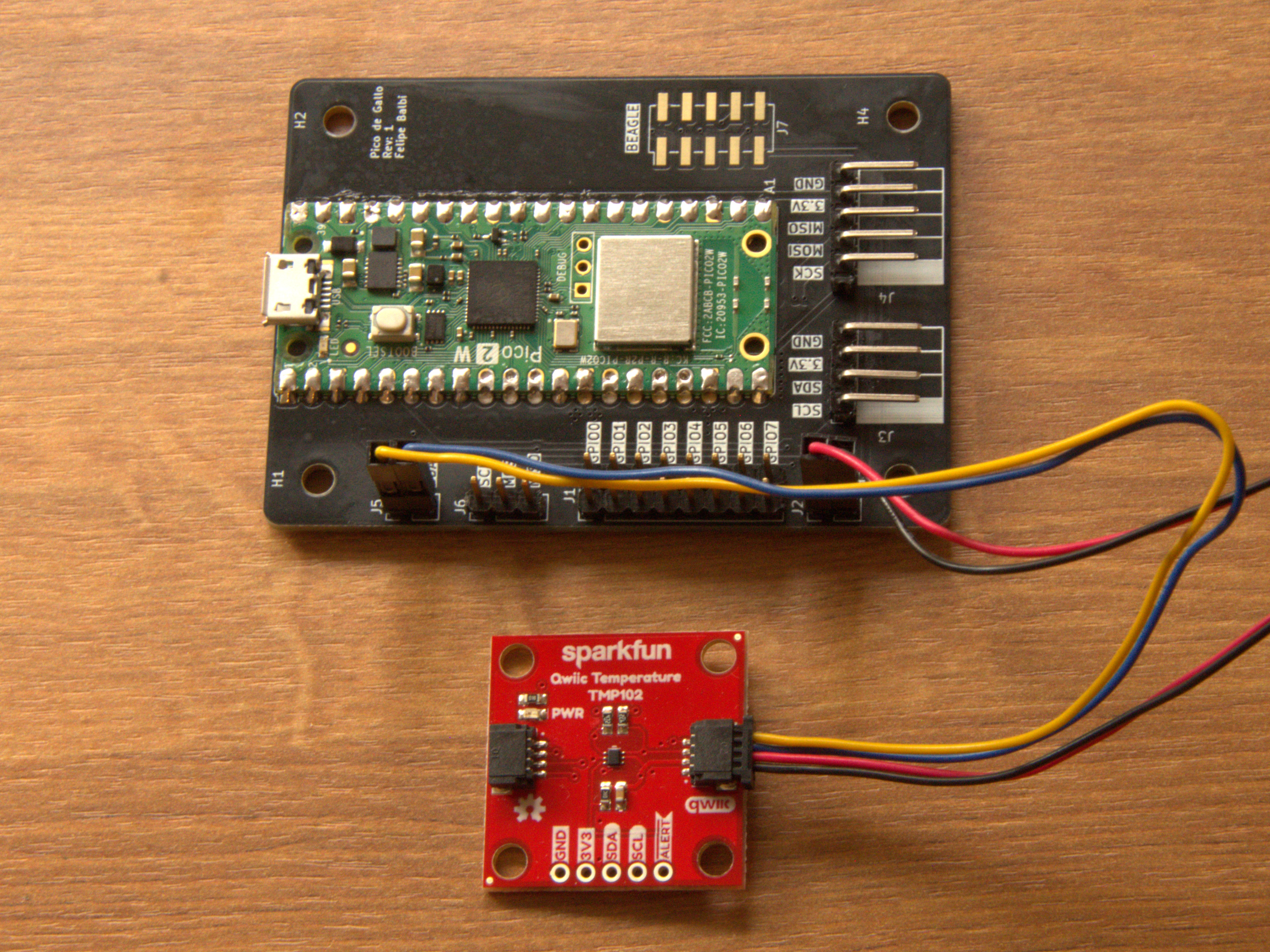
Now scan the I2C bus:
$ gallo i2c scan
╭────┬────┬────┬────┬────┬────┬────┬────┬────┬────┬────┬────┬────┬────┬────┬────┬────╮
│    │  0 │  1 │  2 │  3 │  4 │  5 │  6 │  7 │  8 │  9 │  a │  b │  c │  d │  e │  f │
├────┼────┼────┼────┼────┼────┼────┼────┼────┼────┼────┼────┼────┼────┼────┼────┼────┤
│ 0  │ RR │ RR │ RR │ RR │ RR │ RR │ RR │ RR │ -- │ -- │ -- │ -- │ -- │ -- │ -- │ -- │
│ 1  │ -- │ -- │ -- │ -- │ -- │ -- │ -- │ -- │ -- │ -- │ -- │ -- │ -- │ -- │ -- │ -- │
│ 2  │ -- │ -- │ -- │ -- │ -- │ -- │ -- │ -- │ -- │ -- │ -- │ -- │ -- │ -- │ -- │ -- │
│ 3  │ -- │ -- │ -- │ -- │ -- │ -- │ -- │ -- │ -- │ -- │ -- │ -- │ -- │ -- │ -- │ -- │
│ 4  │ -- │ -- │ -- │ -- │ -- │ -- │ -- │ -- │ 48 │ -- │ -- │ -- │ -- │ -- │ -- │ -- │
│ 5  │ -- │ -- │ -- │ -- │ -- │ -- │ -- │ -- │ -- │ -- │ -- │ -- │ -- │ -- │ -- │ -- │
│ 6  │ -- │ -- │ -- │ -- │ -- │ -- │ -- │ -- │ -- │ -- │ -- │ -- │ -- │ -- │ -- │ -- │
│ 7  │ -- │ -- │ -- │ -- │ -- │ -- │ -- │ -- │ RR │ RR │ RR │ RR │ RR │ RR │ RR │ RR │
╰────┴────┴────┴────┴────┴────┴────┴────┴────┴────┴────┴────┴────┴────┴────┴────┴────╯
The interesting part is address 0x48. TMP102 supports four possible
7-bit addresses depending on how pin A0 is strapped; datasheet table
6-4 gives us:
| A0 | Address |
|---|---|
| Ground | 0x48 |
| V+ | 0x49 |
| SDA | 0x4a |
| SCL | 0x4b |
So our breakout board almost certainly ties A0 to ground. SparkFun’s
schematic confirms exactly that.
That tiny exercise already tells us something useful for the driver API:
we should not accept an arbitrary u8 address if the device only has
four legal values. We will come back to that later.
Reading the register map
TMP102 only exposes four registers. Datasheet figure 6-2 and table 6-7 show the pointer-register layout:
| P1 | P0 | Register |
|---|---|---|
| 0 | 0 | Temperature register (read-only) |
| 0 | 1 | Configuration register (read-write) |
| 1 | 0 | TLOW register (read-write) |
| 1 | 1 | THIGH register (read-write) |
That’s a nice register map for a first driver: four addresses, two-byte registers, and a configuration register with a handful of bitfields.
Triggering a one-shot conversion
Datasheet section 6.5.3.6 says setting the one-shot bit (OS) in the
configuration register starts a conversion while the device is in
shutdown mode.
For a first pass we can avoid a full read-modify-write dance and use the power-on reset value from tables 6-10 and 6-11. The reset contents are:
| B7 | B6 | B5 | B4 | B3 | B2 | B1 | B0 | |
|---|---|---|---|---|---|---|---|---|
| Byte 1 | 0 | 1 | 1 | 0 | 0 | 0 | 0 | 0 |
| Byte 2 | 1 | 0 | 1 | 0 | 0 | 0 | 0 | 0 |
Setting bit 7 of byte 1 turns 0x60 0xa0 into 0xe0 0xa0, so we can
write the configuration register like this:
$ gallo i2c write --address 0x48 --bytes 0x01 0xe0 0xa0
The leading 0x01 is the pointer byte selecting the Configuration
register.
Note
In a real driver we will not hard-code reset values like this. We will model the register properly and let the generated API flip only the bits we care about.
Reading the temperature result
The temperature register lives at pointer 0x00, so a write-then-read
gets us the raw conversion result:
$ gallo i2c write-read --address 0x48 --bytes 0x00 --count 2
6b 15
TMP102 reports temperature with a resolution of $0.0625,^{\circ}\text{C}$ per least-significant bit. Using the sample above, the same conversion the draft chapter used is:
$$ \frac{5843 \cdot 0.0625}{16} \approx 21.4^{\circ}\text{C} $$
The exact bytes on your desk will differ, of course. The point is not this specific room temperature; the point is that the bus transaction, register selection, and conversion math all line up with the datasheet.
At this stage we know enough to start writing a proper driver:
- the legal device addresses
- the register map
- which register fields deserve names
- how raw samples become degrees Celsius
That is exactly the information we need for the next step: turning the register map into code.
Scaffolding the crate
This driver is an ordinary Rust library crate. It needs no board support package, cross toolchain, or custom linker setup.
The recommended starting point is
drive-rs, a
cargo-generate
template that scaffolds a no_std, embedded-hal driver crate on top
of the device-driver toolkit.
After three prompts, it generates a compiling crate with a register map,
a transport layer, a high-level API, hardware-free mock tests, and a
Pico de Gallo example. No TMP102-specific code is required yet.
To assemble the crate by hand, skip to starting from an empty crate at the end of this chapter.
Prerequisites
Install cargo-generate to run the template. The template’s
post-generation hook also uses the ddc compiler from
device-driver-cli to turn the register manifest into Rust:
$ cargo install cargo-generate
$ cargo install device-driver-cli
Running the template
$ cargo generate --git https://github.com/OpenDevicePartnership/drive-rs template --allow-commands
The template asks three questions:
- Enter the project name in kebab-case. It becomes the crate name, and its PascalCase form becomes the driver struct name.
- Select one or more interfaces from
gpio,i2c,spi, anduart. - Choose
sync,async, orboth. The answer is resolved at generation time, not behind a Cargo feature:syncemits only the blocking surface,asynconly the async one, andbothemits the two side by side.
TMP102 is a plain I2C part with no discrete control lines, so
select i2c as the only interface. Select both to support blocking and
async users:
🤷   Project Name: tmp102
🤷   Which bus/interface(s) does the device use? [i2c]
🤷   Generate blocking, async, or both APIs? both
Generated files
tmp102/
├── Cargo.toml            # embedded-hal + embedded-hal-async + device-driver runtime
├── README.md
├── device.ddsl           # device-driver manifest, the source of truth
├── src/
│   ├── lib.rs            # #![no_std] crate root
│   ├── error.rs          # generic Error<E> that preserves the underlying bus error
│   ├── registers.rs      # generated from device.ddsl by ddc (don't edit by hand)
│   ├── interface.rs      # I2cInterface: bridges embedded-hal to device-driver
│   └── driver.rs         # the high-level Tmp102 type and its constructors
├── tests/
│   └── integration.rs    # mock-based tests, no hardware required
└── examples/
    └── pico.rs           # runs against real hardware over a Pico de Gallo bridge
Because this configuration selects only i2c, the template does not
emit code for gpio, spi, or uart. It omits unused interfaces
instead of placing them behind feature flags.
The generated Cargo.toml contains the driver dependencies and the
host-side test harness:
[package]
name = "tmp102"
version = "0.1.0"
edition = "2024"
rust-version = "1.94"
license = "MIT OR Apache-2.0"

[dependencies]
embedded-hal = "1.0"
embedded-hal-async = "1.0"
device-driver = { version = "2.1.0", default-features = false }
defmt = { version = "1", optional = true }

[dev-dependencies]
pico-de-gallo-hal = { version = "0.7", default-features = false }
tokio = { version = "1", features = ["macros", "rt", "rt-multi-thread"] }

[features]
default = []
defmt = ["dep:defmt", "device-driver/defmt"]
embedded-hal provides the blocking driver surface, while
embedded-hal-async provides the async API. Both are ordinary,
non-optional dependencies: the both answer was already resolved when
the crate was generated, so there is no async feature to turn on or
off. Answering sync would have emitted neither embedded-hal-async
nor any async code at all. device-driver supplies the generated
register accessors. The optional defmt dependency supports logging on
the target.
The development dependencies serve the host-side code:
pico-de-gallo-hal lets tests and examples communicate with real
hardware, and tokio runs async examples and hardware-in-the-loop
tests.
device-driver uses default-features = false.
The register map is compiled ahead of time by ddc, so the crate only
needs the runtime. Users do not compile its procedural macro or manifest
parser.
Tip
Keep
pico-de-gallo-halin[dev-dependencies], not in normal[dependencies]. Your end users should depend on your driver crate, not on the host-side test harness you used while writing it.
Build checks
The generated crate compiles and passes its tests before it contains any TMP102-specific code:
$ cd tmp102
$ cargo test
$ cargo clippy -- -D warnings
It’s no_std, so it builds for a bare-metal target too:
$ rustup target add thumbv7em-none-eabihf
$ cargo build --target thumbv7em-none-eabihf
Next, replace the template’s placeholder register map with the one from the TMP102 datasheet, then build the driver API on top of it.
device.ddsl is the single source of truth for that map. It is written
in DDSL, device-driver’s own specification language, and it names the
generated device itself. There is no separate device-name flag:
device Tmp102Registers {
    default-byte-order: LE,
    register-address-type: u8,
    ...
}
After editing it to match the datasheet, regenerate src/registers.rs,
which is committed to the crate:
$ ddc build rust -s device.ddsl -o src/registers.rs --rust-defmt-feature=defmt
Optional: starting from an empty crate
The template is optional. To add each piece by hand, start with a fresh library:
$ cargo new --lib tmp102
    Creating library `tmp102` package
$ cd tmp102
Then add the dependencies we know we will need:
$ cargo add embedded-hal
$ cargo add embedded-hal-async
$ cargo add device-driver --no-default-features
$ cargo add --dev pico-de-gallo-hal
$ cargo add --dev tokio -F rt-multi-thread,time,macros
$ cargo install device-driver-cli
This produces the same dependency set as the generated crate, but leaves
src/lib.rs empty. It does not create error.rs, interface.rs,
driver.rs, mock tests, or examples/pico.rs. The following chapters
write those files from scratch, so this route involves more typing and
teaches more of the process.
Both routes produce a library-first, embedded-hal-based driver with an
async API and host-side hardware testing. The next chapter describes the
TMP102 registers in the format the generator accepts.
Describe the device for code generation
Hand-writing register boilerplate is dull, repetitive work. TMP102 is small, but it still benefits from code generation.
Open device.ddsl in the crate root and replace the template’s
placeholder device with the real TMP102 map. If you started from an
empty crate, create the file now.
DDSL is device-driver’s own specification language. One file describes the whole map, including the name of the device itself.
1. The device block
The device node names the generated low-level type and sets the
defaults that every object below it inherits.
device Tmp102Registers {
    register-address-type: u8,
    default-byte-order: LE,
    default-access: RW,

    // registers and fieldsets go here
}
register-address-typeis the type of a register address. TMP102’s pointer register is 8 bits, sou8.default-byte-ordersets the byte order for fieldsets that do not declare one.default-accesssets the access for objects that do not declare one.
The compiler works out word boundaries on its own, so Tlow becomes
tlow() and SD becomes sd().
2. Register declarations
TMP102 has four registers. Three of them, the reading and the two alert limits, share a single layout, so declare that layout once as a named fieldset and point all three registers at it.
    /// Left-justified temperature code, transmitted MSB first.
    ///
    /// 12 significant bits in normal mode, 13 in extended mode.
    fieldset TemperatureCode {
        size-bytes: 2,
        byte-order: BE,

        /// The raw 16-bit register value.
        field value 15:0 -> uint,
    },

    /// Temperature register.
    register Temperature {
        address: 0,
        access: RO,
        fields: TemperatureCode,
    },

    /// T-low register.
    register Tlow {
        address: 2,
        fields: TemperatureCode,
    },

    /// T-high register.
    register Thigh {
        address: 3,
        fields: TemperatureCode,
    },
byte-order: BE overrides the device default for these three registers
only, because TMP102 sends the temperature high byte first. access: RO
on Temperature leaves the generated operation without a write
method, so the datasheet’s read-only rule shows up as a compile error.
3. Configuration bitfields
The configuration register is a pile of enums packed into bit ranges.
Its layout is used once, so define the fieldset inline; fieldset _
gives the generated type the name of the register it sits in.
    /// Configuration register.
    register Configuration {
        address: 1,
        fields: fieldset _ {
            size-bytes: 2,

            /// Shutdown mode.
            field SD 0 -> _ as enum ShutdownMode {
                Running: 0,
                PowerOff: 1,
            },
            /// Thermostat mode of operation.
            field TM 1 -> _ as enum ThermostatMode {
                Comparator: 0,
                Interrupt: 1,
            },
            /// Alert pin polarity.
            field POL 2 -> _ as enum Polarity {
                ActiveLow: 0,
                ActiveHigh: 1,
            },
            /// Fault queue depth.
            field F 4:3 -> _ as enum FaultQueue {
                One: 0,
                Two: 1,
                Four: 2,
                Six: 3,
            },
            /// Converter resolution.
            field R 6:5 RO -> uint,
            /// One-shot conversion.
            field OS 7 -> bool,
            /// Extended mode.
            field EM 12 -> _ as enum ExtendedMode {
                Disable: 0,
                Enable: 1,
            },
            /// Alert.
            field AL 13 -> bool,
            /// Conversion rate.
            field CR 15:14 -> _ as enum ConversionRate {
                QuarterHz: 0,
                OneHz: 1,
                FourHz: 2,
                EightHz: 3,
            },
        },
    },
Bit ranges are written high-to-low and are inclusive, so 15:14 is the
two-bit conversion rate and a bare 0 is the single shutdown bit. The
_ before as lets each field take its base type from the enum it
converts to.
That means:
SDstops being a magic bit and becomes aShutdownModeCRstops being0b10and becomesConversionRate::FourHzRcarriesRO, so the fieldset getsr()but noset_r()- every enum covers all bit patterns of its field, so
sd()andcr()return the enum itself rather than aResult
Tip
Keep the manifest focused on register truth, not ergonomic policy. It describes what the hardware is; the public driver API decides what is pleasant and safe to call.
4. Generate src/registers.rs
With the manifest in place, generate the low-level register interface:
$ ddc build rust -s device.ddsl -o src/registers.rs --rust-defmt-feature=defmt
The device node supplies the name, so the generated low-level type is
Tmp102Registers.
The generated file is intentionally not the public API. We will treat it as an implementation detail:
registers.rsknows registers, fields, and access widths- our hand-written wrapper will know addresses, conversions, and human-facing methods
Let the generator write the repetitive code and keep the policy decisions in the part you maintain.
Next we connect that generated layer to a real I2C bus.
Implementing RegisterInterface and AsyncRegisterInterface
At this point we have generated code, but it still has no idea how to reach real hardware. That is our job.
Tmp102Registers wants a tiny transport object that knows how to read
and write a register by address. For TMP102 that transport is just
I2C plus the selected device address.
Encode the legal addresses
TMP102 does not live at an arbitrary address. Datasheet table 6-4 gives us four legal values, so we should model exactly those four values.
/// Logic level wired onto the TMP102 A0 pin.
#[derive(Clone, Copy, Debug, Default, Eq, PartialEq)]
pub enum A0 {
    /// A0 tied to ground (`0x48`).
    #[default]
    Gnd,
    /// A0 tied to V+ (`0x49`).
    Vplus,
    /// A0 tied to SDA (`0x4a`).
    Sda,
    /// A0 tied to SCL (`0x4b`).
    Scl,
}

impl From<A0> for u8 {
    fn from(a0: A0) -> Self {
        match a0 {
            A0::Gnd => 0x48,
            A0::Vplus => 0x49,
            A0::Sda => 0x4a,
            A0::Scl => 0x4b,
        }
    }
}
That alone eliminates a whole class of mistakes. The caller can no
longer accidentally pass 0x52 and then wonder why the driver never
sees an ACK.
Wrap the bus
Now create the transport type that the generated layer will sit on top of:
use embedded_hal::i2c::I2c;
use embedded_hal_async::i2c::I2c as AsyncI2c;

struct Interface<I2C> {
    i2c: I2C,
    addr: u8,
}

impl<I2C> Interface<I2C> {
    fn new(i2c: I2C, a0: A0) -> Self {
        Self {
            i2c,
            addr: a0.into(),
        }
    }
}
RegisterInterfaceBase declares the two associated types that the
blocking and async traits are both built on:
use device_driver::RegisterInterfaceBase;
use embedded_hal::i2c::ErrorKind;

impl<I2C> RegisterInterfaceBase for Interface<I2C> {
    type Error = ErrorKind;
    type AddressType = u8;
}
AddressType has to match the register-address-type we set in the
manifest. ErrorKind comes from embedded-hal, and
embedded-hal-async re-exports that same type, so one impl covers both
sides and needs no bound on I2C.
The job of Interface is deliberately boring: take register operations
from generated code and translate them into real I2C
transactions.
Blocking register access
For blocking embedded-hal, that translation looks like this:
use device_driver::{FieldsetMetadata, RegisterInterface};
use embedded_hal::i2c::{Error, I2c};

impl<I2C: I2c> RegisterInterface for Interface<I2C> {
    fn write_register(
        &mut self,
        address: Self::AddressType,
        data: &mut [u8],
        _metadata: &FieldsetMetadata,
    ) -> Result<(), Self::Error> {
        let mut buf = [0u8; 3];
        buf[0] = address;
        buf[1..].copy_from_slice(data);

        self.i2c.write(self.addr, &buf).map_err(|e| e.kind())
    }

    fn read_register(
        &mut self,
        address: Self::AddressType,
        data: &mut [u8],
        _metadata: &FieldsetMetadata,
    ) -> Result<(), Self::Error> {
        self.i2c
            .write_read(self.addr, &[address], data)
            .map_err(|e| e.kind())
    }
}
TMP102 keeps this pleasantly simple: one pointer byte, then two bytes of payload.
Both methods take data as &mut [u8]. The write side gets a mutable
buffer so that an interface can rearrange bytes in place before sending,
which we do not need here. _metadata carries the fieldset’s byte
order, which we can also ignore because the framing is the same for
every TMP102 register.
Note
The fixed
[u8; 3]buffer is TMP102-specific. For a bigger device with wider registers, size the stack buffer to your largest write or switch to a small growable buffer type.
Async register access
The async version is the same idea with .await in the obvious places.
Because the template resolved both at generation time, this impl sits
next to the blocking one with no cfg between them:
use device_driver::AsyncRegisterInterface;

impl<I2C: AsyncI2c> AsyncRegisterInterface for Interface<I2C> {
    async fn write_register(
        &mut self,
        address: Self::AddressType,
        data: &mut [u8],
        _metadata: &FieldsetMetadata,
    ) -> Result<(), Self::Error> {
        let mut buf = [0u8; 3];
        buf[0] = address;
        buf[1..].copy_from_slice(data);

        self.i2c.write(self.addr, &buf).await.map_err(|e| e.kind())
    }

    async fn read_register(
        &mut self,
        address: Self::AddressType,
        data: &mut [u8],
        _metadata: &FieldsetMetadata,
    ) -> Result<(), Self::Error> {
        self.i2c
            .write_read(self.addr, &[address], data)
            .await
            .map_err(|e| e.kind())
    }
}
So far, so good. The generated code can finally talk to the sensor.
Put the generated layer behind a real driver type
Build this as it stands and the compiler will report that fields and
methods on Tmp102Registers are never used. It is right: we generated a
low-level API and nothing calls it yet.
A minimal wrapper clears those warnings and gives the chapter a place to keep growing:
mod registers;

use registers::{ShutdownMode, Tmp102Registers};

pub struct Tmp102<I2C> {
    inner: Tmp102Registers<Interface<I2C>>,
    extended_mode: bool,
}

impl<I2C> Tmp102<I2C> {
    pub fn new(i2c: I2C, a0: A0) -> Self {
        Self {
            inner: Tmp102Registers::new(Interface::new(i2c, a0)),
            extended_mode: false,
        }
    }
}

impl<I2C: I2c> Tmp102<I2C> {
    pub fn raw_temperature_register(&mut self) -> Result<[u8; 2], ErrorKind> {
        Ok(self.inner.temperature().read()?.into())
    }

    pub fn configure_shutdown_bit(&mut self, shutdown: bool) -> Result<(), ErrorKind> {
        self.inner.configuration().modify(|reg| {
            reg.set_sd(if shutdown {
                ShutdownMode::PowerOff
            } else {
                ShutdownMode::Running
            })
        })
    }

    pub fn set_low_limit_raw(&mut self, raw: [u8; 2]) -> Result<(), ErrorKind> {
        self.inner.tlow().write(|reg| *reg = raw.into())
    }

    pub fn set_high_limit_raw(&mut self, raw: [u8; 2]) -> Result<(), ErrorKind> {
        self.inner.thigh().write(|reg| *reg = raw.into())
    }
}

impl<I2C: AsyncI2c> Tmp102<I2C> {
    pub async fn raw_temperature_register_async(&mut self) -> Result<[u8; 2], ErrorKind> {
        Ok(self.inner.temperature().read_async().await?.into())
    }
}
Now inner.temperature(), inner.configuration(), inner.tlow(), and
inner.thigh() are all exercised through Tmp102, so those dead-code
warnings disappear for the right reason: the generated layer is no
longer orphaned.
This wrapper is still too raw for real use, but that is fine. The next step is where the driver starts feeling like a crate you would actually publish.
Make invalid states unrepresentable
The generated API is accurate, but it is not the API we want to hand to users. Driver users do not want to think in pointer bytes and raw 16-bit register images; they want to ask for a temperature, configure alert limits, and move the device between running and shutdown modes.
This is the point where we decide what the public crate feels like.
Start with a temperature type
A plain f32 works, but it tells the caller nothing about units. A tiny
newtype fixes that immediately:
#[derive(Clone, Copy, Debug, PartialEq, PartialOrd)]
pub struct Celsius(pub f32);
Now a return value of Celsius(21.5) is obviously a temperature and not
an arbitrary calibration constant.
Collect configuration into a builder
Instead of making users pass four unrelated arguments into
configure(...), give them a small builder with good defaults. The four
fields are enums ddc generated from the manifest.
use registers::{ConversionRate, ExtendedMode, Polarity, ThermostatMode};

#[derive(Clone, Copy, Debug)]
pub struct Config {
    thermostat_mode: ThermostatMode,
    polarity: Polarity,
    extended_mode: ExtendedMode,
    conversion_rate: ConversionRate,
}

impl Default for Config {
    fn default() -> Self {
        Self {
            thermostat_mode: ThermostatMode::Comparator,
            polarity: Polarity::ActiveLow,
            extended_mode: ExtendedMode::Disable,
            conversion_rate: ConversionRate::FourHz,
        }
    }
}

impl Config {
    pub fn new() -> Self {
        Self::default()
    }

    pub fn thermostat_mode(mut self, mode: ThermostatMode) -> Self {
        self.thermostat_mode = mode;
        self
    }

    pub fn polarity(mut self, polarity: Polarity) -> Self {
        self.polarity = polarity;
        self
    }

    pub fn extended_mode(mut self, mode: ExtendedMode) -> Self {
        self.extended_mode = mode;
        self
    }

    pub fn conversion_rate(mut self, rate: ConversionRate) -> Self {
        self.conversion_rate = rate;
        self
    }
}
That lets the call site read cleanly:
let config = Config::new()
    .extended_mode(ExtendedMode::Enable)
    .conversion_rate(ConversionRate::EightHz);
Use typestate for run vs shutdown
TMP102 has two materially different operating states:
- running, where the sensor converts continuously
- shutdown, where it sleeps until explicitly kicked
A single Tmp102 type with a runtime boolean would work, but typestate
lets us express the distinction in the type system.
use core::marker::PhantomData;

use registers::Tmp102Registers;

pub struct Running;
pub struct Shutdown;

pub struct Tmp102<I2C, State = Running> {
    inner: Tmp102Registers<Interface<I2C>>,
    extended_mode: bool,
    _state: PhantomData<State>,
}
The extra state parameter means we can say “this method only exists when the sensor is running” and let the compiler enforce it.
A small helper keeps state transitions tidy:
impl<I2C, State> Tmp102<I2C, State> {
    fn change_state<Next>(self) -> Tmp102<I2C, Next> {
        Tmp102 {
            inner: self.inner,
            extended_mode: self.extended_mode,
            _state: PhantomData,
        }
    }
}
Constructors and shared helpers
We will make continuous-conversion mode the default constructor:
impl<I2C> Tmp102<I2C, Running> {
    pub fn new(i2c: I2C, a0: A0) -> Self {
        Self::continuous(i2c, a0)
    }

    pub fn continuous(i2c: I2C, a0: A0) -> Self {
        Self {
            inner: Tmp102Registers::new(Interface::new(i2c, a0)),
            extended_mode: false,
            _state: PhantomData,
        }
    }

    fn decode_temperature(raw: [u8; 2], extended_mode: bool) -> Celsius {
        let mut value = i16::from_be_bytes(raw);

        value /= if extended_mode { 8 } else { 16 };
        Celsius(value as f32 * 0.0625)
    }

    fn encode_limit(limit: Celsius) -> [u8; 2] {
        ((limit.0 / 0.0625) as i16 * 16).to_be_bytes()
    }
}
Those helpers keep all the datasheet math in one place instead of smearing it across every high-level method.
The high-level async API
Here is the shape we are after for the async path:
use registers::ShutdownMode;

impl<I2C: AsyncI2c> Tmp102<I2C, Running> {
    pub async fn configure(&mut self, config: Config) -> Result<(), ErrorKind> {
        self.extended_mode = config.extended_mode == ExtendedMode::Enable;

        self.inner
            .configuration()
            .modify_async(|reg| {
                reg.set_tm(config.thermostat_mode);
                reg.set_pol(config.polarity);
                reg.set_em(config.extended_mode);
                reg.set_cr(config.conversion_rate);
            })
            .await
    }

    pub async fn set_low_limit(&mut self, limit: Celsius) -> Result<(), ErrorKind> {
        let raw = Self::encode_limit(limit);
        self.inner.tlow().write_async(|reg| *reg = raw.into()).await
    }

    pub async fn set_high_limit(&mut self, limit: Celsius) -> Result<(), ErrorKind> {
        let raw = Self::encode_limit(limit);
        self.inner.thigh().write_async(|reg| *reg = raw.into()).await
    }

    pub async fn temperature(&mut self) -> Result<Celsius, ErrorKind> {
        let raw: [u8; 2] = self.inner.temperature().read_async().await?.into();
        Ok(Self::decode_temperature(raw, self.extended_mode))
    }

    pub async fn shutdown(mut self) -> Result<Tmp102<I2C, Shutdown>, ErrorKind> {
        self.inner
            .configuration()
            .modify_async(|reg| reg.set_sd(ShutdownMode::PowerOff))
            .await?;

        Ok(self.change_state())
    }
}

impl<I2C: AsyncI2c> Tmp102<I2C, Shutdown> {
    pub async fn run(mut self) -> Result<Tmp102<I2C, Running>, ErrorKind> {
        self.inner
            .configuration()
            .modify_async(|reg| reg.set_sd(ShutdownMode::Running))
            .await?;

        Ok(self.change_state())
    }

    pub async fn configure(&mut self, config: Config) -> Result<(), ErrorKind> {
        self.extended_mode = config.extended_mode == ExtendedMode::Enable;

        self.inner
            .configuration()
            .modify_async(|reg| {
                reg.set_tm(config.thermostat_mode);
                reg.set_pol(config.polarity);
                reg.set_em(config.extended_mode);
                reg.set_cr(config.conversion_rate);
            })
            .await
    }
}
The important part is not the exact spelling; it is the contract:
- temperatures come back as
Celsius - alert thresholds are set in
Celsius configure()accepts one coherent settings objectshutdown()consumesTmp102<_, Running>run()gives you backTmp102<_, Running>
That makes illegal flows hard to write. You cannot accidentally call the “running-only” API on a shutdown sensor because the type no longer matches.
Final public shape
This is the surface we want readers to remember:
pub enum A0 { Gnd, Vplus, Sda, Scl }
pub struct Celsius(pub f32);
pub struct Config { /* builder-style setters */ }
pub struct Running;
pub struct Shutdown;
pub struct Tmp102<I2C, State = Running> { /* private fields */ }

impl<I2C> Tmp102<I2C, Running> {
    pub fn new(i2c: I2C, a0: A0) -> Self;
    pub fn continuous(i2c: I2C, a0: A0) -> Self;
}

impl<I2C: AsyncI2c> Tmp102<I2C, Running> {
    pub async fn configure(&mut self, config: Config) -> Result<(), ErrorKind>;
    pub async fn set_high_limit(&mut self, limit: Celsius) -> Result<(), ErrorKind>;
    pub async fn set_low_limit(&mut self, limit: Celsius) -> Result<(), ErrorKind>;
    pub async fn temperature(&mut self) -> Result<Celsius, ErrorKind>;
    pub async fn shutdown(self) -> Result<Tmp102<I2C, Shutdown>, ErrorKind>;
}

impl<I2C: AsyncI2c> Tmp102<I2C, Shutdown> {
    pub async fn run(self) -> Result<Tmp102<I2C, Running>, ErrorKind>;
}
Tip
The alternative is a single
Tmp102<I2C>with a runtimeboolthat tracks shutdown state. That keeps the type simpler, but it also pushes more mistakes to runtime. For a tiny driver like TMP102, the extra typestate surface is worth it.
Next we put that API to work against real hardware.
Testing with pico-de-gallo-hal
This is the whole payoff.
Because the driver is written against embedded-hal, and because
pico-de-gallo-hal implements those traits on top of a USB-connected
Pico de Gallo board, we can run the driver on a host machine against a
real TMP102.
No mocks. No firmware flashing loop. No sacrificial example binary that only exists so you can manually test one register read.
A hardware-in-the-loop test
Our public API is async, so the test is too:
#![allow(unused)]
fn main() {
#[cfg(feature = "hil")]
#[tokio::test]
async fn tmp102_reports_a_plausible_temperature() {
    use pico_de_gallo_hal::Hal;
    use tmp102::{Celsius, Tmp102, A0};

    let hal = Hal::new();
    let i2c = hal.i2c();
    let mut sensor = Tmp102::new(i2c, A0::Gnd);

    let Celsius(temp) = sensor.temperature().await.unwrap();

    assert!((-40.0..=125.0).contains(&temp));
}
}
That range is intentionally broad: it matches the device’s operating range and keeps the test robust across different lab environments.
The blocking siblings we add in the next chapter work the same way with
a plain #[test] and no .await.
Why this is special
Most embedded-driver test setups force you into one of two extremes:
- pure mocks, which are fast but can only prove your expectations about bus traffic
- target-hardware tests, which are realistic but slow and usually drag in flashing, runners, probes, and target-specific setup
Pico de Gallo sits in a very productive middle ground:
- the sensor is real
- the electrical path is real
- the I2C transactions are real
- the test still runs from your normal host-side Rust test harness
That means you can put a USB-connected board on a CI runner and execute
real hardware-in-the-loop tests with cargo test.
Gate HIL tests behind a feature
Not every CI environment has hardware attached, so gate the test behind an opt-in feature:
#[cfg(feature = "hil")]
#[tokio::test]
async fn tmp102_reports_a_plausible_temperature() {
    // ...
}
And in Cargo.toml:
[features]
default = []
defmt = ["dep:defmt", "device-driver/defmt"]
hil = []
Now normal CI can run cargo test, while the hardware-backed runner can
run:
$ cargo test --features hil
Tip
Keep
pico-de-gallo-halin[dev-dependencies]. End users of your published crate do not need the host transport layer just because you used it for tests.
Mocks still have a place
pico-de-gallo-hal is not a replacement for embedded-hal-mock.
Instead, the two complement each other nicely:
- use
embedded-hal-mockfor pure logic tests, edge cases, and exact bus-sequence assertions - use Pico de Gallo for integration tests against a real sensor
That combination is hard to beat:
- mocks keep your fast inner loop fast
- HIL tests catch the mistakes that only show up with actual hardware
For driver authors, that is exactly why pico-de-gallo-hal exists.
Blocking vs async parity
One of the nicest things about building on embedded-hal is that you do
not have to choose one execution model forever.
pico-de-gallo-hal::I2c implements both the blocking
embedded_hal::i2c::I2c trait and the async
embedded_hal_async::i2c::I2c trait. So the exact same TMP102 driver
can be used from synchronous code and from async code.
Share the hard parts
The register definitions, address handling, temperature conversions, and configuration builder do not care whether the bus is blocking or async. Keep those pieces shared:
impl<I2C> Tmp102<I2C, Running> {
    fn decode_temperature(raw: [u8; 2], extended_mode: bool) -> Celsius {
        let mut value = i16::from_be_bytes(raw);
        value /= if extended_mode { 8 } else { 16 };
        Celsius(value as f32 * 0.0625)
    }

    fn encode_limit(limit: Celsius) -> [u8; 2] {
        ((limit.0 / 0.0625) as i16 * 16).to_be_bytes()
    }
}
Then make the blocking and async fronts as thin as possible.
A simple parity pattern
Because some I2C types implement both traits, duplicating the same inherent method names can get awkward. The least surprising pattern for a small driver is:
- keep the ergonomic async API as the primary surface
- add thin blocking siblings with
_blockingsuffixes - keep all encoding and decoding logic in shared helpers
impl<I2C: embedded_hal::i2c::I2c> Tmp102<I2C, Running> {
    pub fn temperature_blocking(&mut self) -> Result<Celsius, ErrorKind> {
        let raw: [u8; 2] = self.inner.temperature().read()?.into();
        Ok(Self::decode_temperature(raw, self.extended_mode))
    }

    pub fn configure_blocking(&mut self, config: Config) -> Result<(), ErrorKind> {
        self.extended_mode = config.extended_mode == ExtendedMode::Enable;

        self.inner.configuration().modify(|reg| {
            reg.set_tm(config.thermostat_mode);
            reg.set_pol(config.polarity);
            reg.set_em(config.extended_mode);
            reg.set_cr(config.conversion_rate);
        })
    }
}

impl<I2C: embedded_hal_async::i2c::I2c> Tmp102<I2C, Running> {
    pub async fn temperature(&mut self) -> Result<Celsius, ErrorKind> {
        let raw: [u8; 2] = self.inner.temperature().read_async().await?.into();
        Ok(Self::decode_temperature(raw, self.extended_mode))
    }

    pub async fn configure(&mut self, config: Config) -> Result<(), ErrorKind> {
        self.extended_mode = config.extended_mode == ExtendedMode::Enable;

        self.inner
            .configuration()
            .modify_async(|reg| {
                reg.set_tm(config.thermostat_mode);
                reg.set_pol(config.polarity);
                reg.set_em(config.extended_mode);
                reg.set_cr(config.conversion_rate);
            })
            .await
    }
}
If you want identical method names on both sides, a macro-based approach
such as maybe-async-cfg is a good next step. For a first driver,
though, the explicit version is easier to read and maintain.
Same driver, blocking usage
use pico_de_gallo_hal::Hal;
use tmp102::{Celsius, Tmp102, A0};

fn main() -> Result<(), embedded_hal::i2c::ErrorKind> {
    let hal = Hal::new();
    let i2c = hal.i2c();
    let mut sensor = Tmp102::continuous(i2c, A0::Gnd);

    let Celsius(temp) = sensor.temperature_blocking()?;
    println!("{temp:.2} °C");
    Ok(())
}
Same driver, async usage
Same crate, same build, no extra feature flag — just an executor:
use pico_de_gallo_hal::Hal;
use tmp102::{Celsius, Tmp102, A0};

#[tokio::main]
async fn main() -> Result<(), embedded_hal::i2c::ErrorKind> {
    let hal = Hal::new();
    let i2c = hal.i2c();
    let mut sensor = Tmp102::continuous(i2c, A0::Gnd);

    let Celsius(temp) = sensor.temperature().await?;
    println!("{temp:.2} °C");
    Ok(())
}
That is the payoff: same driver type, same register model, same public concepts, two execution models.
When async is worth it
For one occasional temperature read, blocking code is often perfectly fine.
Async starts paying for itself when your program wants to interleave sensor access with other work, for example:
- polling several devices on one executor
- serving a network API while reading sensors
- overlapping I/O-bound work with unrelated futures
- driving a GUI or TUI without stalling the event loop
The nice part is that you do not have to guess up front. A well-shaped TMP102 driver can serve both audiences.
Publishing the driver
Once the driver feels good locally, spend ten extra minutes making it a crate other people will trust.
Cargo metadata
Start with the basics in Cargo.toml:
[package]
name = "tmp102"
version = "0.1.0"
edition = "2024"
description = "embedded-hal driver for the TMP102 I2C temperature sensor"
license = "MIT OR Apache-2.0"
repository = "https://github.com/OpenDevicePartnership/pico-de-gallo"
categories = ["embedded", "hardware-support", "no-std"]
keywords = ["tmp102", "temperature", "sensor", "i2c", "embedded-hal"]
If the crate is no_std, say so clearly in the README and crate docs.
The generated crate resolves blocking versus async when it is scaffolded
rather than behind a Cargo feature, so state which of the two surfaces it
exposes right next to the first example.
docs.rs
If your docs need specific features enabled, tell docs.rs explicitly.
Here the only optional features are defmt and hil, so turning
everything on is the simplest correct answer:
[package.metadata.docs.rs]
all-features = true
rustdoc-args = ["--cfg", "docsrs"]
That avoids the common “works locally, missing items on docs.rs” trap.
README essentials
At minimum, include:
- what the device is
- which traits the crate implements or expects
- a blocking example
- an async example if you support one
- feature flags (
defmt, and thehilgate from the previous chapter) - wiring or address-selection notes for
A0
For this driver, also mention that pico-de-gallo-hal is only used for
examples and tests; it should stay in [dev-dependencies] so downstream
users do not pay for it.
defmt support
The template already wired this up, and it spans two places that have to
agree. Cargo.toml keeps the dependency optional and forwards the
feature to the runtime:
[dependencies]
defmt = { version = "1", optional = true }

[features]
defmt = ["dep:defmt", "device-driver/defmt"]
The other half is the --rust-defmt-feature=defmt we passed to ddc.
That is what puts #[cfg(feature = "defmt")] and
#[cfg_attr(feature = "defmt", derive(defmt::Format))] in
registers.rs. Rename the Cargo feature without regenerating and the
generated code silently stops matching it.
Release hygiene
Three last bits of boring professionalism matter a lot:
- keep a
CHANGELOG.md - follow semver when you change the public API
- commit
src/registers.rsand let it into the package
Small drivers live a long time. A clean README, useful crate metadata, and predictable releases do more for adoption than one more clever type.
Architecture
At a high level, Pico de Gallo is a typed RPC bridge between a host computer and an RP2350 microcontroller. The host talks USB; the firmware talks peripherals. The wire contract in the middle is shared Rust code.
host app / script / test
        |
        +--> pico-de-gallo-lib  (async Rust client)
        +--> gallo             (CLI)
        +--> pico-de-gallo-ffi (C ABI)
        +--> pyco-de-gallo     (Python bindings)
                     |
                     v
                   nusb
                     |
                 USB cable
                     |
                     v
        pico-de-gallo-firmware (Embassy on RP2350)
                     |
      +--------------+--------------+--------------+
      |              |              |              |
     I2C            SPI            UART        GPIO/PWM/ADC/1-Wire
      |              |              |              |
      +--------------------- external hardware --------------------+
Three design choices make that stack work.
Why postcard-rpc?
Pico de Gallo uses postcard-rpc because it keeps both sides honest:
- the request and response types live in one shared crate,
- endpoints are schema-typed instead of stringly typed APIs,
- the protocol is transport-agnostic even though Pico de Gallo currently uses USB.
That shared crate is pico-de-gallo-internal. Both the firmware and every host
surface depend on it, so the same Rust types define the wire format everywhere.
Tip
This is why new protocol features tend to start in
pico-de-gallo-internal: once the type exists there, the rest of the stack can wire it through.
Why Embassy?
The firmware is built on Embassy, which gives Pico de Gallo an async executor on bare metal. That matters because USB traffic, interrupt-driven peripherals, DMA-backed transfers, and GPIO event monitoring all need to coexist without a giant polling loop.
Embassy also maps well to the hardware roles here:
- async I2C and SPI transfers,
- interrupt-driven UART,
- low-jitter timing primitives,
- background tasks for server dispatch and GPIO event publishing.
Why a host-side embedded-hal shim?
pico-de-gallo-hal adapts the RPC client into familiar embedded-hal and
embedded-io traits. The goal is simple: write a driver once, then exercise it
from your laptop before you ever flash target firmware.
That is the main idea behind Pico de Gallo as a project: move driver iteration from a flash-debug cycle to a normal host test loop.
The trust boundary
The host trusts the firmware to validate requests before touching hardware.
That is an intentional boundary, and the firmware enforces it: handlers reject
out-of-range pins, oversized buffers, unsupported peripherals on hw-rev1, and
invalid configuration values before they access the RP2350 peripherals.
Important
Validation lives at the firmware edge because the firmware is the part that knows the real hardware limits. Host code should still be well-behaved, but the last line of defense is on-device.
For contributor-only detail, see
AGENTS.md
and CONTRIBUTING.md.
Wire Protocol & Schema Versioning
The wire protocol is the most important compatibility contract in Pico de
Gallo. All protocol types live in pico-de-gallo-internal, and both the host
and the firmware compile against that crate.
postcard encoding rules
Pico de Gallo uses postcard for compact binary encoding. That brings one rule that every contributor must understand.
Important
postcard encodes enum variants by variant index, not by the numeric value in
#[repr(...)]. Reordering variants in a wire-visible enum is a silent ABI break.
So this is safe:
- append a new enum variant at the end.
And this is breaking:
- reorder variants,
- remove a variant,
- rename a variant that old peers still expect.
The warning comments in pico-de-gallo-internal are there for a reason; keep
them.
The shared protocol crate
pico-de-gallo-internal defines:
- endpoint marker types,
- request and response structs,
- topic message types,
- directional payload constants
MAX_TRANSFER_SIZEandMAX_RESPONSE_PAYLOAD, - schema-version constants generated at build time.
The crate also uses the use-std feature to switch certain response types
between owned host buffers and borrowed firmware buffers:
- host build:
Vec<u8> - firmware build:
&[u8]
That lets the host own received data while the firmware can answer from a shared scratch buffer without heap allocation.
The two payload constants are independent and selected by byte direction:
| Direction | Constant | Value |
|---|---|---|
| host → device | MAX_TRANSFER_SIZE | 4096 |
| device → host | MAX_RESPONSE_PAYLOAD | 1014 |
MAX_RESPONSE_PAYLOAD is derived from postcard-rpc’s 1024-byte host inbound
USB buffer: 1024 − 7 bytes of response header (1 discriminant, 2 key, 4
sequence) − 1 postcard Result discriminant − 2 bytes of varint length prefix
= 1014. It is a host-transport property that firmware cannot observe.
Full-duplex spi/transfer proves why both constants are needed: its one length
travels in both directions, so the tighter response ceiling applies.
A third constant, MAX_REQUEST_FRAME (5119), bounds the whole request frame
rather than any one argument. It only binds the batch endpoints; the section
below derives it.
Issues #158 and #186 added local validation and firmware bounds without changing an endpoint, request or response type. Neither is therefore a wire change, and neither required a schema change or version bump.
The request frame ceiling
MAX_TRANSFER_SIZE bounds a single argument. Independently of it, the whole
request frame — header plus postcard body — has to fit in the firmware’s
receive buffer, which is MAX_TRANSFER_SIZE + 1024 = 5120 bytes (BufStorage
in crates/pico-de-gallo-firmware/src/main.rs).
A frame that does not fit is discarded silently. postcard-rpc’s server maps
WireRxErrorKind::ReceivedMessageTooLarge to continue, so nothing is sent
back; the caller sees only its own timeout. That is the failure mode to expect
here, not BufferTooLong.
The largest frame the firmware accepts is one byte less than the buffer:
| Bytes | Term |
|---|---|
5120 | firmware receive buffer, MAX_TRANSFER_SIZE + 1024 |
-1 | a frame that exactly fills the buffer is refused |
= 5119 | largest accepted request frame |
That -1 is a mechanism, not a safety margin. postcard-rpc’s
EUsbWireRx::receive ends a frame when a short USB packet arrives, and
loops while !window.is_empty(). A frame whose length equals the buffer size
fills the window with full 64-byte packets, so the loop runs out of window
before it ever sees a short packet, falls into its “ran out of space” branch,
reads the transfer-terminating zero-length packet there, and reports
ReceivedMessageTooLarge. Frames that are a multiple of 64 but smaller than
the buffer are unaffected, because window remains and the zero-length packet
ends the frame in the normal path.
What is left for the payload depends on the header, which is not a constant:
| Bytes | Term |
|---|---|
5119 | largest accepted request frame |
-1 | header discriminant |
-8 or -2 | header key — see below |
-4 | header sequence number (VarSeq::Seq4, always; VarSeq::resize is defined in postcard-rpc 0.12.1 and called nowhere in it, so the VarSeqKind this repo passes never takes effect) |
-N | whatever the request struct encodes around the payload — for a bare &[u8] field that is a 2-byte postcard varint length prefix |
postcard-rpc narrows the key width over the life of a connection.
HostClient starts at VarKeyKind::Key8 and adopts the server’s narrower key
only after it has received a reply; this device’s server answers with
Key2. So a process’s first request carries a 13-byte header and every request
after the first reply carries 7, and the usable payload is six bytes smaller
until then. A request that is itself dropped does not narrow anything, because
no reply came back.
For an endpoint whose request is a single byte slice, that works out to:
| State | Header | Largest payload |
|---|---|---|
| before the first reply | 13 | 5104 |
| after the first reply | 7 | 5110 |
No supported single-argument call can reach this. Since #158 every host
surface caps a write argument at MAX_TRANSFER_SIZE, which puts the worst-case
frame a little over 4110 bytes — a kilobyte clear of the ceiling.
pico-de-gallo-internal asserts that ordering at compile time, so it cannot
quietly stop being true.
Batches were the exception, because nothing bounded their aggregate write
bytes: i2c/batch and spi/batch could build an over-ceiling frame and lose
it silently. Since #186 both are bounded host-side against MAX_REQUEST_FRAME
before transmission, using the wide header so the answer does not depend on
whether the client has received a reply yet. The firmware cannot help here — it
never sees the frame — which is what makes this the one ceiling with no
device-side counterpart. See
Transaction Batching.
Measured on board 49742081C885AC69 (hw-rev2, firmware
firmware-v0.11.0-79-gc3c6a3e07bec) under Linux/nusb, and previously on
5256657D8A5D7F03 under Windows/WinUSB with identical edges — issue #180. The
5119/5120 edge was re-measured on firmware-v0.11.0-88-gfcb38de3a1ff for
issue #186, with the new host guard stubbed out, and was unchanged.
Endpoints and topics
Endpoints are normal request/response RPCs declared with endpoints!. Topics
are push-style messages declared with topics!.
In practice:
- endpoints cover commands like
i2c/read,spi/transfer, anddevice/info, - topics cover asynchronous server-to-client events.
Today the main topic is GPIO event streaming:
| Kind | Example | Direction | Purpose |
|---|---|---|---|
| Endpoint | i2c/read | host → device → host | Request/response RPC |
| Endpoint | device/info | host → device → host | Compatibility probe |
| Topic | gpio/event | device → host | Push edge notifications |
A short slice of the endpoint catalog looks like this:
| Path | What it does |
|---|---|
ping | Echo test payload |
version | Report firmware version |
device/info | Report firmware/schema versions, hardware revision, capabilities, runtime GPIO count, and build identity |
i2c/read | Read from an I2C target |
spi/transfer | Full-duplex SPI transfer |
gpio/subscribe | Start GPIO event monitoring |
For the full list, see the Endpoint Catalog.
I²C batch framing contract
i2c/batch executes the complete operation list as one I2C
transaction:
- a START and address precede the first operation,
- adjacent operations of the same type run back to back without a STOP or repeated START; two adjacent writes therefore form one gather write,
- a direction change emits a repeated START and re-addresses the target,
- a STOP follows the last operation, and only the last operation.
The repeated START on a direction change is documented by the RP2350 vendor
SVD: the DesignWare IC_CON register resets to 0x00000065, with
IC_RESTART_EN (bit 5) set, and embassy-rp does not write that register.
Validation errors report the exact zero-based operation index in
I2cBatchError.failed_op. A bus failure applies to the atomic transaction as
a whole and cannot be attributed to one operation, so it reports
failed_op = 0.
UART framing contract
The UART framing enums are wire-visible and serialized by variant index. Their
deployed order in crates/pico-de-gallo-internal/src/lib.rs is:
| Type | Index | Variant | Meaning |
|---|---|---|---|
UartDataBits | 0 | Five | Five data bits |
UartDataBits | 1 | Six | Six data bits |
UartDataBits | 2 | Seven | Seven data bits |
UartDataBits | 3 | Eight | Eight data bits; power-on default |
UartParity | 0 | None | No parity bit; firmware default |
UartParity | 1 | Odd | Odd parity |
UartParity | 2 | Even | Even parity |
UartParity | 3 | Mark | Parity bit always 1 |
UartParity | 4 | Space | Parity bit always 0 |
UartStopBits | 0 | One | One stop bit; firmware default |
UartStopBits | 1 | Two | Two stop bits |
UartStopBits deliberately does not use Zephyr’s numbering. Zephyr assigns
UART_CFG_STOP_BITS_0_5 = 0, _1 = 1, _1_5 = 2, and _2 = 3. The RP2350
PL011 exposes only the STP2 bit, so 0.5 and 1.5 stop bits are unreachable.
The wire enum therefore uses the dense One = 0, Two = 1 encoding instead
of preserving two permanently unrepresentable holes. Consumers must map these
values explicitly; changing their order to match Zephyr would be a wire break.
The configuration endpoints carry the complete framing tuple:
| Path | Request type | Response type |
|---|---|---|
uart/set-config | UartSetConfigurationRequest | Result<(), UartError> |
uart/get-config | () | Result<UartConfigurationInfo, UartError> |
Both configuration structs contain the same fields, in the same order:
| Field | Type |
|---|---|
baud_rate | u32 |
data_bits | UartDataBits |
parity | UartParity |
stop_bits | UartStopBits |
uart/get-config reports the last successfully requested values from the
firmware’s software shadow, not a register read-back. In particular,
baud_rate is the requested rate rather than the divisor-rounded rate.
This wire-shape change did not move a package version. It rides the already
pending, unreleased schema 0.8 change:
crates/pico-de-gallo-internal/Cargo.toml currently declares version 0.8.0,
and that crate’s build.rs derives
SCHEMA_VERSION_MAJOR, SCHEMA_VERSION_MINOR, and SCHEMA_VERSION_PATCH as
0, 8, and 0. Firmware built from this tree therefore reports schema v0.8.0.
SPI chip-select contract
SpiError is serialized by variant index. The deployed indices are:
| Index | Variant | Meaning |
|---|---|---|
| 0 | BufferTooLong | Argument exceeds its directional payload ceiling |
| 1 | Other | Unspecified firmware-reported SPI failure |
| 2 | InvalidCsPin | Chip-select index outside 0..DeviceInfo::num_gpios |
| 3 | CsPinUnavailable | Chip-select pin is explicitly configured as an input |
| 4 | CsPinMonitored | Chip-select pin is monitored for GPIO events |
For spi/batch, the chip-select pin behaves as follows:
- the pin is driven as an output for the duration of the batch,
- on success it is left configured as an output, deasserted high; the prior direction is not restored,
- on an execution failure after CS was asserted, it is likewise left deasserted high,
- on a pre-validation failure or a refusal, the pin is left untouched,
- pins explicitly configured as inputs are refused — firmware predating this contract may instead reconfigure them.
DeviceInfo::num_gpios is the runtime-authoritative pin count. Valid GPIO and
SPI chip-select indices are 0..num_gpios; when it is zero, no index is
valid. It supersedes the compile-time NUM_GPIOS default and must never be
synthesized or defaulted when device/info decoding fails.
Build identity
DeviceInfo::build_id carries the firmware’s
git describe --always --dirty --tags --match firmware-v* output, captured
when the firmware was built, or "unknown" when git was unavailable. A
trailing -dirty means the image was built from a modified working tree.
It is informational only and never a compatibility gate. validate()
deliberately ignores it.
The two fields answer different questions, and conflating them would be a mistake in both directions:
| Question | Field |
|---|---|
| Can we talk? | schema_major / schema_minor |
| Are you the build I think you are? | build_id |
The schema version is derived from pico-de-gallo-internal’s package version,
so it moves when the wire types change. Firmware behaviour can change while
the types do not — i2c/batch moved from per-operation START/STOP to a single
transaction inside an unchanged schema 0.7 — and bumping the schema version for
such a change would falsely signal a wire-format break. build_id covers that
gap without disturbing the compatibility axis.
The field is a heapless::String<BUILD_ID_CAPACITY> (64 bytes), encoded by
postcard as a plain varint-length string, so an empty value costs one byte.
Decoding an over-long string fails rather than truncating; the firmware build
script truncates.
Schema versioning
The schema version constants are not handwritten. pico-de-gallo-internal
generates SCHEMA_VERSION_MAJOR, SCHEMA_VERSION_MINOR, and
SCHEMA_VERSION_PATCH in build.rs from the crate’s [package].version.
Caution
Do not edit
SCHEMA_VERSION_*constants directly. Bump thepico-de-gallo-internalcrate version and letbuild.rsregenerate them.
Before 1.0, the minor version is the breaking axis. After 1.0, that role moves to the major version.
That means a pre-1.0 bump is required when you:
- add or remove an endpoint or topic,
- change a request or response type,
- append a new wire enum variant.
Host/firmware compatibility checks
The host library exposes PicoDeGallo::validate(). It calls device/info,
reads the firmware’s schema version, and rejects mismatches early.
If validation fails, the host returns:
LegacyFirmwarewhen the firmware is too old to supportdevice/info, orSchemaMismatchwhen the host and firmware disagree on the schema version.
This turns an otherwise confusing runtime failure into an explicit compatibility error.
Validation compares reported version numbers. It is only as trustworthy as the discipline that keeps those numbers honest: a schema bump is what makes a shape change visible, which is why appending even a single wire enum variant requires one.
Warning
Call
validate()before doing real work. A mismatched pair is not guaranteed to fail fast on its own: postcard-rpc response keys include the response schema, so a peer that disagrees about a response type may wait indefinitely rather than return an error.
Lockstep releases for protocol changes
A wire change is never just one crate. Per the project rules, the same release cycle must update:
pico-de-gallo-internal,pico-de-gallo-firmware,pico-de-gallo-lib,pico-de-gallo-hal,pico-de-gallo-ffi,pico-de-gallo-app,pico-de-gallo-mcp,pyco-de-gallo.
Important
Nothing automated knows that the protocol crate and firmware are wire-coupled. Lockstep is enforced by contributors, not by tooling.
For contributor policy and the full compatibility rules, see
AGENTS.md.
The Firmware
The Pico de Gallo firmware lives in its own Cargo workspace at
crates/pico-de-gallo-firmware/. That separation is intentional: it targets
thumbv8m.main-none-eabihf, is no_std, and carries its own committed
Cargo.lock.
Runtime model
The firmware runs on the RP2350 using Embassy:
embassy-executorfor async task scheduling,embassy-rpfor RP2350 peripherals,embassy-usbfor the USB device stack.
postcard-rpc sits on top of that USB transport and dispatches endpoint
handlers into async peripheral code. Requests are serialized on a shared
context, while background tasks handle work such as GPIO event publication.
Tip
This is why the firmware can do DMA-backed transfers and interrupt-driven I/O without turning into a hand-written state machine maze.
Watchdog
The watchdog_supervisor_task arms the RP2350 hardware watchdog at 2 seconds,
but feeds it only while dispatch and transmit progress remain plausible. Two
independent slots track that progress:
- The dispatch slot arms after
receive()returns a frame and disarms when postcard-rpc goes back to waiting. Most handlers receive the 10-second default budget. Slow handlers declare a longer bound; caller-supplied bounds are capped at 30 minutes and receive 30 seconds of reply-serialization slack. - The TX slot arms while any
WireTxsender is outstanding. Its 60-second budget covers TX-mutex starvation and GPIO event publishers that run outside the dispatcher.
The supervisor polls every 250 ms. The designed reset-latency bound is the active slot’s budget plus one poll period; this is a design target, not a board-attached measurement. On expiry it logs the slot and frame breadcrumb, writes them to watchdog scratch registers, and triggers a forced reset. Reset drops USB and loses every GPIO subscription. On the next boot, RTT reports the breadcrumb and clears it.
pause_on_debug(true) stops the hardware watchdog while the core is halted,
but Embassy time continues. A supervisor wake gap above 500 ms is therefore
treated as a debugger or scheduling discontinuity: live deadlines are shifted
by the gap instead of resetting immediately. This rule’s board-attached
acceptance check is still pending.
The supervisor is a backstop, not complete hang detection:
- A wedge inside
receive()itself is indistinguishable from legitimate idle and is not covered. - The TX slot has no hardware acceptance trigger; its correctness rests on inspection.
- The single TX slot measures aggregate TX progress, not per-sender progress.
One permanently starved sender remains masked while another sender completes
at least once per 60-second
TX_BUDGET.
The wedge-test feature provides a build-only acceptance hatch by disabling
the firmware’s zero-length I2C write guard. It cannot be reached
through the normal Rust-library or MCP i2c_write routes because both reject
an empty payload host-side. Reproducing the wedge therefore also requires
temporarily removing one of those host guards locally, as an uncommitted test
mutation; the guards remain correct production behaviour.
The watchdog is the same on both hw-rev1 and hw-rev2 (no rev-specific
code). The firmware crate has no unit-test harness; none is implied by the pure
supervision policy function.
Build identity
crates/pico-de-gallo-firmware/build.rs runs
git describe --always --dirty --tags --match firmware-v*
and emits the result as a BUILD_ID constant, which main() logs at boot over
defmt and the device/info handler returns.
Every flag matters, and each has a silent failure mode:
| Flag | Removing it causes |
|---|---|
--tags | The firmware-v* tags are a mix of annotated and lightweight. Without this, git describe sees only annotated tags and resolves hundreds of commits too far back. |
--match firmware-v* | Describe picks the nearest tag in any namespace, returning an application-v* description. |
--always | Describe fails outright when no matching tag is reachable, e.g. in a shallow CI clone. |
--dirty | The locally-modified marker is lost — the single most useful part for a developer mid-bisect. |
When git is unavailable, exits non-zero, or there is no repository, the script
emits "unknown" and a cargo:warning. The build still succeeds, so a source
tarball remains buildable. Values longer than 64 bytes are truncated on a
UTF-8 character boundary.
The script re-runs on every build, by design. The pre-existing
rerun-if-changed=memory.x narrows re-runs to a single file, so without an
unconditional trigger the embedded identity would go stale across incremental
builds and keep reporting a clean tree for a dirty one. A stale identity is
worse than none, because it confirms a wrong conclusion rather than merely
failing to prevent one.
Release workflows must fetch tags (fetch-depth: 0), or git describe
degrades to a bare commit hash.
USB descriptors
The device enumerates as VID 045e / PID 067d with
bDeviceClass = 0xFF (vendor-specific), so no OS class driver claims
it. embassy_usb::Config defaults bcdUSB to 0x0210, which is what
makes hosts request the BOS descriptor at all.
Interfaces
| # | Class | Endpoints | Purpose |
|---|---|---|---|
| 0 | 0xFF | bulk IN + bulk OUT | The postcard-rpc transport |
| 1 | 0xFF | none | Carries the WebUSB capability only |
Interface 0 must stay first. The two interfaces share an identical
class/subclass/protocol triple, so ordering is the only thing that
distinguishes them. On Linux and macOS the host claims the first
class-0xFF interface it finds; on Windows it claims interface 0
outright, because interfaces cannot be enumerated through WinUSB.
Interface 1 exists because
WebUsb::configure() cannot append a capability to an existing
interface — bos_capability() is only reachable through an
InterfaceAltBuilder, and embassy-usb exposes no public
Builder::bos_writer().
BOS capabilities
| Capability | Bytes | Written by |
|---|---|---|
| BOS header | 5 | embassy-usb, automatically |
USB_2_0_EXTENSION | 7 | embassy-usb, automatically |
PLATFORM — Microsoft OS 2.0 | 28 | postcard-rpc |
PLATFORM — WebUSB | 24 | firmware, via WebUsb::configure() |
Listed by size, not by wire order: the WebUSB capability is appended
during builder setup, while the Microsoft OS 2.0 one is written later,
inside Builder::build().
Those sizes are as of embassy-usb 0.5.1 and postcard-rpc 0.12.1. That
is 64 bytes of the 256-byte BOS buffer sized by the WireStorage type
alias in main.rs. Overflowing that buffer, or the configuration
descriptor buffer, is a "Descriptor buffer full" panic raised at the
point the descriptor is written.
The MS OS 2.0 capability is what makes Windows bind WinUSB without an INF file. The WebUSB capability advertises the landing page described in USB & OS Notes.
Vendor codes
Both platform capabilities reserve a bRequest value for
vendor-specific control transfers on the device:
| Descriptor | Vendor code |
|---|---|
| Microsoft OS 2.0 | 0x00 (set by postcard-rpc) |
| WebUSB | 0x01 (WEBUSB_VENDOR_CODE in main.rs) |
They are kept distinct deliberately, though not out of strict necessity.
embassy-usb answers a vendor request as an MS OS 2.0 descriptor request
only when the bRequest matches and wIndex is 7; WebUSB’s
GET_URL uses wIndex 2, so the two would not actually collide even
if they shared a code. Using separate codes avoids relying on that
disambiguation.
no_std and logging
This crate is no_std. Logging uses defmt over RTT.
Important
There is no
println!fallback in firmware. If you need diagnostics, usedefmt.
Hardware revisions
Two feature flags select the board revision:
| Feature | Default | Board | Capabilities |
|---|---|---|---|
hw-rev1 | no — deprecated | v1.0 | I2C, SPI, GPIO, PWM |
hw-rev2 | yes | v1.1+ | I2C, SPI, UART, GPIO, PWM, ADC, 1-Wire |
On hw-rev1, unsupported peripherals return Unsupported instead of touching
unrouted hardware.
hw-rev1 is deprecated: it is no longer the default, build.rs emits a
cargo:warning and main() logs a defmt::warn! at boot when it is enabled,
and it will not be removed before 2031-09-01. It stays fully supported and
built in CI until then. See
Revisions: v1.0 vs v1.1 for the user-facing policy.
Build the two variants exactly as CI does — note that the default
(no-flags) build is now hw-rev2:
cd crates/pico-de-gallo-firmware

# hw-rev2 (default)
cargo fmt --check
cargo clippy --target thumbv8m.main-none-eabihf -- -D warnings
cargo build --release --locked --target thumbv8m.main-none-eabihf

# hw-rev1 (deprecated — must opt in explicitly)
cargo clippy --target thumbv8m.main-none-eabihf \
    --no-default-features --features hw-rev1 -- -D warnings
cargo build --release --locked --target thumbv8m.main-none-eabihf \
    --no-default-features --features hw-rev1
Peripheral notes
The RP2350 pin map matches the hardware docs in Pinout & Connector:
- I2C uses I2C1 on GPIO 2/3 and runs asynchronously with Embassy.
- SPI uses SPI0 on GPIO 4/6/7 and supports DMA-backed full-duplex transfers.
- UART uses UART0 on GPIO 0/1 with buffered, interrupt-driven I/O.
- GPIO user pins are GPIO 8-11, with wait and subscribe support.
- PWM outputs are GPIO 12-15 on slices 6 and 7.
- 1-Wire uses PIO0 state machine 0 on GPIO 16.
- ADC reads are single-shot samples on GPIO 26-29 in firmware, with board routing exposing ADC0-2 on current hardware.
UART reads, framing, and supervision
uart/read treats timeout_ms == 0 as a true single poll. The handler uses
embassy_futures::poll_once on AsyncRead::read() and returns an empty result
when that one poll is pending; it does not wait through a nominal one-millisecond
timer. This matters to polling clients such as Zephyr’s uart_poll_in(), which
otherwise pay a timeout on every idle check. It also deliberately reaches
Embassy’s read path rather than consulting only ReadReady: polling the read is
what consumes a latched receive error and re-enables RX interrupts.
Runtime framing is applied directly to UART0’s UARTLCR_H register because
embassy-rp exposes no runtime framing setter. apply_framing() maps word length
to WLEN, enables parity with PEN, selects even or space parity with EPS,
selects mark/space stick parity with SPS, and selects two stop bits with
STP2. The function follows embassy-rp’s disable, delay, register-write, and
restore sequence.
Baud and framing are not applied atomically. uart/set-config calls
set_baudrate() first, and that function restores an enabled UARTCR before
apply_framing() runs. The pins therefore have a brief window with the new
divisor and the old framing. The handler drains neither direction; callers must
quiesce transmit and receive traffic before reconfiguration.
uart/get-config returns Context::uart_config, a software shadow updated
after the two configuration steps. It is not a register read-back and therefore
is never evidence of what the hardware is actually doing. In particular, it
reports the requested baud rate rather than the line rate achieved after divisor
rounding.
Both uart/write and uart/flush declare the fixed 60-second
UART_TX_BUDGET. The ordinary dispatch budget is too short for the 1024-byte TX
ring to drain at low baud rates; the explicit budget keeps a legitimate slow
transmit from being mistaken for a wedged handler.
I²C batch transaction handling
i2c/batch uses two decode passes. The first validates the operation count,
encoding, declared count, total read size, and every write payload before the
bus is accessed. A malformed operation or zero-length write therefore reports
the exact offending index without putting a START on the bus.
After validation, the handler borrows the I2C peripheral and shared
scratch buffer as disjoint fields. Its second pass materialises the decoded
list into a heapless::Vec<Operation, MAX_BATCH_OPS>, carving non-overlapping
read slices from the scratch buffer while write operations borrow their
request data.
The handler then makes one
embedded_hal_async::i2c::I2c::transaction() call for the entire list.
Adjacent same-direction operations have no intervening STOP or repeated
START, a direction change re-addresses under a documented repeated START,
and only the last operation carries a STOP. The repeated START is documented
by the RP2350 vendor SVD: IC_CON resets to 0x00000065 with
IC_RESTART_EN (bit 5) set, and embassy-rp does not write that register.
Because a bus error is returned for the atomic transaction as a whole,
firmware reports it with failed_op = 0. Pre-bus validation errors retain
their exact zero-based operation index.
SPI chip-select arbitration
spi/batch validates the operation count, encoding, declared count, and
total read size before inspecting its chip-select pin. These checks therefore
report their batch error before any chip-select error. Once the batch is
valid, firmware refuses a chip-select index outside
0..DeviceInfo::num_gpios, a pin owned by a GPIO event monitor, or a pin
explicitly configured as an input. These refusals occur before chip-select
is driven: an invalid index does not touch any pin, and the other refusals
leave the selected pin’s direction, level, and pull unchanged.
A LegacyAuto pin or an explicitly configured output is accepted. Firmware
configures the pin as an output, drives it high, asserts it low for the batch,
and deasserts it high after execution even when an SPI operation fails. It
does not restore the prior direction or level and does not update the tracked
GPIO mode.
Changing an accepted pin to output does not alter its configured pull: firmware changes only the SIO output-enable state, while the pull-up and pull-down settings remain in the separate pad-control state.
The shared transfer buffer is 4096 bytes (MAX_TRANSFER_SIZE). Firmware
i2c/write and spi/write reject larger payloads before bus access; before
issue #158 those two handlers had no upper bound. Data returned to the host is
separately bounded by MAX_RESPONSE_PAYLOAD (1014 bytes), including the
aggregate returned by a batch. That tighter value is derived from the host
transport and cannot be observed by firmware, but firmware enforces it where
necessary to avoid executing bus side effects whose result cannot be
delivered. Host surfaces enforce both directional bounds before transmitting.
Dependency pins that matter
The firmware intentionally pins embassy-usb-driver = "=0.2.0".
That exact version is documented in
AGENTS.md
because 0.2.1 pulled in an incompatible embedded-io-async update for the
current embassy-usb 0.5 stack.
That documentation is part of the contributor contract: exact pins are not supposed to look mysterious.
Flashing
Flashing is the normal Pico UF2 flow:
- Hold
BOOTSELwhile connecting USB. - Wait for the
RP2350mass-storage device to appear. - Drag and drop the firmware
.uf2. - The board auto-resets and reconnects with the new firmware.
After flashing, gallo version is the quickest sanity check because it shows
firmware version, schema version, hardware revision, and capabilities.
Releases & Compatibility
Pico de Gallo releases are cut by hand, and compatibility depends on humans understanding which pieces move together.
Tag prefixes
Each published surface has its own release tag prefix:
| Component | Tag |
|---|---|
pico-de-gallo-internal | internal-v* |
pico-de-gallo-lib | library-v* |
pico-de-gallo-hal | hal-v* |
pico-de-gallo-ffi | ffi-v* |
gallo CLI | application-v* |
gallo-mcp | mcp-v* |
pyco-de-gallo | pyco-v* |
pico-de-gallo-firmware | firmware-v* |
| hardware artifacts | hardware-v* |
What drives a release?
Releases are manual. A maintainer bumps each crate’s
[package].version, updates the cross-crate dependency specs and each
changed crate’s crates/<crate>/CHANGELOG.md, merges to main, and then
pushes one tag per component. The tag-triggered release-*.yml workflows
publish to crates.io / PyPI and build the binary artifacts.
There is no root changelog. Every crate owns its own, and the Zephyr module
uses zephyr/CHANGELOG.md.
Contributors still land Conventional Commits with crate scopes such as
feat(internal): ... or fix(firmware): ... — that scoped history is what a
maintainer reads when hand-writing those changelogs and deciding which crates
to bump.
Tip
The scope is not decoration. It tells the release author what changed in each crate and where the version bump belongs.
Protocol changes are lockstep changes
When the wire protocol changes, compatibility is broader than one crate tag. The protocol crate, firmware, and every host-facing crate must move in the same release cycle.
That means coordinating:
pico-de-gallo-internal,pico-de-gallo-firmware,pico-de-gallo-lib,pico-de-gallo-hal,pico-de-gallo-ffi,pico-de-gallo-app,pico-de-gallo-mcp,pyco-de-gallo.
Important
Nothing enforces wire coupling for you. If a protocol change lands without its matching host and firmware version bumps, users will feel it.
Unreleased schema 0.8 changes
Schema 0.8 is still in flight: internal-v0.7.0 is the latest published
protocol tag. Until 0.8 is released, build the host and firmware from the same
tree rather than treating two builds that both report 0.8.0 as interchangeable.
DeviceInfo changed, so 0.7 pairs fail opaquely
Schema 0.8 appended build_id to DeviceInfo. That is an append in the
encoding, but DeviceInfo is not an ordinary wire type: postcard-rpc derives
each endpoint’s key from its response type’s schema, so changing it re-keyed
device/info itself.
The consequence is that a schema 0.8 host and schema 0.7 firmware — or the
reverse — cannot diagnose each other. The peer replies under the other key,
the dispatcher drops the unmatched frame, and validate() returns Timeout
rather than SchemaMismatch. The schema numbers that would have named the
problem are inside the message that was dropped, and no version bump can
surface them, because the version is payload rather than key.
So this particular boundary does not produce the normal, self-describing
failure documented below. It looks exactly like an unresponsive board. If
gallo hangs or times out against a board you believe is healthy, suspect a
0.7/0.8 skew before you suspect the hardware.
gallo version still works across the pair and is the tool to reach for: it
reads the version endpoint, whose VersionInfo schema is deliberately held
stable precisely so one diagnostic survives a device/info re-key.
The fix is the usual one — build both sides from the same release. Schema 0.7 and 0.8 firmware and host components must not be mixed.
UART configuration gained framing
The same unreleased schema 0.8 development cycle expanded both
UartSetConfigurationRequest and UartConfigurationInfo from a baud rate alone
to four fields: baud rate, data bits, parity, and stop bits. It also added three
wire enums, in this exact source order:
UartDataBits:Five,Six,Seven,Eight;UartParity:None,Odd,Even,Mark,Space;UartStopBits:One,Two.
That order is ABI. Postcard serializes enum variants by index, so reordering an existing variant silently changes the wire protocol even though the Rust enum still compiles.
Because these request and response shapes changed while 0.8.0 remains unreleased, a host and firmware built from different commits of this in-flight schema can disagree while both report version 0.8.0. Build both sides from the same tree until schema 0.8.0 is released. The shared version number alone cannot distinguish an earlier baud-only 0.8 build from a later framing-aware one.
How users check compatibility
There are two main compatibility checks:
gallo versionprints firmware version, schema version, hardware revision, and capabilities.PicoDeGallo::validate()checks compatibility programmatically and fails withSchemaMismatchorLegacyFirmwarewhen the pair should not talk.
For most users, gallo version is the first stop. For library users,
validate() is the guardrail you call before doing real work.
“I flashed new firmware and now my host is broken”
That usually means the firmware and host were built against different versions
of pico-de-gallo-internal.
Typical symptoms include:
validate()returningSchemaMismatch,- a new firmware exposing endpoints an older host does not know about,
- older firmware lacking
device/info, which shows up asLegacyFirmware.
The fix is simple: upgrade the matching host component for the firmware you flashed, or downgrade the firmware to the host release you are using.
Warning. The protocol is typed, but a mismatched pair is not guaranteed to fail fast. Because postcard-rpc response keys include the response schema, a mismatched peer may wait indefinitely. See the wire-protocol warning.
MSRV and release hygiene
The workspace tracks Rust 1.90 as its MSRV, and CI checks it explicitly. That includes the host workspace and the firmware workspace.
For contributor-only release details, including the full manual-release
checklist, see
AGENTS.md
and the repository’s
RELEASE.md.
Status Code Reference
Every gallo_* FFI function (except the lifecycle calls
gallo_init, gallo_init_with_serial_number, and gallo_free)
returns a Status value. For C11/C17, cbindgen emits
typedef int32_t Status together with integer constants, rather than making
Status a true C enum type. To catch appended statuses at compile time,
cast the scrutinee (switch ((enum Status)x)), omit any default: label
inside the switch, and build with -Werror=switch. A post-switch fallback
for an unknown numeric value is intentional and correct.
Ok(0) — success.- Negative values — errors, grouped roughly by peripheral.
Stability
Important
Status code numeric values are part of the C ABI and never change once shipped. Existing codes are never renumbered or reused; new codes are only appended at the bottom of the enum.
If you compile against a header from an older release, codes you don’t recognize will be values your code has never seen. Treat unknown negative values as “some error” — never assume a number that doesn’t appear in your header means success.
Complete Status Table
| Name | Value | Description |
|---|---|---|
Ok | 0 | Operation successful |
I2cReadFailed | −1 | I²C read failed |
I2cWriteFailed | −2 | I²C write failed |
InvalidResponse | −3 | Firmware produced an invalid response |
Uninitialized | −4 | Library was not initialised (NULL context) |
InvalidArgument | −5 | Caller passed an invalid argument |
PingFailed | −6 | Ping round-trip failed |
SpiReadFailed | −7 | SPI read failed |
SpiWriteFailed | −8 | SPI write failed |
SpiFlushFailed | −9 | SPI flush failed |
GpioGetFailed | −10 | GPIO get failed |
GpioPutFailed | −11 | GPIO put failed |
GpioWaitFailed | −12 | GPIO wait failed |
SetConfigFailed | −13 | Set config failed (legacy) |
VersionFailed | −14 | Version query failed |
I2cWriteReadFailed | −15 | I²C write-read failed |
I2cSetConfigFailed | −16 | I²C set config failed |
SpiSetConfigFailed | −17 | SPI set config failed |
I2cNack | −18 | I²C target did not acknowledge |
I2cBusError | −19 | I²C bus error |
I2cArbitrationLoss | −20 | I²C arbitration loss |
I2cOverrun | −21 | I²C data overrun |
BufferTooLong | −22 | Argument exceeds its directional payload ceiling |
I2cAddressOutOfRange | −23 | I²C address out of valid range |
GpioInvalidPin | −24 | Invalid GPIO pin number |
CommsFailed | −25 | USB communication failure |
I2cScanFailed | −26 | I²C bus scan failed |
GpioSetConfigFailed | −27 | GPIO set config failed |
GpioWrongDirection | −28 | GPIO pin direction mismatch |
I2cGetConfigFailed | −29 | I²C get config failed |
SpiGetConfigFailed | −30 | SPI get config failed |
UartReadFailed | −31 | UART read failed |
UartWriteFailed | −32 | UART write failed |
UartFlushFailed | −33 | UART flush failed |
UartOverrun | −34 | UART receiver overrun |
UartBreak | −35 | UART break condition |
UartParity | −36 | UART parity error |
UartFraming | −37 | UART framing error |
UartInvalidBaudRate | −38 | Invalid baud rate |
UartSetConfigFailed | −39 | UART set config failed |
UartGetConfigFailed | −40 | UART get config failed |
PwmSetDutyCycleFailed | −41 | PWM set duty cycle failed |
PwmGetDutyCycleFailed | −42 | PWM get duty cycle failed |
PwmEnableFailed | −43 | PWM enable failed |
PwmDisableFailed | −44 | PWM disable failed |
PwmSetConfigFailed | −45 | PWM set config failed |
PwmGetConfigFailed | −46 | PWM get config failed |
PwmInvalidChannel | −47 | Invalid PWM channel |
PwmInvalidDutyCycle | −48 | Invalid PWM duty cycle |
PwmInvalidConfiguration | −49 | Invalid PWM configuration |
AdcReadFailed | −50 | ADC read failed |
AdcGetConfigFailed | −51 | ADC get config failed |
AdcConversionFailed | −52 | ADC conversion error |
GpioPinMonitored | −53 | Pin is currently subscribed |
GpioPinNotMonitored | −54 | Pin is not subscribed |
GpioSubscribeFailed | −55 | GPIO subscribe failed |
GpioUnsubscribeFailed | −56 | GPIO unsubscribe failed |
OneWireNoPresence | −57 | 1-Wire: no device responded to reset |
OneWireBusError | −58 | 1-Wire: bus communication error |
OneWireReadFailed | −59 | 1-Wire: read failed |
OneWireWriteFailed | −60 | 1-Wire: write failed |
OneWireSearchFailed | −61 | 1-Wire: ROM search failed |
DeviceInfoFailed | −62 | Device info query failed |
SchemaMismatch | −63 | Schema version mismatch between host and firmware |
LegacyFirmware | −64 | Firmware too old to support device/info |
Unsupported | −65 | Peripheral not available on this hardware revision |
I2cBatchFailed | −66 | I2C batch transaction failed |
SpiBatchFailed | −67 | SPI batch transaction failed |
SpiTransferFailed | −68 | SPI full-duplex transfer failed |
SystemResetSubscriptionsFailed | −69 | system/reset-subscriptions call failed |
GpioTimeout | −70 | GPIO wait timed out |
SpiInvalidCsPin | −71 | SPI chip-select index is outside the reported GPIO range |
SpiCsPinUnavailable | −72 | SPI chip-select pin is configured as an input |
SpiCsPinMonitored | −73 | SPI chip-select pin is monitored for GPIO events |
SpiNoGpios | −74 | Device reports zero GPIOs, so no chip-select pin exists |
DeviceInfoTimeout | −75 | device/info did not respond within 300 seconds |
CallTimeout | −76 | Device did not answer an RPC within its bound |
CallTimeout (−76) means the request was transmitted but no reply arrived.
It is deliberately distinct from CommsFailed (−25): the transport is
healthy and the device very likely is too, so it is not a link failure. It
is also distinct from DeviceInfoTimeout (−75), which covers only the
validated metadata fetch and has a far longer bound. The handle stays
usable, so the call may simply be retried — except after a batch, whose
fate is unknown (it may have executed fully, partially, or not at all), so
a blind retry there can repeat side effects.
BufferTooLong (−22) is also a host-side refusal. Data returned by the device
is limited to GALLO_MAX_RESPONSE_PAYLOAD (1014 bytes), while data sent to it
is limited to GALLO_MAX_TRANSFER_SIZE (4096 bytes). Full-duplex SPI transfer
uses the tighter response ceiling. A batch is bounded a third way, by
GALLO_MAX_REQUEST_FRAME (5119 bytes) on its whole request frame — the only
bound on its aggregate outgoing bytes. The same status still represents a
device-side buffer refusal, but an over-ceiling argument is rejected locally
before transmission. Issues #158, #179 and #186 added no new Status value.
SpiInvalidCsPin (−71) and SpiNoGpios (−74) are host-side refusals: the
chip-select was rejected before anything was transmitted, and no pin was
driven. DeviceInfoFailed (−62), SchemaMismatch (−63),
LegacyFirmware (−64) and DeviceInfoTimeout (−75) mean the host could
not establish the device-reported GPIO count at all. Those four are never
reported as a chip-select error: a failure to learn the valid range is not
a complaint about the caller’s pin.
Source of Truth
The enum lives in
crates/pico-de-gallo-ffi/src/lib.rs
and is mirrored into the generated pico_de_gallo.h by cbindgen.
If a code is missing from this table after a release, file an
issue — that’s a documentation bug.
Endpoint Catalog
This is the canonical list of postcard-rpc endpoints and topics
exposed by the Pico de Gallo firmware. The source of truth is the
endpoints! and topics! invocations in
crates/pico-de-gallo-internal/src/lib.rs.
Important
Variant order in shared enums is part of the wire ABI. postcard encodes enum variants by their index (0, 1, 2…), not by the discriminant value. Reordering or removing a variant is a breaking schema change. New variants must be appended at the end. See
AGENTS.md§6 for the full rule.
Each schema break bumps SCHEMA_VERSION_MINOR (pre-1.0). The host
library refuses to talk to a firmware whose major/minor version
doesn’‘t match — that’’s where Status::SchemaMismatch (−63) comes
from.
Endpoints
| Path | Description |
|---|---|
ping | Echo a u32. Useful for liveness checks. |
version | Firmware version triple (major / minor / patch). |
device/info | Firmware version + schema version + capability bitfield + runtime GPIO count + firmware build identity. |
i2c/read | Read N bytes from a target address. |
i2c/write | Write bytes to a target address. |
i2c/write-read | Write then read on the same target (repeated start). |
i2c/scan | Probe every address on the bus. |
i2c/batch | One I²C transaction: gather same-direction ops, repeated START on direction changes, one final STOP. See the contract below. |
i2c/set-config | Set I²C frequency (I2cFrequency enum). |
i2c/get-config | Query current I²C frequency. |
spi/read | Clock in N bytes (MISO). |
spi/write | Clock out bytes (MOSI). |
spi/transfer | Full-duplex transfer of equal-length TX and RX. |
spi/flush | Wait for any in-flight DMA SPI ops to complete. |
spi/batch | Sequence of SPI ops under chip-select in one round-trip. See the chip-select contract below. |
spi/set-config | Set frequency, CPHA, and CPOL. |
spi/get-config | Query current SPI configuration. |
uart/read | Read with timeout. |
uart/write | Write bytes. |
uart/flush | Drain the TX FIFO. |
uart/set-config | Set baud rate and framing (data bits, parity, stop bits). |
uart/get-config | Query current UART baud rate and framing. |
gpio/get | Read a pin. |
gpio/put | Write a pin. |
gpio/wait-high | Block until pin is high. |
gpio/wait-low | Block until pin is low. |
gpio/wait-rising | Block until rising edge. |
gpio/wait-falling | Block until falling edge. |
gpio/wait-any | Block until any edge. |
gpio/set-config | Set direction and pull resistor. |
gpio/subscribe | Begin push-based edge events on a pin. |
gpio/unsubscribe | Stop push-based events on a pin. |
pwm/set-duty-cycle | Set raw compare value. |
pwm/get-duty-cycle | Query current compare value and max. |
pwm/enable | Enable the PWM slice owning a channel. |
pwm/disable | Disable the PWM slice owning a channel. |
pwm/set-config | Set frequency and phase-correct mode. |
pwm/get-config | Query PWM configuration. |
adc/read | Single-shot ADC read. |
adc/get-config | Query ADC capabilities (channel count, resolution). |
onewire/reset | 1-Wire reset + presence detection. |
onewire/read | Read N bytes from the 1-Wire bus. |
onewire/write | Write bytes on the 1-Wire bus. |
onewire/write-pullup | Write bytes then assert strong pullup (parasitic power). |
onewire/search | Start a ROM search (returns first ROM). |
onewire/search-next | Continue a ROM search. |
system/reset-subscriptions | Tear down any GPIO subscriptions left over from a prior host. |
i2c/batch transaction contract
Firmware schema 0.7 and newer executes the entire batch as one I²C transaction. A START and address precede the first operation. Adjacent operations in the same direction run back to back without a STOP or repeated START, so two adjacent writes form one gather write. A direction change emits a repeated START and re-addresses the target. Only the final operation is followed by a STOP. Zero-length writes are rejected.
spi/batch chip-select contract
A valid cs_pin is inside 0..DeviceInfo::num_gpios, is not being
monitored for GPIO events, and is not explicitly configured as an input.
Refusals return InvalidCsPin, CsPinMonitored, and CsPinUnavailable
respectively, and leave the pin unchanged. An accepted pin is driven
as an output and left deasserted high.
Topics (server → client push)
| Path | Message | Description |
|---|---|---|
gpio/event | GpioEvent | Push stream of edge events for subscribed GPIO pins. |
The gpio/event topic is a single multiplexed stream carrying
events for every subscribed pin (each GpioEvent carries a
pin: u8 field so the host can demultiplex). gpio/subscribe(pin, edge) enables firmware-side monitoring of one pin; gpio/unsubscribe(pin)
tears it down. Events for any subscribed pin arrive on the shared
stream — there is no per-pin sub-channel and no implicit per-pin
stream-open/close.
Subscriptions are server-side state that outlives the USB transport,
so a host whose process crashed or was killed without unsubscribing
will leave the pin owned by a firmware monitor task. Hosts should
call system/reset-subscriptions once on connect (after
device/info) to reclaim any such pins. The endpoint is idempotent
and returns the number of subscriptions that were torn down.
Stale events: after gpio/unsubscribe(pin) returns Ok, a
GpioEvent for that pin may still arrive (the firmware best-effort
publishes events that were in-flight at unsubscribe time). Consumers
should filter against their current subscription set and drop
unknown-pin events without erroring.
Adding Endpoints
If you’‘re contributing a new endpoint, the recipe touches six crates plus tests and documentation. Don’’t forget the schema-version bump and the lockstep release of internal + firmware + every host crate.
Troubleshooting
Device Doesn’’t Show Up
gallo list finds nothing
- Confirm the LED on the Pico 2 is lit. If not, check the USB cable — many USB-C cables are power-only.
- Confirm the firmware is flashed. Hold BOOTSEL while
plugging in. If the board mounts as a
RPI-RP2mass-storage device, the firmware is not running — see Assembly & Flashing. - Linux: install the udev rule from
USB & OS Notes. Without it,
nusbcan’’t claim the interface as a regular user. - Windows: install the WinUSB driver via Zadig, selecting interface 0. The default Windows USB driver does not expose vendor-specific endpoints to user space, and Pico de Gallo’s second interface exists only for WebUSB descriptors.
- Check
dmesg(Linux), Device Manager (Windows), orsystem_profiler SPUSBDataType(macOS) for VID045Eand PID067D.
gallo version fails with a comms error
A successful gallo list followed by a failing gallo version
usually means another process has the device open — typically a
previous gallo instance that didn’’t exit cleanly, or a Python
script holding a PycoDeGallo. Close it.
SchemaMismatch (status code −63)
The host library was built against a different
SCHEMA_VERSION_MINOR than the running firmware. Re-flash the
matching firmware release, or upgrade/downgrade the host crates
to match. See Releases & Compatibility.
LegacyFirmware (status code −64)
The firmware is too old to answer device/info. Re-flash a
recent firmware build.
DeviceInfoTimeout (status code −75)
device/info produced no answer within the 300-second bound. The
obvious cause is a board that stopped responding, but it is not the
only one, and the host cannot tell them apart.
postcard-rpc derives every endpoint’s key from the schema of its
response type. Changing the shape of DeviceInfo — adding, removing,
renaming, or retyping a field — therefore changes the device/info
key. If the host and the firmware were built from different trees, the
firmware answers under the other side’s key, the receiving dispatcher
finds no match, and the frame is dropped without ever being decoded.
No error is raised, because nothing failed; the call simply never
completes. Retrying or replugging cannot help, since the mismatch is
fixed at compile time.
If you are running a development build of either side, rebuild both
from the same tree. gallo version still works in this situation: it
bounds device/info at five seconds and then falls back to the legacy
version endpoint, whose response type is unchanged and therefore
still matches.
The board reset itself
The firmware’s dispatch supervisor deliberately resets the board when an in-flight request or transmit path exceeds its budget. USB disconnects and re-enumerates, and active GPIO subscriptions are lost.
Attach an RTT reader and look for these defmt messages:
supervisor: <slot> slot expired (key=<frame-key>) — resetting
previous boot ended in a supervisor-forced reset: slot=<slot> key=<frame-key>
dispatch identifies a request handler that did not complete within its
default or declared budget. tx identifies absence of aggregate transmit
completion. The hexadecimal key is the first four frame-header bytes retained
as a breadcrumb; include it with the preceding request when reporting a bug.
If RTT instead reports previous boot ended in a watchdog reset not raised by the supervisor, the executor itself stopped making enough progress to feed the
2-second hardware watchdog. A cold boot has neither message.
Peripheral Errors
Unsupported (status code −65)
The peripheral exists in the protocol but isn’’t wired on this
hardware revision. Confirm discovery with gallo list and firmware
communication with gallo version, then see
Revisions.
GpioTimeout (status code −70)
A bounded GPIO wait expired before the requested level or edge arrived. Check the wiring and increase the timeout only if the expected event is slow.
SpiInvalidCsPin (status code −71)
The chip-select index is outside 0..num_gpios. Query the connected device’s
runtime GPIO count and choose an index below it.
SpiCsPinUnavailable (status code −72)
The selected chip-select pin is explicitly configured as an input. Configure it as an output, or select another user GPIO.
SpiCsPinMonitored (status code −73)
The selected chip-select pin has an active GPIO event subscription. Unsubscribe it before using the pin as chip-select.
SpiNoGpios (status code −74)
The device reports zero user GPIOs, so no firmware-managed SPI chip-select is available. Use a device or firmware build that exposes user GPIOs.
DeviceInfoTimeout (status code −75)
The device/info query did not complete within 300 seconds. Check the USB
connection and peer compatibility before retrying.
I²C Nack (−18)
The target didn’’t acknowledge. Common causes:
- Wrong address.
gallo i2c scanconfirms which addresses ACK. - Missing pull-ups. v1.1 boards have on-board 4.7 kΩ pull-ups; v1.0 does not.
- Target powered off, or VCC level mismatch (Pico de Gallo runs at 3.3 V on the bus pads).
I²C BusError (−19) / ArbitrationLoss (−20)
Usually a wiring issue (long stub leads, no pull-ups, multi-master
collisions). Try a slower clock with gallo i2c set-config --frequency standard.
BufferTooLong (−22)
The argument exceeds one of three independent ceilings. Choose the ceiling by the direction of the bytes and by whether the call is a batch, not by the endpoint:
| Direction | Constant | Value | Examples |
|---|---|---|---|
| device → host | MAX_RESPONSE_PAYLOAD | 1014 | reads, the read half of I²C write-read, batch returning operations, all of full-duplex SPI transfer |
| host → device | MAX_TRANSFER_SIZE | 4096 | writes and the write half of I²C write-read |
| host → device, whole frame | MAX_REQUEST_FRAME | 5119 | a batch’s aggregate outgoing bytes, header and encoding included |
MAX_RESPONSE_PAYLOAD is derived from postcard-rpc’s host inbound USB buffer:
1024 − 7 bytes of response header (1 discriminant, 2 key, 4 sequence) − 1
postcard Result discriminant − 2 bytes of varint length prefix = 1014. It is a
host-transport property that firmware cannot observe. spi_transfer makes the
distinction visible: it is full duplex, so its whole argument is limited to
1014, while send-only spi_write accepts 4096. Issue #158 measured
spi/write succeeding at 1015 bytes exactly where spi/transfer fails.
MAX_REQUEST_FRAME applies only to i2c/batch and spi/batch, because every
other endpoint is kept a kilobyte clear of it by MAX_TRANSFER_SIZE. It bounds
the aggregate, so a batch of individually modest writes can trip it; and it
does not cap an individual batch Write at 4096, because a batch write never
enters the firmware’s scratch buffer. See
Transaction Batching,
and use i2c_batch_request_frame_len / spi_batch_request_frame_len rather
than modelling the overhead by hand.
Every host surface now rejects an over-ceiling argument locally before
transmitting. Rust and MCP report BufferTooLong; C returns
Status::BufferTooLong; Python raises RuntimeError; Zephyr returns
-EMSGSIZE. No new C Status value was added. To fix the call, split or chunk
the transfer. A batch’s returning operations count in aggregate, so dividing a
large read into operations inside one batch does not evade the response limit;
the same is true of its outgoing operations and the frame limit.
The historical measurements explain why these guards exist. Before issue #179,
a batch returning 1015–4096 bytes executed its bus operations and only then lost
the response with Postcard(DeserializeUnexpectedEnd); #179 added the aggregate
batch ceiling. Before #158, plain I²C reads showed the same 1014/1015 edge, while
I²C write requests reached 4096 and initiated a transaction at an unpopulated
address. That verifies request framing, not successful clocking of a 4096-byte
payload, and no I²C hang found in that range proves none exists. Before #186 an
over-ceiling batch frame produced no error at all — see the next section.
These figures come from the issue #158 measurements on board
5256657D8A5D7F03 and the issue #179 and #186 measurements on board
49742081C885AC69.
The older Zephyr SPI guidance capped transfers at 1013 and documented full
duplex only through 512 because 1014 and the 513–1013 range had not been tested.
Issue #158 superseded it: spi/transfer was measured at 1014 successfully, and
1015 now fails cleanly. PDG_SPI_MAX_BUFFER is therefore 1014 and is tied to
GALLO_MAX_RESPONSE_PAYLOAD by a _Static_assert.
An earlier 1015-byte TX-only request did reproduce a device-wide dispatcher
wedge. Issue #158 could not reproduce it on firmware 62dd64e710fd, after
issue #157 added the watchdog supervisor and issue #178 bounded every host RPC:
the call returned a clean error in 12 ms and the board stayed responsive. This
is a non-reproduction on one firmware build, not proof the earlier observation
never occurred.
If you are running firmware older than the #157 watchdog supervisor and do hit
a wedge, the recovery recorded at the time was USB re-enumeration: usbipd detach followed by attach on Windows/WSL. That is an observed procedure, not
proof that detaching cancels the blocked handler. On Linux and macOS,
reconnect the cable or use USB unbind/rebind, and power-cycle if
re-enumeration is unavailable or ineffective. system/reset-subscriptions
cannot run while dispatch is blocked, so it is not a way out.
A large request times out instead of returning BufferTooLong
There is a third ceiling, and crossing it produces silence rather than an
error. The whole request frame — postcard-rpc header plus encoded body —
must fit in the firmware’s 5120-byte receive buffer, and the usable maximum is
5119 bytes. A longer frame is discarded by the server with no reply, so the
call ends in Timeout (or, on firmware older than the #178 host-side bounds,
hangs). The board stays fully responsive; this is not a wedge.
Since issue #186 no supported call should reach this. MAX_TRANSFER_SIZE
keeps every single-argument call clear of it — 4096 bytes of payload plus a
header and the request struct’s own encoding lands a little over 4110 bytes —
and the batch endpoints, which were the one remaining route, are now bounded
against MAX_REQUEST_FRAME host-side and report BufferTooLong instead. If
you still see a timeout in this range, you are either on firmware and host
built from different trees, or you have found a new route into the ceiling
worth reporting.
Two details are worth knowing if you are measuring this yourself, because both have produced wrong answers before:
- The usable payload is six bytes smaller until the connection has received
its first reply. postcard-rpc’s
HostClientstarts with an 8-byte key in the request header and narrows to the server’s 2-byte key only after a reply arrives. A request that is itself dropped narrows nothing. This is also why the batch guard assumes the wide header and so refuses up to six bytes earlier than a warm connection strictly requires. - A probe that does not reproduce the real client’s header measures a different protocol. See Wire Protocol.
GPIO WrongDirection (−28)
You read from a pin configured as output (or vice versa). Call
gpio_set_config first with the matching direction.
Firmware Build Issues
embassy-usb-driver 0.2.1 breaks the build
A known regression. Pin embassy-usb-driver = "=0.2.0" in the
firmware Cargo.toml. See AGENTS.md §13.10 for the full story.
elf2uf2-rs 2.2.0 from crates.io is stale
The CI installs it from git because the crates.io version is
missing the --family flag. Use picotool or install from git.
Driver Development
“It worked over USB but not on the real MCU”
A few things to check:
- Timing. USB introduces ~1 ms round-trip latency. If your driver relies on tight inter-byte timing (some 1-Wire and WS2812-style protocols), the on-host loop will look fine while the on-target loop fails.
- Clock speed. Pico de Gallo’‘s I²C / SPI clocks are configurable but discrete. Confirm the target MCU’’s HAL can produce the same speed.
- Pull-ups and levels. Voltage-level mismatches show up as intermittent NACKs.
An I²C transaction() gather write misbehaves
Firmware with schema 0.7 or newer executes the complete operation list as one I²C transaction. Adjacent operations in the same direction run back to back without a STOP or repeated START, so adjacent writes form one gather write. A direction change emits a repeated START, and only the final operation is followed by a STOP. Zero-length writes are rejected.
Older firmware executed every operation as an independent transaction with
its own START and STOP. If a gather write is split on the bus or the target
interprets adjacent writes separately, check device/info and update to
firmware reporting schema 0.7 or newer.
Where to Get Help
- File issues at github.com/OpenDevicePartnership/pico-de-gallo.
- Discussions: github.com/OpenDevicePartnership/pico-de-gallo/discussions.
- The
AGENTS.mdfile at the repo root has §13 “Common Gotchas” written from real regressions — worth a read before opening an issue.